

To add a link to your Instagram bio, open the Instagram app, go to your profile and tap Edit profile. Tap Links, then Add external link (Android’s help page calls it Add link). Paste the web address, add a short title if you want one, and tap Done. You can add up to 5 links this way. Instagram does not let you add them from a computer.
A bio link is the one place on your profile that every visitor can tap. Small mistakes cost you that visit: an old link sits at the top, a Facebook profile takes your offer’s spot, or an address in your bio text does nothing when tapped.
This guide gives the exact taps on iPhone and Android, how to order up to 5 links, what to link, and how to fix a link that will not show. For the 150 characters of text above your links, see how to write a bio for Instagram.
Key Takeaways
- The path: Profile, Edit profile, Links, Add external link. It works in the app only, not on a computer
- The limit: Up to 5 links on any account, for free. A paid Meta One plan allows 20 on a link page (checked November 2026)
- Order matters: Your profile shows the first link in your list, so put the link most visitors need at the top
- Pick by count: One link goes in alone. Two to five use Instagram’s own links. Six or more belong on one link in bio page
- Two kinds of clicks: Profile visitors tap the bio link. People who comment can get the link by DM without opening your profile
- Bottom line: Use the Links field, keep the most-needed link first, and send commenters the link where they already are
- For 6 or more links: More.You, from our team, holds them all on one free page that AI assistants can read too
How to Add a Link to Your Instagram Bio on iPhone and Android
Use the Instagram app on your phone. The steps are the same on iPhone and Android, and only two button names change. You open Edit profile, add the address under Links, and save it. Then tap the link on your profile to test it.
- Tap Profile or your profile picture in the bottom right.
- Tap Edit profile at the top of the screen.
- Tap Links.
- Tap Add external link and paste the web address. Copy it from your browser so it has no typos.
- Add a short title, such as “Shop” or “Free guide”, so people know where the link goes.
- Tap Done, then tap Back.
| Step | iPhone | Android |
|---|---|---|
| Add a new link | Add external link | Add link |
| Save a new order | Done, then Back | Accept, then Back |
These labels come from Instagram’s Help Center pages for adding a website on iPhone and on Android (checked November 2026). The computer version of the page says the feature is not available on computers. Anyone, on or off Instagram, can see the links you add.
How to Add Multiple Links to Your Instagram Bio
Repeat the steps for each link, up to 5. Your profile shows the first link in your list, with a short note that more links are there. Visitors tap that line to see the rest, so your order decides which link most people see.
To reorder: go to Edit profile, then Links. Tap Options (the three dots), then Reorder links. Press and hold a link, drag it up or down, and save.
To remove a link: go to Edit profile, then Links, tap the link and tap Remove link.
If you add a Facebook link: you can also link your Facebook profile from the same Links screen. Instagram shows that link as “the first website people see” in your bio, per its Facebook profile link help page. If your main offer must come first, do not add it.
If you need more than 5: Meta’s link page help article says a paid Meta One plan lets eligible accounts add up to 20 links, each with an image and title, on a page with its own URL. Teens can’t use it, and Meta One is not sold in every region (checked November 2026).
What Should Your Instagram Bio Link Point To?
Point it at the page most visitors need right now. With one destination, link it directly. With two to five, use Instagram’s own links and order them by job. With six or more, build one link in bio page that holds them all and add that page as your bio link.
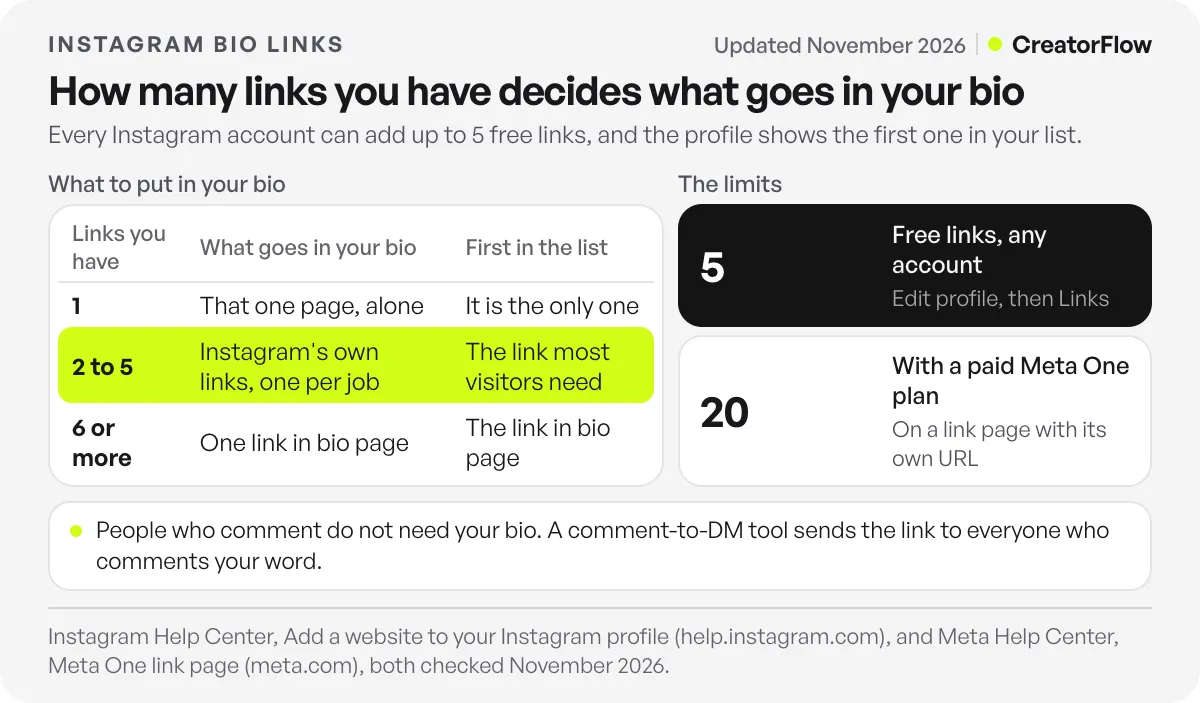
| Links you have | What to put in your bio | Which link goes first |
|---|---|---|
| 1 | That one page, as your only link | It is the only one |
| 2 to 5 | Instagram’s own links, one per job | The link most visitors need this month |
| 6 or more | One link in bio page that holds them all | The link in bio page |
The page behind the link is usually your website, a single offer such as a launch or booking page, or a link in bio page. If you are choosing between the first and last, compare a link in bio page and a website.
How to order 2 to 5 links by job:
- The current offer, or the newest thing your posts mention
- Your main shop, booking or service page
- Your free guide or newsletter sign-up
- Your website or portfolio
- Another platform, such as YouTube or a podcast
Name each link by what people get, such as “Book a call”. For wording that fits your account type, browse these Instagram bio ideas.
From our team, for 6 or more links: More.You is a link in bio page builder built by the same team as CreatorFlow. Its Free plan is free forever (checked November 2026), and one page at more.you/yourname holds links, social icons, events, bookings, opening hours and FAQs as blocks. The More.You page writer can write the first version from one sentence about what you do. Nothing is saved until you approve it. Add that page as the first link in your bio.
Where Each Kind of Follower Clicks
Two groups want your link, and they look in different places. People who open your profile use the bio link. People who comment on a post or Reel are still on that post, so the shortest path for them is a DM with the link. Your bio holds the links that stay the same. A DM carries the one link a post is about.
The profile path has four steps: leave the post, open your profile, tap the links line, pick a link. Every extra tap is a place where someone can stop.
The DM path starts where the interest is. You ask people to comment a word, and a tool sends the link as a private reply. Meta’s private replies documentation allows one message to each commenter within 7 days of the comment, on a professional account (checked November 2026).
CreatorFlow, a Meta Tech Provider, does this on Meta’s official Instagram API. Ask people to comment LINK on your Reel, and CreatorFlow sends everyone who comments LINK your link by DM in seconds. It works on the Free plan, and setup takes under 2 minutes. See how Instagram comment auto-reply works.
Why Your Instagram Bio Link Is Not Showing or Not Clickable
Most bio link problems come from the wrong device, the wrong field, the wrong order or a link Instagram will not accept. Find your problem in the table below. You can fix each one in the app.
| Problem | Likely cause | What to do |
|---|---|---|
| You cannot find Links | You are on a computer | Use the Instagram app on your phone |
| The address does not open | You typed it in the Bio text box | Delete it there and add it under Links |
| Your main link is not first | Wrong order, or a Facebook link sits first | Reorder, or remove the Facebook link |
| An error when you save | Instagram does not allow that link | Use a different link and save again |
| You cannot add a sixth link | The free limit is 5 | Remove one, or use one link page |
| A caption link does nothing | Captions are plain text on most accounts | Put it in your bio, or send it by DM |
Instagram’s help page on errors when saving your profile names “links that ask someone to add you on another service” as one cause. When multiple links launched in April 2023, TechCrunch reported that Meta scans bio links against its Community Guidelines and Terms of Use.
Do You Need a Professional Account for Bio Links?
No. Any Instagram account can add up to 5 bio links. The Help Center steps name no account type, and Meta said at launch that the feature was for all accounts, business and creator accounts included. A professional account keeps the same 5-link limit and adds other tools.
TechCrunch quoted that “all accounts” wording in its launch report. Instagram’s professional accounts page says a professional account is either Business or Creator and cannot be private. A Business account can show one action button, such as Book now, Reserve or Order food. Meta’s private replies also work only on professional accounts, so comment-to-DM tools need one.
FAQ
How many links can you add to an Instagram bio?
Up to 5 on any account, for free, under Edit profile, then Links. A paid Meta One plan lets eligible accounts add up to 20 links on a link page with its own URL, according to Meta’s Help Center (checked November 2026).
Can you add a link to your Instagram bio from a computer?
No. Instagram’s Help Center says adding a website to your profile is not available on computers. Use the Instagram app on an iPhone or Android phone. You can still edit your bio text on a computer.
How do I make a link clickable in my Instagram bio?
Add it in the Links field under Edit profile. A web address typed into the Bio text box stays plain text. Paste the full address from your browser, tap Done, then open your profile and tap the link to test it.
Can you put a clickable link in an Instagram caption?
Not on most accounts. Engadget reported on March 12, 2026 that Meta was testing clickable caption links for Meta Verified subscribers. For everyone else, send people to your bio, or ask them to comment a word and send the link by DM.
Do you need a business account to add links to your Instagram bio?
No. Personal, Creator and Business accounts can all add up to 5 bio links. A Business account can add an action button, and any professional account can use comment-to-DM tools.
Can you add affiliate links to your Instagram bio?
Yes. An affiliate link is a web address like any other, so add it under Links. Meta checks links against its Community Guidelines. For Reels, Stories and DMs too, see every place to add affiliate links on Instagram.
Sources and checks
Steps, button labels and the 5-link limit checked on Instagram’s Help Center pages for adding a website on iPhone, on Android and on a computer, plus Facebook profile links, bios, errors when saving, professional accounts and action buttons, in November 2026. The 20-link figure comes from Meta’s link page help article, regional availability from Meta One plans, and the private reply rules from Meta’s developer documentation, all checked November 2026. Launch details: TechCrunch (April 18, 2023). Caption link test: Engadget (March 12, 2026). More.You and CreatorFlow plan details checked on their own sites in November 2026. Instagram renames buttons from time to time; if a label differs, look for the same step in the same place.





