

To promote music on Instagram, run each song as a short campaign: teach people the hook in Reels, share the track from Spotify to Stories, and give every viewer one keyword that sends the link by DM. Instagram is where people hear the song. Spotify is where the stream counts. Your plan has to carry them across that gap.
That gap is wider than most guides admit. A normal caption holds no clickable link, and Instagram told creators in an in-app notice that Linked Reels would be removed from October 28, 2026, according to SocialBee’s update log. So a fan who likes 15 seconds of your chorus has to stop watching, open your profile, tap a link and wait for another app.
This guide is for independent artists, managers and small labels. It covers where Instagram ranks among your release channels, the Spotify sharing facts that changed in 2025, a 14-day release plan, the reply text for each fan question, and a way to count what each Reel brought in.
Key Takeaways
- Instagram’s job: It introduces the song. Spotify’s own tools and your email list do more of the work once someone is a fan.
- Spotify share: A track shared from Spotify to Stories now carries a short audio clip, and viewers tap the music sticker to open the song in Spotify.
- Keyword route: A word such as LISTEN in a comment sends the streaming link by DM, so nobody has to leave the Reel to find your bio.
- One message: Meta allows one private reply per comment, within 7 days. A fan who commented PRESAVE gets no second DM on release day unless they reply first.
- Measurement: Spotify’s source of streams chart lists places inside Spotify. One keyword and one link per Reel gives you the Instagram half.
- Bottom line: Run one song, one link and one keyword per Reel, then compare clicks per 1,000 views each week.
How Do You Promote Music on Instagram?
Promote music on Instagram by giving each post one way to reach the song. Five routes exist, and they ask different amounts of effort from the fan. Use Reels to reach new listeners, Stories to reach followers, and a comment keyword when a stranger wants the full track. The table shows what each route asks and what you can count afterwards.
| Route | What the fan does | What you need | What you can count |
|---|---|---|---|
| Reel with a comment keyword | Comments LISTEN, opens the DM, taps the link | A DM tool and a Business or Creator account | Clicks per Reel, on CreatorFlow Pro and Growth |
| Story shared from Spotify | Taps the music sticker, then Open on Spotify | The Spotify app and an updated Instagram app | Story views in Instagram |
| Story link sticker | Taps the sticker | Any account | Clicks in your smart link tool |
| Bio link | Opens your profile, taps a link | One of up to 5 profile links | Clicks in your smart link tool |
| Music sticker from the library | Taps the song title for its details | Your song in Instagram’s library | Story views in Instagram |
Paid plans add one more route. Meta One’s Advanced plan, at $49.99/month, lists native links in 4 posts and 4 Reels a month on its plans page (checked October 2026). That is a small allowance, so keep it for release day.
Is Instagram the Best Place to Promote Music?
Instagram alone is not the best place to promote music, and a release plan built only on Reels leaves free reach unused. Instagram is good at making strangers care about 15 seconds of a song. Spotify’s own tools and your email list are better at reaching people who already care. Use Instagram to feed those two.
No public study ranks these channels, so this order is our judgment:
- Spotify for Artists. Spotify says that if you pitch an unreleased song at least 7 days before release, it goes into your followers’ Release Radar playlists (checked October 2026).
- Your own email list. It is the one channel on this list that no platform controls, and it reaches people on release day.
- Short video. Reels, TikTok and YouTube Shorts all show clips to strangers. Post the same hook clip on all three.
- Live shows. A crowd that heard the song tonight is your warmest audience. Put the keyword on a slide or a poster.
Instagram sits third because short video is how strangers meet a song. Spend your posting time here, and do the Spotify pitch first, because it has a fixed deadline.
How Do You Add Spotify to an Instagram Story?
To add Spotify to an Instagram Story, open the song in the Spotify app, tap share and choose Instagram Stories. Spotify builds the Story for you and adds a short audio clip automatically. Add your text and post it. Anyone watching can tap the music sticker and choose Open on Spotify, which takes them to the track.
Spotify described this in its August 2025 announcement. Tapping the song title also opens the track’s audio page on Instagram, where a viewer can see Reels that use it and save it to Liked Songs on Spotify.
If you add a Canvas, the 3 to 8 second looping visual, it appears in the Story automatically, according to Spotify’s release guide. Spotify also says tracks with a Canvas get saved or added to playlists over 4x more on average. That is Spotify’s own figure.
Ask fans to share the song the same way. Their Story carries the same sticker to people you have never reached. For a link that covers every streaming service, use the Story link sticker with a smart link instead.
How Do You Get Your Song on Instagram?
Your song reaches Instagram’s music library through your distributor. You cannot upload a song to the library from the app. Choose a distributor that delivers to Meta, release early enough to allow for the delay, and search for your song in the app before you plan any post around it. Then check which account type you run.
Timing varies by service. Amuse says tracks it delivers go live on Instagram within one week of your release date. Soundstripe’s guide to the library, updated September 2026, reports a lag of at least 30 days at some services. Ask your distributor before you set a date.
Your account type matters too. Instagram’s music help page says certain business accounts do not have access to the licensed library, and those accounts get Meta’s Sound Collection instead. Creator accounts keep the licensed library. Our Creator vs Business account comparison covers the other differences. For most artists, a Creator account is the simple choice, and CreatorFlow works with both.
While you wait for delivery, post the song as original audio in a Reel, provided you own the rights. Once the song is in the library, you can also add a 30-second section to your profile, as TechCrunch reported when the feature launched in 2024.
What Should a Music Release Plan Look Like on Instagram?
A music release plan on Instagram needs about 14 days, and one keyword for each stage. Before release, every post sends people to a pre-save page. From release day, every post sends them to the song. Do the Spotify pitch before Day -7. This plan is a working template, so shift the days to fit your own release.
| Day | Post | Keyword | What the DM sends |
|---|---|---|---|
| Day -14 | Reel with the hook and no date | SOON | Your email sign-up page |
| Day -10 | Story about where the song came from | SOON | Your email sign-up page |
| Day -7 | Reel with the release date on screen | PRESAVE | Your pre-save page |
| Day -3 | Carousel with the lyrics | PRESAVE | Your pre-save page |
| Day 0 | Reel with the chorus, plus a Story shared from Spotify | LISTEN | The song |
| Day +2 | Studio clip or fan clip | LISTEN | The song |
| Day +5 | New edit of the Reel with the most clicks per 1,000 views | LISTEN | The song |
| Day +7 | Show or merch Reel | TICKETS or MERCH | Your ticket page or store |
The pre-save step has a catch that many guides skip. Meta allows one private reply per comment, within 7 days, with follow-ups only if the person replies, and then only within 24 hours (checked October 2026). So nobody who commented PRESAVE can get a release-day DM from you unless they replied in the last 24 hours. Tell them about release day through other channels.
You have three. Spotify’s Countdown Pages send a push notification to everyone who pre-saved and add the release to their library. Spotify says nearly 60% of people who pre-save an album stream it in the first week. The page needs at least 3,000 monthly active listeners and covers new albums and EPs only (checked October 2026).
For a single, use a pre-save page from your distributor. DistroKid’s HyperFollow is one example, according to RouteNote’s review. The third channel is your email list, which is why Day -14 sends people there first.
What Does a Keyword Like LISTEN or PRESAVE Do?
A keyword turns a fan’s comment into a link. Someone comments LISTEN on your Reel, and a DM with your streaming link arrives while they are still watching. You write the message once. You run one automation per question, with its own keyword and link, so each fan gets the answer to the question they asked.
Here are the questions fans ask most often, with a reply that fits one message and one link.
| Fan’s question | Post or trigger | Keyword | Reply text |
|---|---|---|---|
| ”Where can I hear this?” | Reel with the hook | LISTEN | ”Here’s the full song: [link]. Thanks for listening." |
| "When does it come out?” | Reel with the date | PRESAVE | ”It’s out on [date]. Save it here and it’s ready that day: [link]" |
| "Is it on Apple Music?” | Story reply | APP | ”Pick your app here: [smart link]" |
| "Are you playing near me?” | Tour Reel | TICKETS | ”All dates and tickets are here: [link]" |
| "Do you sell merch?” | Story or Reel | MERCH | ”The store is open here: [link]" |
| "Can we book you?” | Keyword DM | BOOKING | ”Send your date and city through this form: [link]” |
CreatorFlow runs each of these as a separate automation, triggered by a comment on a post or Reel, a Story reply or a keyword DM. You can add up to 20 keywords per automation, and capital letters do not matter. Our page on sending streaming links by Instagram DM shows the setup, and the music and entertainment overview covers labels and venues. For more ideas, see these fan workflows for musicians.
You can also collect the address inside the DM. Email Gate, on Pro and Growth, asks for the fan’s email before it sends the link, so SOON can send a demo or an early clip in exchange. Export the contacts as CSV for your email tool, and tell people what they will get. This guide to collecting emails in Instagram DMs has wording you can copy.
How Do You Measure What Each Reel Brought to Spotify?
You measure it in two halves, because neither app shows the whole path. Instagram shows views and comments. Spotify shows streams. Nothing connects one Reel to one stream, so give each Reel its own keyword and link, count clicks per 1,000 views, then look at Spotify for the days after each post.
Spotify’s source of streams chart lists where people listen on Spotify: your artist profile, their own playlists and library, their queue, and editorial, algorithmic and other listeners’ playlists (checked October 2026). It has no line for Instagram. A fan who taps your link, saves the song and plays it later from Liked Songs appears under their own library. Spotify also records its stats in UTC, so a post at 9pm in Los Angeles lands on the next day in the chart.
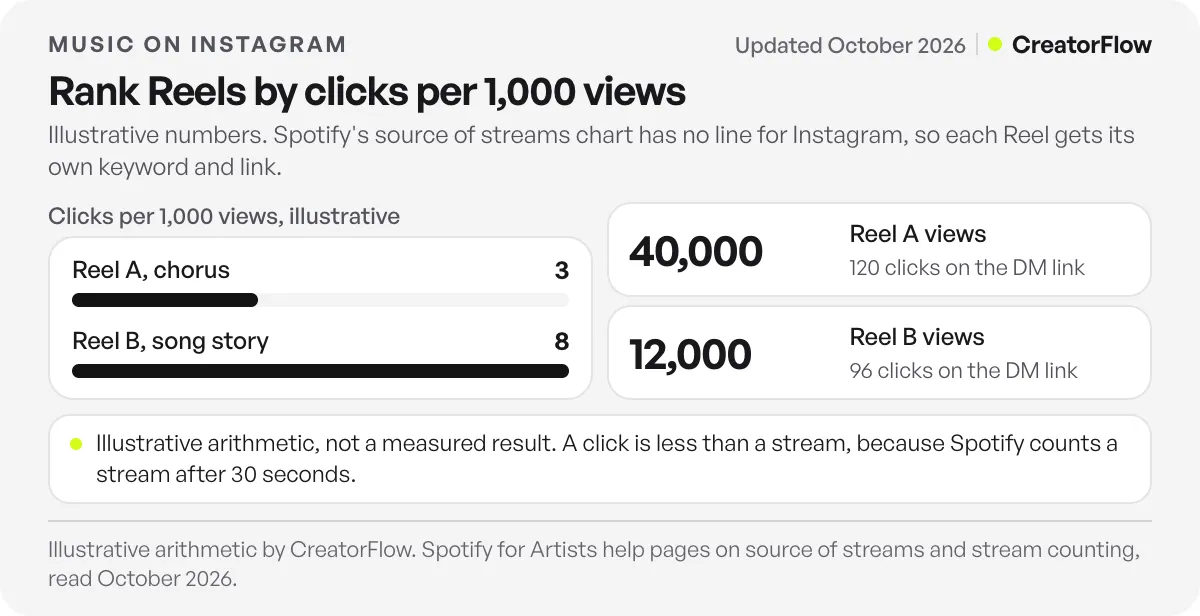
So compare Reels by clicks per 1,000 views. Here is an illustrative example, with made-up numbers:
| Reel | Views | Clicks on the DM link | Clicks per 1,000 views |
|---|---|---|---|
| Reel A, chorus | 40,000 | 120 | 3 |
| Reel B, the story behind the song | 12,000 | 96 | 8 |
Reel A reached more people, and Reel B moved more of them. On Day +5, make a new edit of Reel B. If you run Instagram ads for the song, this is also the Reel to test first.
CreatorFlow Pro and Growth include link click tracking and clicks by country and city. City data helps with touring, because it shows where your next show could sell. This guide to tracking Instagram DM links explains how to read the numbers. A click is still less than a stream, because Spotify counts a stream only after 30 seconds of listening.
What Should Musicians Post on Instagram?
Musicians should post whatever gives a stranger a reason to ask for the song. A hook clip works because the viewer wants to hear the rest. A story about the song works because it gives them a person to care about. A polished cover image with a release date gives them nothing to respond to.
Four post types cover most of a release. The first is the hook, 15 to 30 seconds, starting on the best line with nothing before it. The second is the making of the song: a voice memo, the first demo, or the moment the chorus changed. The third is the song in real life, such as a live clip or a fan’s video, posted with their permission. The fourth is the lyric carousel, which gives people something to save and send to a friend.
Say the keyword out loud in the Reel and put it on screen. Then repeat it in the first line of the caption. If you tag a producer or a featured artist as a collaborator, their followers see the same post and the same keyword. When a post is about a show, this guide on promoting an event on Instagram has the countdown plan.
What Should You Avoid When Promoting Music on Instagram?
Avoid anything that sells you numbers in place of listeners. Services that promise streams, playlist spots or followers for money put your catalog and your distributor account at risk. Also take care with paid creator posts and with ticket prices, because both have written rules. Check with your lawyer or compliance team if you are unsure about a specific deal.
Spotify’s artificial streaming page says third-party services that advertise streams for payment violate its terms, and that using them could get your music removed. The same applies to services that claim guaranteed playlist placement for money (checked October 2026). In the US, the FTC’s final rule on fake reviews also bans buying followers or views generated by bots or hijacked accounts when you know or should know they are fake and use them to misrepresent your influence for a commercial purpose.
If you pay creators to use your sound, or send them free merch or tickets, they need to disclose it. The FTC’s Disclosures 101 guide covers anything of value. In the UK, read the ASA and CMA influencer guide, whose fourth edition came out on October 23, 2026.
If you put a ticket price in a post, the FTC’s fee rule FAQ says a business that advertises live-event tickets must show the total price, with mandatory fees, up front. The FAQ names concerts and music. The simple answer is to send people to the ticket page and leave the number out of the caption.
FAQ
How do I add my Spotify link to Instagram?
You have four places. Add it as one of up to 5 links on your profile, put it on a Story with the link sticker, share the song from the Spotify app to your Story, or send it by DM when someone comments a keyword. Use a smart link if your fans use more than one streaming app.
Can I DM everyone who pre-saved my song on release day?
Meta’s rules allow one private reply per comment, and a follow-up only if the person replies, within 24 hours of that reply. So plan for other channels on release day. A Spotify Countdown Page notifies everyone who pre-saved, and an email list reaches anyone who gave you their address.
Do I need a Business or Creator account?
Yes, for DM automation. Instagram’s messaging API works with professional accounts, so a personal account has to switch first. Your posts, followers and username stay the same. Most artists choose Creator, and you can check the differences before you switch.
How much does it cost to send streaming links by DM?
CreatorFlow’s Free plan costs $0 and includes 500 DMs a month with comment, Story reply and keyword triggers. Pro costs $15/month or $144/year and adds 5,000 DMs a month per workspace, Email Gate, link click tracking and clicks by city. A new account starts with a 14-day Pro trial, and a card is required to start it.
Do pre-saves get my song onto playlists?
Spotify’s pages do not promise that. What Spotify does state is that pitching at least 7 days before release puts the song in your followers’ Release Radar, and that nearly 60% of people who pre-save an album stream it in the first week. Treat pre-saves as a way to reach your fans on day one.
How many songs should one keyword cover?
One keyword per song is the clean setup. Once a new song is out, point LISTEN at it on your new posts and leave the older automations running on the older posts. Then each Reel keeps sending the song it was made for, even months later.
Sources and checks
Checked on October 31, 2026. Sources: Spotify’s August 2025 Instagram sharing post, pitching help page, Countdown Pages help page, source of streams help page and paid stream services page; Meta’s private replies documentation; the FTC’s FAQ on ticket fees. Spotify’s release guide gives nearly 70% for the pre-save figure and its help page gives nearly 60%, so we used the help page. The clicks table is illustrative. Linked Reels’ removal comes from an in-app notice reported by SocialBee, with no Meta post we could find. The limit of 5 profile links comes from TechCrunch’s 2023 report.