

To promote an event on Instagram, publish one announcement with a Reminder, run a countdown in Stories, and give every post one keyword that sends the ticket link by DM. Instagram’s event features only remind people of a time. Tickets still sell on your own page, so your plan has to move people there and count who registered from each post.
Older guides tell you to add a Get Tickets button to your profile. Eventbrite’s own post about that integration now opens with a note that it is no longer available. So that advice sends you looking for a button that integration no longer gives you, while people ask “how much?” under your post and get no answer.
This guide is for venues, promoters, workshop hosts and conference teams. It covers what Instagram offers for events today, where it ranks against your other channels, a 21-day plan, the reply text for common attendee questions, how to count sign-ups by post, and the ticket price rules that apply to your captions.
Key Takeaways
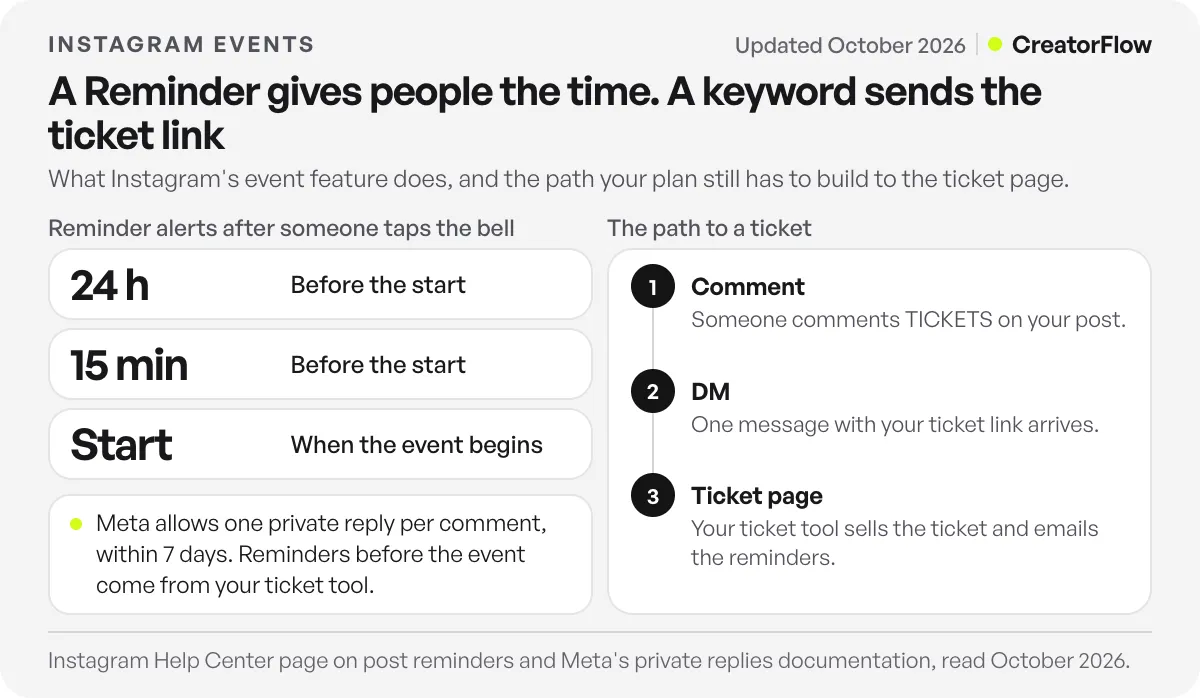
- Reminders: A post with a Reminder lets people tap a bell and get 3 notifications. It does not sell a ticket or carry a link.
- Fit: Instagram suits events people can picture, such as concerts, markets and classes. For a trade conference, email and LinkedIn come first.
- One keyword: A word such as TICKETS in a comment sends your ticket link by DM, so nobody has to leave the post to find your bio.
- Reminder messages: Meta allows one private reply per comment. Reminders before the event come from your ticket tool by email.
- Ticket prices: In the US and the UK, a ticket price in an ad must include mandatory fees. Check before you put a number in a caption.
- Bottom line: Give each post its own keyword and tracking link, and you can see which post sold tickets.
What Instagram Event Features Exist Today?
Instagram has no event page of its own. It offers Reminders on feed posts, a countdown sticker in Stories, a link sticker, and paid Reminder ads. All of them help people remember or reach your event, and none of them sell a ticket. The table shows what each one does and what it leaves for you to do.
| Feature | What it does | What you need | What it leaves to you |
|---|---|---|---|
| Reminder on a feed post | People tap a bell and get 3 notifications | A professional account | The ticket link |
| Countdown sticker in Stories | People tap to be told when it ends | Any Story | The ticket link |
| Link sticker in Stories | One tap to your ticket page | Any account | The reason to tap |
| Reminder ads | Paid reach, with the same opt-in | A professional account and Ads Manager | The budget and the ticket link |
| Comment keyword by DM | Sends your link to anyone who comments the word | A DM tool and a Business or Creator account | The ticket page itself |
Instagram’s Help Center page on reminders says you start a new feed post, tap Add reminder, enter a title and a start time, and share. People who tap the bell get alerts 24 hours before, 15 minutes before and at the start. You can edit the event later from the post’s Options menu. That page is several years old, so the labels in your app may differ.
Two limits are worth knowing. Later’s write-up from the 2022 launch says a Reminder must be at least one hour ahead and at most three months ahead. Reminders also belong to feed posts, so share the post to your Story to show it there.
We looked for a current Meta page that describes publishing a Facebook Event to Instagram and did not find one. This plan does not rely on it.
Is Instagram the Right Channel for Your Event?
Instagram works best for events people can picture and decide on quickly, and it works less well for events a manager has to approve. If your buyers already know you, email will sell more tickets per hour of your time. Use Instagram to reach people who have never been, and use it for the last week, when interest is highest.
No public study ranks these channels, so this table is our judgment. Rank your own channels from last year’s ticket reports if you have them.
| Event type | Sell first through | Instagram’s job |
|---|---|---|
| Concert, club night, comedy | Past buyers, the artist’s audience | Main channel for new buyers |
| Food market, festival, local fair | Local partners, Instagram | Main channel, plus “what time” and “where” answers |
| Paid workshop or class | Email list, Instagram | Finds new people and answers price questions |
| Trade conference | Email, LinkedIn, sponsors | Speaker clips and the after-film |
| Online webinar | Email, partner lists | Sends the sign-up link |
Online sessions have their own rules on replays and reminders. Our guide to Instagram webinar registration automation covers them. For a concert or a tour, add this plan for promoting music on Instagram, because the song is often what sells the ticket.
How Far in Advance Should You Promote an Event on Instagram?
Start at least three weeks before a small or local event, and earlier for anything people must travel to. Announce once, give people something new each week, and post the most in the final week. This 21-day plan is a working template and not a measured benchmark, so shift the days to fit your own event.
| Day | Post | Keyword | Job of the post |
|---|---|---|---|
| Day -21 | Announcement Reel with a Reminder | TICKETS | Say what, where, when |
| Day -14 | Collab post with a speaker, artist or venue | TICKETS | Reach their followers |
| Day -10 | Carousel with the schedule | SCHEDULE | Answer the main question |
| Day -7 | Story with a countdown sticker | Story reply | Start the final week |
| Day -3 | Reel of the venue or last year’s crowd | TICKETS | Show what it feels like |
| Day -1 | Story with parking, doors and what to bring | INFO | Remove the last doubts |
| Day 0 | Live Stories from the room | None | Proof for the next event |
| Day +1 | Recap Reel | NEXT | Start the list for next time |
If a speaker or a venue shares your post, ask them to use the same keyword. This guide to Instagram Collab posts with DM automation shows the setup. If you use last year’s crowd, get permission from anyone who can be clearly identified.
The clock matters when you run this plan. Meta’s private reply rule gives you 7 days from each comment, and each comment gets its own 7 days (checked October 2026). A comment left on the Day -21 Reel in the final week still gets an answer, as long as the automation is on. If you turned it on late, CreatorFlow’s Rewind goes back and DMs people who already commented on your recent posts, on Pro and Growth.
How Do You Send Ticket Links With One Keyword?
Ask people to comment one word, and a DM with the ticket link reaches them within seconds. You set the keyword and the message once. Each question gets its own automation, keyword and link, so the person asking about parking gets the parking page. The reply has to fit one message, so put the link in it.
| Attendee’s question | Post or trigger | Keyword | Reply text |
|---|---|---|---|
| ”How much are tickets?” | Announcement Reel | TICKETS | ”All ticket types and total prices are here: [link]" |
| "What’s the schedule?” | Schedule carousel | SCHEDULE | ”Here’s the full schedule for [date]: [link]" |
| "Where do I park?” | Day -1 Story | INFO | ”Parking, doors and what to bring are all here: [link]" |
| "Can I bring a group?” | Keyword DM | GROUP | ”Group options are on this page: [link]" |
| "Is it free?” | Free event post | RSVP | ”It’s free. Save your place here: [link]" |
| "When’s the next one?” | Recap Reel | NEXT | ”Join the list for the next one here: [link]” |
CreatorFlow runs each of these from a comment on a post or Reel, a Story reply or a keyword DM, with up to 20 keywords per automation. Our page on event registration by Instagram DM shows the setup, and the overview for event and webinar teams covers other uses. When you run several events at once, keep them apart with this keyword system for multiple offers.
Do not plan a reminder DM. Meta allows one private reply per comment, and a follow-up only if the person replies, within 24 hours of that reply. Your ticket tool already has the buyer’s email, so reminders belong there. For a free event with no form, Email Gate on Pro and Growth asks for the person’s email before it sends the link, and you can export the list as CSV.
How Do You Count Who Registered From Each Post?
Give every post its own tracked link, then read the sales for each link in your ticket tool. Instagram can show you views and comments, and your DM tool can show you clicks. Only the ticket tool knows who bought. Line up all three numbers for each post, and you can see which one is worth repeating next time.
On Eventbrite, tracking links sit under Marketing in your Event Dashboard. You name a link, get a unique URL, and see how many people visit it and buy through it. Share the link exactly as it appears, because a change in spelling can break it. Name each link after the post, such as “Reel day 21”.
Know the limit before you trust the number. Eventbrite’s guide to analytics says these figures do not include people who viewed your page and bought later by another route. Its traffic and conversion report shows where attendees came from by channel. On other ticket tools, add UTM tags to each link and read them in your analytics.
Here is an illustrative example with made-up numbers. It shows how to read the three columns together.
| Post | Clicks on the DM link | Tickets sold | Clicks per ticket |
|---|---|---|---|
| Announcement Reel | 180 | 12 | 15 |
| Collab post with the headliner | 90 | 15 | 6 |
| Day -3 venue Reel | 60 | 10 | 6 |
The announcement brought the most clicks, and the Collab post sold the most tickets. Next time, spend your effort on the partner post and the final week. CreatorFlow Pro and Growth include link click tracking and clicks by country and city. City data also shows how far people are willing to travel, which helps you choose where to run ads.
What Rules Apply to Ticket Prices in Instagram Posts?
If you put a ticket price in a post, the rules on total price can apply to that post. In the US the FTC has a rule for live-event tickets, and in the UK the CMA prohibits adding mandatory charges after a lower headline price. Neither rule bans fees. Both ask you to show the full price. Check with your lawyer or compliance team before you run paid offers.
The FTC’s Rule on Unfair or Deceptive Fees took effect on May 12, 2025. Its FAQ covers any business that offers, displays or advertises live-event tickets, including online and in apps. A business that includes pricing in its ads must show the total price up front, with mandatory fees. The FAQ defines live events as concerts, sporting events, music, theater and other live performances. It excludes pre-recorded shows and film screenings, and it does not mention conferences.
In the UK, the CMA’s guidance on unfair commercial practices says that showing a headline price and adding mandatory charges later, called drip pricing, is prohibited. So write the all-in price, or write no price and send people to the ticket page with the keyword.
Free tickets count as something of value. If you give a creator free entry and they post about it, they need to disclose it. See the FTC’s Disclosures 101 guide and, for the UK, the ASA and CMA influencer guide, whose fourth edition came out on October 23, 2026.
Should You Pay to Promote an Event on Instagram?
Pay only after a free post has shown you what works. Take the post with the lowest clicks per ticket and put money behind that one. Use paid reach in the final two weeks, when people are ready to decide. If your event is small and local, a small budget aimed at a short distance around the venue is the sensible test.
You have three options. Instagram’s Boost is the simple one. Reminder ads are made in Ads Manager and need a professional account. They suit dates people must remember, such as a ticket release, and Instagram’s announcement says people who opt in get three push notifications before the event.
The third option is a Click-to-Direct ad, which opens a chat. Since September 28, 2026, Meta gives those chats up to 7 days of messaging from the person’s first message, against the usual 24 hours (checked October 2026). This helps when your event needs a longer conversation, such as a group booking or a corporate table. We do not quote typical costs here, because prices vary by city and date.
FAQ
Can you create an event on Instagram?
You can add a Reminder to a feed post, with a title, a start time and an optional end time, on a professional account. Instagram has no separate event page. Put your ticket link on your profile, in a Story link sticker, or in a DM sent when someone comments a keyword.
Can I add a ticket button to my Instagram profile?
Eventbrite says its Instagram integration is no longer available, and the action buttons Meta’s help pages list today are Book Now, Reserve and Order Food. Use a profile link instead. Instagram allows up to 5 links on a profile, and you can add a link sticker to a Story from any account.
Can I send people a reminder DM before my event?
Plan on email. Meta allows one private reply per comment, and a follow-up only if the person replies, within 24 hours of that reply. Your ticket tool can email everyone who registered, and Instagram’s Reminder notifies people who tapped the bell.
What does the countdown sticker do?
Viewers can tap it to get a reminder when the timer ends. Add it to a Story with a clear label and the date, then save it to a Highlight so new visitors can find it. Guides disagree on how much you can see about who set a reminder, so check your own Story insights.
How do I promote a free event on Instagram?
Use the same plan with RSVP as the keyword. A free event still needs a list, or you will have no idea how many people to expect. Send people to a sign-up form, or turn on Email Gate so the email is collected in the DM. Then email the details from your own tool.
How many DMs will an event use?
Each matching comment or keyword uses one DM. CreatorFlow’s Free plan includes 500 DMs a month, Pro includes 5,000 per workspace for $15/month or $144/year, and Growth includes 10,000 per workspace for $30/month or $288/year. New accounts start with a 14-day Pro trial, and a card is required to start it.
Sources and checks
Checked on October 31, 2026. Sources: Instagram’s reminders help page, action buttons help page and reminder ads help page, read through search index text because Instagram’s pages did not load for our tools; Meta’s private replies documentation; Eventbrite’s tracking links help page; the FTC’s fee rule FAQ; the CMA’s guidance CMA207, updated November 18, 2025. The click and ticket table is illustrative. The limit of 5 profile links comes from TechCrunch’s 2023 report.