

ManyChat vs Chatfuel is a choice between two meters. ManyChat charges for active contacts, starting at $17/month billed monthly for 250 people. Chatfuel charges $20/month billed monthly and gives you $20 of usage credits, with unlimited contacts. AI replies spend those credits. Neither plan caps DMs directly, so your audience size and your use of AI decide the bill.
The two entry prices look close, and they measure different things. A Reel that brings 4,000 commenters moves you up ManyChat’s ladder because of the headcount. On Chatfuel, by its own rules, the same Reel spends no credits if the reply is fixed text, and $37.20 to $74.40 of credits if AI writes it. Many older comparisons also describe Chatfuel plans that are no longer on its pricing page.
This guide gives both price ladders with the billing period on every number, then works out a monthly bill for 2 audience shapes. It also compares Instagram automation, channels and AI. If you want the wider field first, our guide to the best Instagram chatbots covers 10 tools.
Key Takeaways
- Different meters: ManyChat counts active contacts. Chatfuel spends dollars of usage credits. Neither plan caps DMs directly.
- Entry prices: ManyChat Essential is $17/month, or $14/month billed annually, for 250 contacts. Chatfuel Business S is $20/month, or $18/month billed annually, with $20 of credits.
- Free access: ManyChat has a Free plan for 25 active contacts. Chatfuel has no free plan and offers a 7-day free trial.
- What spends Chatfuel credits: AI replies cost about $0.0093 each at recommended quality. Chatfuel says keyword replies and other non-AI automation do not count.
- Channels: ManyChat adds Telegram, SMS and email. Chatfuel adds website chat and puts every channel on every plan.
- Bottom line: A wide audience with short replies tends to cost less on Chatfuel. A small audience in long chats tends to cost less on ManyChat, before any ManyChat AI cost.
ManyChat vs Chatfuel at a Glance
ManyChat and Chatfuel both automate Instagram comments and DMs, and both cover WhatsApp and TikTok. ManyChat sells plans by the number of people who interact each month, and it has a free plan. Chatfuel sells a subscription with a balance of usage credits, unlimited contacts and every channel on every plan. It offers a trial in place of a free plan.
| ManyChat | Chatfuel | |
|---|---|---|
| What you pay for | Active contacts per month | A subscription plus dollars of usage credits |
| Free plan | 25 active contacts | None; 7-day free trial |
| Entry plan, billed monthly | Essential $17, 250 contacts | Business S $20, $20 of credits |
| Entry plan, billed annually | $14/month | $18/month ($216/year) |
| Contacts | 25 to 25,000 by plan, with paid overage above that | Unlimited, per Chatfuel |
| Channels | 7, limited by plan | 5, all on every plan |
| Team | 2 to 10 users on paid plans | Unlimited teammates |
| AI | AI features; price not stated here | Included and metered at about $0.0093 per reply |
| Meta status, in its own words | ”Official Meta Business Partner" | "Official Meta Partner” |
Sources: Chatfuel’s pricing page and ManyChat’s plan guide (checked October 2026).
How Much Does ManyChat Cost in 2026?
ManyChat costs $0 to $199/month billed monthly, or up to $139/month billed annually. The price depends on how many active contacts you reach in a billing month. An active contact is a person who interacted with you through ManyChat in that month, and repeat messages from that person count once. Counts reset each month, even on annual plans.
| Plan | Billed monthly | Billed annually (per month) | Active contacts | Channels |
|---|---|---|---|---|
| Free | $0 | $0 | 25 | 2 |
| Essential | $17 | $14 | 250 | 2, excluding WhatsApp, SMS and email |
| Pro | $39 | $29 | 2,500 | 3, including WhatsApp, SMS and email |
| Business | $99 | $69 | 7,500 | Unlimited |
| Advanced | $199 | $139 | 25,000 | Unlimited |
ManyChat’s help center has a page for each plan: Free, Essential, Pro, Business and Advanced (checked October 2026). The $14, $29, $69 and $139 figures need a yearly payment, so they are not the month-to-month price. This pricing dates from March 2, 2026, and an older account may see other numbers.
ManyChat’s Active Contacts article says your automations keep running when you pass your limit. You then pay for each extra contact. On monthly billing, that is $0.10 on Essential, $0.05 on Pro, $0.025 on Business and $0.004 on Advanced (checked October 2026).
A contact meter behaves differently from a tool that counts messages sent. Our LinkDM vs ManyChat comparison works through that difference, and Inro vs ManyChat compares two tools that both count contacts.
How Much Does Chatfuel Cost in 2026?
Chatfuel costs $20/month billed monthly, or $18/month billed annually, on its smallest plan. Each plan is a subscription plus a balance of usage credits in US dollars. Contacts and teammates are unlimited. Chatfuel’s published cost is about $0.0093 per AI reply at recommended quality, so $20 of credits covers about 2,150 AI replies.
| Plan | Billed monthly | Billed annually (per month) | Credits per month | AI replies covered (our division) |
|---|---|---|---|---|
| Business S | $20 | $18 | $20 | About 2,150 |
| Business M | $45 | $40.50 | $50 | About 5,380 |
| Business L | $90 | $81 | $100 | About 10,750 |
| Business XL | $170 | $153 | $200 | About 21,500 |
| Business XXL | $410 | $366.67 | $500 | About 53,760 |
Chatfuel’s pricing page lists these plans (checked October 2026). Each Business plan covers 1 bot, and each Instagram account connects to its own bot. Agency plans start at Agency S, which is $100/month billed monthly or $90/month billed annually, with $100 of credits and 3 companies. Agency M and above list unlimited bots.
Its pricing FAQ names three metered items: AI replies, WhatsApp templates and lead events reported to Meta. Chatfuel’s usage limits page adds that keyword replies, button flows and other non-AI automation do not count. The calculator also lists about $0.0041 to read a photo, $0.0030 to transcribe a voice message and $0.020 for a lead event.
The $0.0093 figure assumes recommended quality and a medium knowledge base. Chatfuel says larger knowledge bases and longer conversations take more processing. On the default estimate in its calculator, Economy quality lowers the monthly cost by $8.50 and Premium raises it by $12.10.
Unused credits do not carry over to the next month. At zero, AI replies pause until you add credits or move up a plan, and the FAQ also offers credit packs and auto-reload. Setup through Chatfuel’s Coworker assistant costs about $10 per bot, once, from your credits. Its plans guide says the 7-day trial includes $15 of credits. For this meter against other Instagram tools, see our Instagram chatbot pricing comparison.
What Would Each One Cost You? Two Worked Bills
A wide audience with short replies tends to cost less on Chatfuel. A small audience in long AI chats tends to cost less on ManyChat, before any ManyChat AI cost. These two bills are illustrative arithmetic on published prices, not measured results. Use your own busiest month, because ManyChat’s contact count and Chatfuel’s credits both reset monthly.
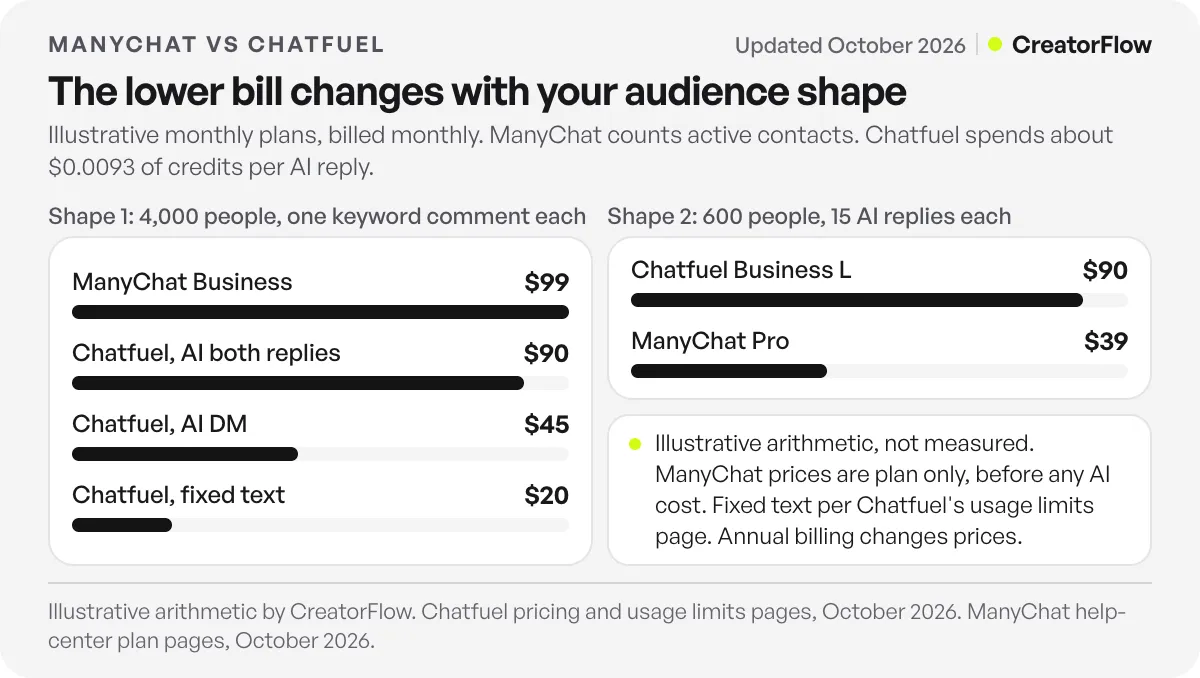
The formula is short. ManyChat’s usage is the number of people. Chatfuel’s usage is people x AI replies per person x $0.0093. Prices below are billed monthly, with the annual-billing price per month in brackets.
| Illustrative month | Usage | ManyChat plan | Chatfuel plan |
|---|---|---|---|
| Shape 1: 4,000 people, fixed-text reply | $0 of credits | Business, $99 ($69) | Business S, $20 ($18) |
| Shape 1: 4,000 people, AI writes the DM | 4,000 replies, $37.20 of credits | Business, $99 ($69) | Business M, $45 ($40.50) |
| Shape 1: 4,000 people, AI writes the DM and a public reply | 8,000 replies, $74.40 of credits | Business, $99 ($69) | Business L, $90 ($81) |
| Shape 2: 600 people, 15 AI replies each | 9,000 replies, $83.70 of credits | Pro, $39 ($29), before any AI cost | Business L, $90 ($81) |
Shape 1 is one Reel with 4,000 commenters. A creator gets 4,000 different people commenting a keyword in a month, and each person gets a link by DM. ManyChat counts 4,000 active contacts. Pro plus 1,500 extra contacts at $0.05 comes to $114, so Business at $99 is the lower bill. On Chatfuel, the bill depends on who writes the reply. Its usage limits page says fixed keyword replies do not count, which gives the $0 row. Its calculator says comment replies are 1 or 2 messages, which gives the two AI rows.
Shape 2 is 600 enquiries in long chats. A clinic or a coach takes 600 enquiries a month, and an AI assistant qualifies and books each one. Chatfuel’s calculator says this takes 10 to 15 replies, so this bill uses 15. ManyChat counts 600 active contacts. Essential plus 350 extra contacts at $0.10 comes to $52, so Pro at $39 is the lower bill.
Read these bills with care. The ManyChat price in Shape 2 is the plan only, because we could not confirm a ManyChat AI price, so the two columns are not like for like. Annual billing changes one result: in the third row, ManyChat at $69/month sits below Chatfuel at $81/month.
The bills also assume Instagram only, so no WhatsApp fees, and all people are different people. Coworker’s $10 setup would still fit inside each plan’s credits in the first month. Chatfuel’s credit packs are another route, but its pricing page lists no pack price.
Which Is Better for Instagram Comment-to-DM?
Both tools send a DM when someone comments a keyword on a post or Reel. ManyChat builds this inside its Flow Builder, with conditions and tags that send people down different paths. Chatfuel sets a public reply and a private reply for each rule, and each one can be fixed text or written by its AI. Meta’s rules apply to both. For how each tool decides which comment gets which reply, see our Chatfuel vs ManyChat comment automation breakdown.
ManyChat’s strength here is flow control. Its Condition Block guide sends matching and non-matching contacts down separate paths, and tags work as a filter. That fits a marketing funnel with several steps after the first reply.
Chatfuel’s strength is rule setup around the first reply. Its comment autoreply guide lists exact or partial keyword matching, chosen posts or ads, and up to 30 custom automations per source with up to 50 keywords per rule. Ad comments have their own source. Its Instagram page also lists story replies.
Neither plan ladder we read lists an hourly DM cap, but Meta’s limits sit above both tools. Meta’s rate-limiting documentation gives 750 private replies an hour on the Instagram Login path (checked October 2026). At that rate, the 4,000 replies in Shape 1 take more than 5 hours to send.
Meta’s private replies page also says a private reply must go within 7 days of the comment. Only one message can go out until the person replies. On either tool, put the link or the question in that first message.
Which Channels Do ManyChat and Chatfuel Cover?
ManyChat lists 7 channels: Instagram, Facebook Messenger, WhatsApp, TikTok, Telegram, SMS and email. Chatfuel lists 5: Facebook, Instagram, WhatsApp, TikTok and website chat. ManyChat limits channels by plan, with WhatsApp, SMS and email starting at Pro. Chatfuel puts every channel on every plan, including its $20/month entry plan.
Telegram, SMS and email are outside Chatfuel’s channel list, and website chat is outside ManyChat’s. If you need one of those, the choice is already made. If you need WhatsApp at the lowest entry price, Chatfuel’s Business S includes it at $20/month billed monthly, and ManyChat’s Pro includes it at $39/month billed monthly, or $29/month billed annually.
WhatsApp carries a second bill. Chatfuel’s FAQ says Meta charges for WhatsApp messages separately from your plan, and the fees come out of the same credits. Templates you start are billed at Meta’s rate plus 10%. Check ManyChat’s WhatsApp terms before you budget, because this article does not price them.
TikTok works differently from Instagram. Chatfuel’s comment replies guide says TikTok comment replies use keywords only and do not allow a private message, so the public reply asks the person to write first. Our TikTok comment-to-DM guide explains that limit across tools.
For integrations, Chatfuel says every plan includes tools like Google Sheets and Zapier, and its FAQ also names Stripe and the Chatfuel API. ManyChat lists API access on Advanced.
How Do ManyChat and Chatfuel Handle AI?
Chatfuel puts AI at the center and charges for it by use, at about $0.0093 per reply from your credits. ManyChat puts flows at the center and offers AI features under the Manychat AI name. We give no ManyChat AI price here because the sources we could read conflict. Check its pricing page before you compare.
Both products began as Messenger bot builders. In April 2019, TechCrunch reported that ManyChat was focused on Facebook Messenger, with tools for creating a bot and for live human chat. Chatfuel’s about page describes its own path as running “from the first chatbots on Messenger to agentic infrastructure and tools for developers”.
The two now aim at different buyers. Chatfuel’s help center overview describes a simple loop: connect a channel, give its AI your company details, catalog and FAQ, and let it reply to incoming messages. Its Business card on the pricing page reads “For teams ready to sell and support with AI”.
ManyChat’s plan guide lists AI automation as a Pro feature, and its help center documents an AI Flow Builder assistant. Your flows stay the main unit of work, and AI assists inside them.
If you need the same wording in every reply, both tools can do it. Use fixed text in a Chatfuel rule, or a fixed message in a ManyChat flow.
Should You Choose ManyChat or Chatfuel?
Choose ManyChat if your plan depends on branching flows, on Telegram, SMS or email, or on a free plan to start. Choose Chatfuel if you want AI to handle conversations, need every channel at the entry price, or expect an audience large enough to move you up a contact ladder. Run your busiest month through both meters first.
Pick ManyChat if you build marketing funnels with conditions and tags, you reach a contained audience each month, or you want to start on the 25-contact Free plan. Essential and Pro also list a 14-day trial.
Pick Chatfuel if you run a service business that answers questions and books slots in chat, you need several teammates in one inbox at no seat fee, or you want website chat beside Instagram and WhatsApp. If your replies are fixed text, the $20/month plan covers a large audience by Chatfuel’s own rules.
Then test the number. Count the different people who wrote to you last month and the AI replies each one would need, then use the formula above. Chatfuel’s 7-day trial is a good place to check the real cost per reply with your own knowledge base.
What If You Only Need Instagram Comment-to-DM?
CreatorFlow uses a third meter, DMs sent per month. It covers Instagram comment-to-DM, story replies and keyword DMs, with unlimited automations on every plan. Pro costs $15/month or $144/year, with 5,000 DMs a month per workspace and 2 workspaces. Growth costs $30/month or $288/year, with 10,000 DMs a month per workspace and 5 workspaces.
The Free plan is $0 with 500 DMs a month and 1 workspace. The 4,000 one-message DMs in Shape 1 fit inside Pro’s 5,000. CreatorFlow is a Meta Tech Provider. You can compare CreatorFlow with ManyChat on our ManyChat alternative page.
FAQ
Is ManyChat or Chatfuel cheaper?
The answer changes with the shape of your audience. In our illustrative bills, 4,000 people with short replies cost $20 to $90/month on Chatfuel and $99/month on ManyChat, both billed monthly. 600 people with 15 AI replies each cost $90/month on Chatfuel and $39/month on ManyChat, before any ManyChat AI cost.
Does Chatfuel have a free plan?
No. Chatfuel’s pricing page lists no free plan. It offers a 7-day free trial with a starting balance of credits, and its plans guide puts that balance at $15. ManyChat has a Free plan for 25 active contacts, with up to 4 active automations and 2 channels (checked October 2026).
Do ManyChat or Chatfuel limit how many DMs I send?
Neither plan caps DMs directly. ManyChat counts people, and Chatfuel’s usage limits page says plans cover unlimited messages, with AI processing metered from credits. Meta’s limits still apply, including 750 private replies an hour on the Instagram Login path (checked October 2026).
What uses Chatfuel credits?
Chatfuel names AI replies, WhatsApp templates and lead events reported to Meta. One AI reply costs about $0.0093 at recommended quality with a medium knowledge base. Reading a photo, transcribing a voice message and setup through Coworker also have listed costs. Credits do not carry over to the next month.
What happens when Chatfuel credits run out?
AI replies pause until you add credits or move up a plan. Chatfuel’s FAQ says you can buy a credit pack or turn on auto-reload to keep the bot running. Its pricing page also says bigger packs cost less per credit, up to 30% off.
Can I use Chatfuel without AI replies?
Yes, for comment replies. Chatfuel’s guides say a comment reply can be written by its AI, be the same fixed text each time, or be turned off. Its usage limits page says keyword replies and other non-AI automation do not count toward AI usage. Test this during the trial, because its pages describe usage in two different ways.
Which is better for WhatsApp?
Both cover WhatsApp. Chatfuel includes it on every plan from $20/month billed monthly. ManyChat includes it from Pro at $39/month billed monthly, or $29/month billed annually. Meta’s fees are separate from Chatfuel’s plan and come out of your credits, so model those fees before you compare the two.
Sources and checks
Chatfuel’s plans, credits, per-reply cost, channels and trial were read on its pricing page, usage limits page, plans guide and comment autoreply guide in October 2026. ManyChat’s site did not open for our direct read, so its prices come from its help-center plan pages as read on October 14, 2026, with indexed text of its help center checked later that month. Meta’s limits were checked on developers.facebook.com in October 2026. Meta status wording is each vendor’s own. The monthly bills are illustrative arithmetic, not measured results. Both vendors change pricing, so check each page before you buy.





