

PrestaShop Instagram setup covers three separate jobs: showing a feed on your store with a module, sending your catalog to Meta so you can tag products, and answering buyers in DMs with a link. The official PrestaShop Social module handles the catalog. Paid modules handle the feed. DM replies need no module at all, because a product URL is enough.
Few English guides answer this for PrestaShop, and most of them sell one module. A store owner in Lyon or Madrid pays for a feed slider, sees it on the homepage, and still gets the question “c’est combien ?” under last week’s Reel with no answer.
This guide covers the three jobs, the modules with their listed prices, what happens at checkout, how to answer comments in more than one language, and the EU consent basics that apply when Instagram brings you buyers and email addresses.
Key Takeaways
- Three jobs: Feed display, catalog sync and DM replies need different tools, so buy for the job you have.
- Official module: PrestaShop Social with Facebook & Instagram is listed at no cost and handles catalog sync.
- Check your version: PrestaShop 9.2 shipped on September 30, 2026, and several feed modules list older version ranges.
- Replies need no module: You paste a PrestaShop URL into one automation per question and language.
- EU rules still apply: Marketing email needs prior consent, pixels need cookie consent, and online buyers keep a 14-day withdrawal right.
- Bottom line: Answer the comments first, connect the catalog second, and add a feed module only if a page needs the proof.
How do you connect PrestaShop to Instagram?
You connect PrestaShop to Instagram in one of three ways. A feed module displays your posts on your store. The PrestaShop Social module sends your products to a Meta catalog for tags and ads. A DM tool replies to comments with your product link, and it needs nothing installed in your back office. Start with the job that matches your problem.
| Job | Who it serves | Tool | Cost | Touches your back office? |
|---|---|---|---|---|
| Show Instagram posts on your store | People already on your site | A feed module from PrestaShop Addons | About €50 to $85 as listed | Yes |
| Sync catalog for tags and ads | People browsing Instagram | PrestaShop Social with Facebook & Instagram | Listed at no cost | Yes |
| Answer comments and DMs | People who already asked | A DM tool such as CreatorFlow | CreatorFlow Free $0, Pro $15/month | No, you paste a URL |
Instagram is not the main channel for every PrestaShop store. If most orders come from Google Shopping, marketplaces and email, keep your time there and add a link in bio. If your product Reels get comments, the reply job comes first, because those people have already told you what they want.
Which PrestaShop Instagram modules exist, and what do they cost?
PrestaShop Addons lists one official catalog module at no cost and several paid feed modules, mostly around €50 at the prices we saw. Version support matters more than price. Several listings show ranges ending in PrestaShop 1.7, while the current release is 9.2. Confirm your version with the developer before you pay.
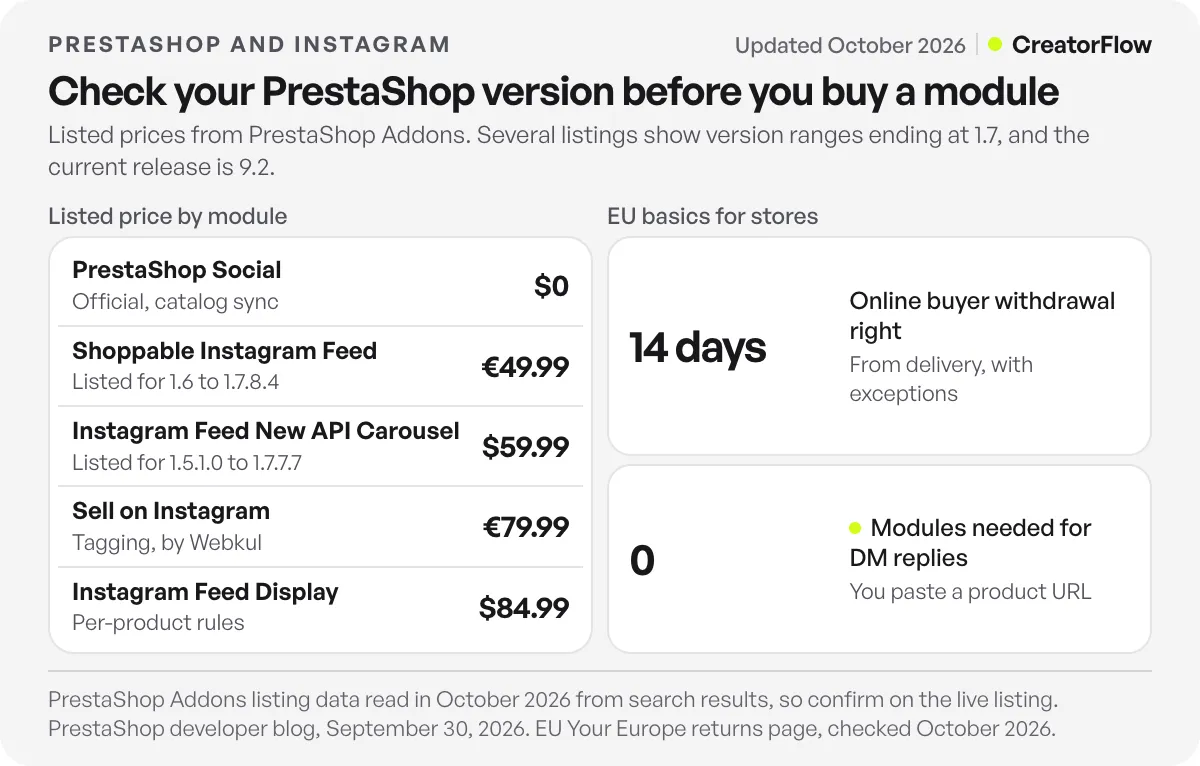
These figures come from PrestaShop Addons listing data read in October 2026. The site blocks automated readers, so we read the listing data held in search results, and some of it may lag the live page. Treat it as a guide, and open the listing before you buy.
| Module | Job | Listed price | Versions listed |
|---|---|---|---|
| PrestaShop Social with Facebook & Instagram | Catalog sync | $0 | 1.7+ per its README |
| Shoppable Instagram Feed | Feed with product links | €49.99, down from €69.99 | 1.6 to 1.7.8.4 |
| Instagram Feed Gallery | Feed | €49.99, down from €69.99 | 1.6.0.4 to 1.7.7.8 |
| Instagram Feed New API Carousel | Feed | $59.99 | 1.5.1.0 to 1.7.7.7 |
| Instagram Feed Display | Feed with per-product rules | $84.99 | Check the listing |
| Sell on Instagram | Tagging by Webkul | €79.99, down from €111.99 | Check the listing |
The version column is the one to read. PrestaShop’s developer blog announced PrestaShop 9.2 on September 30, 2026. A module whose listing stops at 1.7 may have a newer build, or it may not. Ask the developer in writing whether it runs on your exact version, then test it on a copy of your store.
How do you set up the PrestaShop Social module?
Install PrestaShop Social with Facebook & Instagram from the module catalog in your back office, then connect your Facebook business assets and export your catalog. You need a Facebook Page, a business account and an Instagram professional account. After Meta reviews your catalog and account, you can tag products in posts and Reels.
The module is published by PrestaShop SA. Its Packagist page shows version 1.38.19, released August 5, 2026, and its README says it works with PrestaShop 1.7 and later (checked October 2026). Neither page says 9.2 by name, so test on a copy of your store first.
BigBuy’s guide to selling on Instagram with PrestaShop gives the setup path. Go to Modules, then Modules Catalogue, and search for Facebook. It also lists the accounts you need, and says you can add the catalog from the Shopping section of your Instagram business profile if it does not appear.
Category mapping causes most export errors. Webkul’s module guide notes that Facebook identifies Google product categories, so your store categories must map to that list before export. Meta’s product tagging documentation adds that an account without an Instagram Shop cannot tag products, and allows up to 20 tags on a feed post and 30 on a Reel (checked October 2026).
What happens at checkout on a PrestaShop Instagram shop?
The sale finishes on your PrestaShop site. Meta moved shops on Facebook and Instagram to website checkout in 2025, so a buyer taps a tag in the app and pays on your store. Your payment module, your carriers and your returns policy all stay in place, and the order appears in your back office as normal.
PPC Land’s report on the change gives the 2025 timeline. Meta’s checkout URL documentation says a shop needs a checkout URL that lets customers finish on your website. The module’s public pages do not explain how it handles this, so run one real purchase from a tag before you launch.
Some older PrestaShop guides still describe buying inside Instagram. That no longer applies. The practical effect is that your mobile product page and checkout carry the sale. PrestaShop 9.2 added a native one-page checkout module, according to the same developer blog post, which is worth a test if your checkout has many steps.
How do you answer Instagram comments with a PrestaShop link?
Create a keyword automation in a DM tool, write one line of text and paste your PrestaShop URL. When someone comments that keyword, they get one DM with the link. Nothing is installed and nobody needs back-office access. For stores selling in several languages, run one automation per language, each with its own keyword and localized link.
This is the part EU stores usually solve badly, with one English reply to everyone. Keywords match whole words and ignore capitals, with up to 20 per automation, so you can list “prix”, “combien” and “tarif” together. You can run an automation on a specific post, your next post or any post, which lets a French Reel get a French reply. Tell people the keyword in your caption. The store details below are illustrative.
| Customer asks | Post or trigger | Keyword | Reply text |
|---|---|---|---|
| ”Where can I buy this?” | Comment on an English Reel | LINK | Here is the page for this bag, with all colors: [/en/ product link] |
| “C’est combien ?” | Comment on a French Reel | PRIX, COMBIEN | Ce sac coûte 89 €. Voici la page du produit : [/fr/ product link] |
| “Versand nach Österreich?” | Keyword sent by DM | VERSAND | Wir liefern nach Österreich. Die Preise stehen hier: [/de/ delivery page link] |
| “Any discount?” | Story reply | CODE | Use WELCOME10 in your cart for 10% off: [category link] |
Discount codes in PrestaShop are cart rules. The Cart Rules documentation says customers enter the code in the “Have a promo code?” field of the cart, and the version 9 docs use the same term for vouchers. Put the code in the message text. The steps for building keywords are in our guide to keyword trigger automation, and the full build is in the comment-to-DM setup guide.
Meta’s private replies rules allow one private reply per comment, within 7 days of the comment, and more messages only after the person replies (checked October 2026). Any follow-up goes by email, with consent, or through your store’s own tools.
CreatorFlow, a Meta Tech Provider, does this job with no PrestaShop module. The Free plan has 500 DMs a month, and Pro is $15/month with 5,000 DMs per workspace. Pro and Growth add link click tracking and clicks by country and city, which show you which language to write next. See the page for Instagram DM automation on PrestaShop stores. Stores on other platforms can compare with our guide to WooCommerce on Instagram.
What do EU stores need to check for Instagram marketing?
Three EU basics apply. Marketing email needs prior consent, with a limited exception for existing customers. Cookies and tracking pixels need consent unless strictly necessary. Online buyers can withdraw within 14 days. Instagram does not change any of these, because the sale and the data end up with your store. Check with your lawyer or compliance team for your country.
Email. The EU’s Your Europe page on online privacy says marketing emails need prior consent, and that a company may market similar products to existing customers, who can object at any time (checked October 2026). The European Commission’s marketing data page adds that email marketing must also follow the ePrivacy Directive.
So if you collect an address in a DM, say what it is for in that message. “Type your email and we will send the size guide and our monthly offers” is clearer than “type your email to continue”. Our notes on Instagram DM automation and GDPR go further, and the guide to collecting emails in DMs covers the build.
Cookies. The same Your Europe page says a website must get consent before installing a cookie, unless the cookie is strictly necessary. If you install a Meta pixel through a module, connect it to your cookie banner.
Withdrawal. The EU’s returns page says online buyers can cancel within 14 days without giving a reason, counted from delivery for goods, with some exceptions such as personalised items (checked October 2026). A discount code sent by DM does not change this. These pages cover the EU only. UK stores follow UK rules.
Which PrestaShop Instagram setup fits your store?
Choose by what your account does today. Comments on product posts mean replies come first. Running Meta ads means the catalog and pixel come first. A strong set of customer photos may justify a feed module. If you post less than once a week, leave modules alone and put the time into your Google listings and email.
A small store can do this in order over a month. Set up replies on your three most-commented products in week one. Add UTM tags to those links and check orders in week two. Install the official module on a copy of your store in week three. Add a feed module only after you can show that a page needs it.
Keep the module count low. Each one adds a version check to your next PrestaShop upgrade, and a link in a DM adds none.
FAQ
Does PrestaShop have an official Instagram module?
Yes. PrestaShop Social with Facebook & Instagram is published by PrestaShop SA and listed on PrestaShop Addons at no cost. It helps you feature products on Facebook and Instagram. It is a catalog tool and does not display a feed on your store.
How do I add an Instagram feed to PrestaShop?
Install a feed module from PrestaShop Addons, connect your Instagram account and choose where it displays. Listed prices we saw run from about €50 to $85. Check that the listing names your PrestaShop version, and ask the developer if it does not.
Can customers buy inside Instagram from my PrestaShop store?
No. Meta moved shops to website checkout in 2025. A buyer can tap a product tag in the app, and then pays on your PrestaShop site with your usual payment module.
Do I need a module to send PrestaShop links in Instagram DMs?
No. A DM tool sends the message and your product URL already exists. You paste the URL into the reply. For a store in several languages, use the URL for the language of the post.
Can I run Instagram replies in several languages?
Yes, with separate automations. Give each language its own post, keyword, reply text and localized link, so a French Reel gets a French reply and a French product page.
Is Instagram worth it for a small PrestaShop store?
If your product posts get questions, yes, because the reply job costs little and answers people who already want the product. If your account is quiet and orders come from search, put your time there first and keep a link in your bio.
Sources and checks
PrestaShop Addons figures come from listing data read in October 2026, because the site blocks automated readers, so confirm them on the live listing. The PrestaShop 9.2 announcement, PrestaShop documentation, the ps_facebook package page and README, the EU’s online privacy and returns pages, and Meta’s checkout URL documentation were checked in October 2026. Example replies and prices are illustrative.





