

WooCommerce Instagram integration covers three separate jobs: showing an Instagram feed on your store, syncing your catalog so you can tag products, and answering buyers in DMs. Each job needs different tooling. A feed needs a plugin, a catalog needs Meta for WooCommerce or a product feed, and DM replies need only a link. Pick by the job, not by the plugin list.
Most WooCommerce Instagram guides are plugin lists. A store owner installs a feed plugin, sees posts on the homepage, and still has 40 comments asking “how much?” on last week’s Reel. The plugin did what it promised. It was the wrong tool for that job.
This guide separates the three jobs, names the real options with prices, explains what happens at checkout, and shows the replies that turn a comment into a store visit. It also covers a change most older guides miss, because the Meta plugin has moved.
Key Takeaways
- Three jobs: Feed display, catalog sync and DM replies are different problems with different tools.
- The Meta plugin moved: WooCommerce.com retired its listing. Meta for WooCommerce is free on WordPress.org, with 400,000+ active installations.
- Checkout is on your site: Meta’s shops use website checkout, and the plugin’s changelog shows a checkout endpoint for this.
- DMs need no plugin: You paste a WooCommerce URL into the reply, and WooCommerce can build a link that adds the product and the coupon.
- Track by order: WooCommerce order attribution reads UTM tags, so each DM link can name its Reel.
- Bottom line: If your posts get product comments, build the reply first. Add the catalog for tags and ads. Add a feed last.
What are the ways to connect WooCommerce to Instagram?
You can connect WooCommerce to Instagram in three ways, and they do not overlap. A feed plugin shows your posts on your store. A catalog connection sends your products to Meta so you can tag them and run product ads. A DM tool answers comments with a store link. Most stores need one or two of these, not all three.
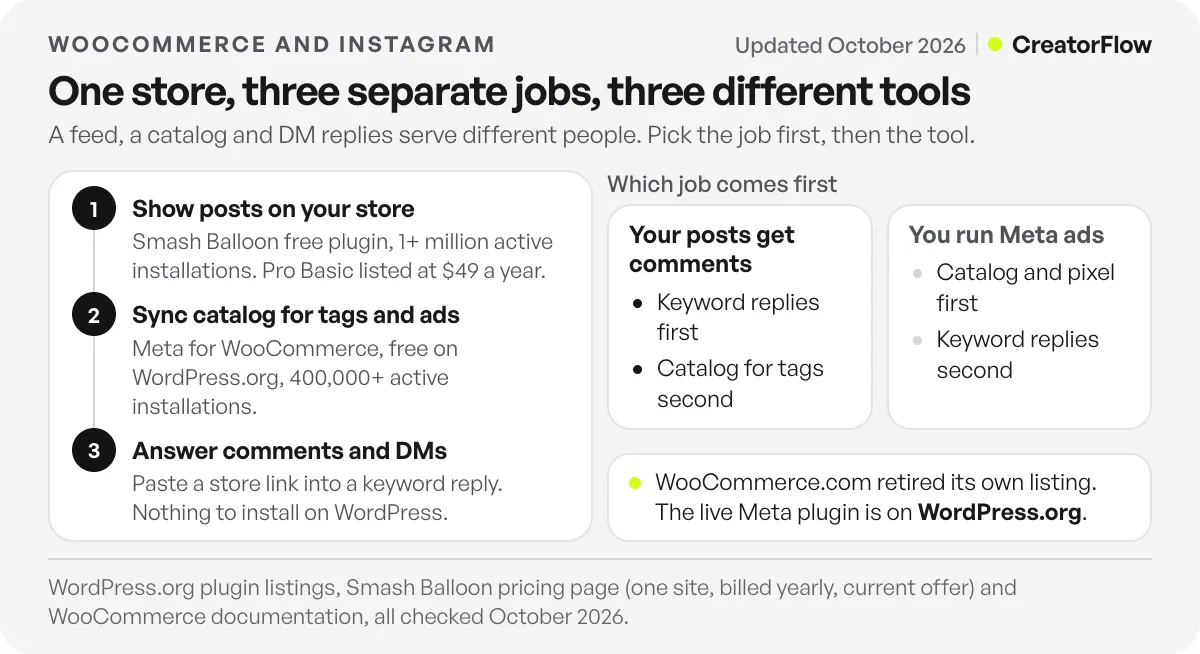
| Job | Who it serves | Option | Listed price (checked October 2026) | Install on WordPress? |
|---|---|---|---|---|
| Show posts on your store | People already on your site | Smash Balloon Social Photo Feed | Free. Pro Basic is $49/year for 1 site at the current offer | Yes |
| Sync catalog for tags and ads | People browsing Instagram | Meta for WooCommerce | Free | Yes |
| Sync catalog by feed file | Stores that want feed control | WebToffee WooCommerce Product Feeds | Free version, paid upgrades offered | Yes |
| Answer comments and DMs | People who already asked | A DM tool such as CreatorFlow | CreatorFlow Free $0, Pro $15/month | No, you paste a URL |
The order depends on how your store gets orders. If most sales come from Google and you post on Instagram once a month, a link in bio is enough for now, and your time belongs in search. If your Reels bring product questions, the reply job pays first, because those people already told you what they want.
How do you add an Instagram feed to a WooCommerce store?
Install a feed plugin from WordPress.org, connect your Instagram account, choose a layout and place the feed on a page. Smash Balloon’s free plugin has over 1 million active installations and is the common starting point. A feed displays your posts. It does not sync products or answer anyone, so judge it as page decoration and social proof.
The Smash Balloon Social Photo Feed listing shows 1+ million active installations (checked October 2026). Its Instagram Feed pricing page lists shoppable feeds as a product area, and Pro Basic at $49/year for one site, shown as a 50% reduction from $98/year (checked October 2026). Check the renewal price before you buy.
A feed works best on a product or collection page where people want proof of how a product looks in use. On the homepage it can send shoppers away from your store to Instagram. Test it on one page, then watch whether add-to-cart changes.
How do you sync WooCommerce products to Instagram?
Use the official Meta for WooCommerce plugin, which connects your store to a Meta catalog, a Page and a pixel. You need a Facebook Page, a business account and an Instagram professional account. After the catalog syncs and Instagram approves you, you can tag products in posts and Reels. You can also upload a feed file instead.
The name and the home of this plugin changed, and older guides still send you to the wrong page. WooCommerce.com now shows the old product page as a retired product. Its documentation says the product is no longer available there and that the page will no longer be updated.
The live version is Meta for WooCommerce on WordPress.org, published by Facebook. The listing shows version 3.7.8 and 400,000+ active installations (checked October 2026). WooCommerce’s documentation gives the setup path. From WP Admin, go to Marketing, then Facebook, and select Get Started. The wizard asks you to sign in, choose or create your business account, Page, ad account, pixel and catalog, turn on two-factor authentication, and authorize the connection. Because that document is frozen, follow your own screen if the labels differ.
Tagging has one more gate. Meta’s product tagging documentation says an account without an Instagram Shop cannot tag products. Once eligible, you can use up to 20 tags on a feed post and 30 on a Reel (checked October 2026). The Meta side of setup is covered in our guide to setting up an Instagram Shop.
If you prefer a feed file, a plugin such as WebToffee WooCommerce Product Feeds creates one, and you upload it in Commerce Manager. WebToffee’s own guide notes that Instagram Shopping is limited to supported markets. Check yours first.
Does WooCommerce support checkout on Instagram?
The sale finishes on your WooCommerce site. Meta moved shops on Facebook and Instagram to website checkout in 2025, so the buyer selects a product in the app and completes payment on your store. You keep the order, the customer record and the payment processor you already use, and you handle tax as usual.
PPC Land’s report on the change gives the 2025 timeline. Meta’s checkout URL documentation says a shop needs a checkout URL that lets customers finish on your website. The Meta plugin’s changelog records a checkout permalink with product and coupon support, and an /fb-checkout endpoint. Test one real purchase from a tag before you launch.
Ignore any guide that promises buyers can pay inside Instagram. Your payment gateway, your shipping rules and your returns page all still apply, and all of them still have to work on a phone.
How do you answer Instagram comments with a WooCommerce link?
Create a keyword automation in a DM tool, write one line of text and paste your WooCommerce URL. When someone comments that keyword, they get one DM with the link. No plugin, no wp-admin access and no catalog are involved. This is the job plugin lists leave out, and it serves the person who already asked.
Tell people the keyword in your caption, such as “comment LINK for the page”. Here is how common buyer questions map to automations. The store details are illustrative, so write your own.
| Customer asks | Post or trigger | Keyword | Reply text |
|---|---|---|---|
| ”Where can I buy this?” | Comment on a product Reel | LINK | Here is the page for this mug, with all colors: [product link] |
| “How much?” | Comment on a product Reel | PRICE | It is $32. This link adds one to your cart: [add-to-cart link] |
| “How long is delivery?” | Keyword sent by DM | DELIVERY | We ship in 2 working days. Rates are here: [shipping page link] |
| “Any discount?” | Story reply | CODE | Use WELCOME10. This link adds the code for you: [checkout link] |
WooCommerce can build better links than a plain product page. Its add-to-cart URL guide uses the format yourstore.com/?add-to-cart=ID&quantity=1, with the variation ID for variable products. Its sharable checkout URL guide uses yourstore.com/checkout-link/?products=ID:1&coupon=CODE, and says the coupon applies automatically. A shorter path helps on a phone. The steps for coupons and copy are in our guide to sending discount codes by DM.
Each question gets its own automation and keyword. Keywords match whole words and ignore capitals, with up to 20 per automation, so add “price”, “cost” and “how much” as separate entries. You can run an automation on a specific post, your next post or any post. If you want the build itself, follow the comment-to-DM setup guide.
Meta’s private replies rules allow one private reply per comment, within 7 days of the comment, and more messages only after the person replies (checked October 2026). Meta’s window means DM tools answer people who messaged first, so do not plan cart reminders by DM. Any follow-up goes by email or through your store’s own abandoned cart tool.
CreatorFlow, a Meta Tech Provider, does this job with no WordPress install. The Free plan has 500 DMs a month, and Pro is $15/month with 5,000 DMs per workspace. See the page for Instagram DM automation on WooCommerce stores. A broader platform comparison sits in our DM guide for Shopify, Etsy and WooCommerce.
Which WooCommerce Instagram setup fits your store?
Choose by what your Instagram account does today. Stores with comments on product posts need replies first. Stores running Meta ads need the catalog and pixel. Stores with strong user photos may want a feed. Stores that post rarely should fix search and email before they install anything, because no plugin creates demand.
| Your situation | Do this first | Then |
|---|---|---|
| Reels get “price?” and “link?” comments | Keyword replies with product links | Catalog for tags |
| You run or plan Meta product ads | Meta for WooCommerce catalog and pixel | Keyword replies on your best organic posts |
| Customers post photos of your product | A feed on product pages | Keyword replies |
| You post less than once a week | Link in bio and your Google listings | Revisit after 10 posts |
| Your store sells one-off or custom work | Keyword reply with a contact form link | Skip the catalog |
If you sell on more than one platform, the same logic applies when you connect Instagram to Shopify or run a PrestaShop store on Instagram, with different tools for the first two jobs and the same link for the third.
How do you track Instagram orders in WooCommerce?
Add UTM tags to each DM link and read WooCommerce’s order attribution. Each order then shows where the buyer came from, so you can compare Reels by orders, not likes. Pair this with click counts from your DM tool. Clicks show what got attention, and orders show what sold.
A tagged link looks like this: yourstore.com/product/mug/?utm_source=instagram&utm_medium=dm&utm_campaign=mug-reel. Use one campaign name per Reel, and write them in a simple spreadsheet so you do not repeat a name.
WooCommerce’s order attribution documentation says UTM and organic sources override earlier sources, and a direct visit never overrides a known source (checked October 2026). That matters when someone clicks your DM link, leaves, and types your address the next day.
On CreatorFlow, Pro and Growth add link click tracking and clicks by country and city. Our guide to tracking DM links shows how to read them against your store numbers.
FAQ
Does WooCommerce have an official Instagram integration?
The official connection is Meta for WooCommerce, published by Facebook on WordPress.org. It connects your store to Facebook, Instagram and WhatsApp, and it is free to install. WooCommerce.com no longer sells or updates its own listing for it.
Can I sell directly on Instagram with WooCommerce?
You can tag products and send people to your store, and the sale finishes on your site. Meta moved shops to website checkout in 2025. Your account also has to be eligible for Instagram shopping in your market.
Do I need a plugin to send WooCommerce links in Instagram DMs?
No. A DM tool sends the link, and your product URL already exists. You paste it into the reply. WooCommerce documents add-to-cart and sharable checkout links in its own guides, so test them on your version.
What is the best WooCommerce Instagram feed plugin?
Smash Balloon’s Social Photo Feed has the largest install base we found, at 1+ million active installations on WordPress.org. The best one is the one that loads fast on your theme, so test it on a staging site and check page speed before and after.
Why are my WooCommerce products not showing on Instagram?
Check four things in order. Your Instagram account must be a professional account linked to your Facebook Page. The catalog must have synced without errors in Commerce Manager. Instagram must have approved your account for shopping. Your market must be supported.
Can I offer a coupon through an Instagram DM on WooCommerce?
Yes. Create the coupon in WooCommerce, then use a sharable checkout URL with a coupon parameter, so the link applies it. Put the code in the message text too, for people who open the link in another browser.
Sources and checks
Meta for WooCommerce, Smash Balloon and WebToffee listings on WordPress.org, WooCommerce’s documentation on add-to-cart links, sharable checkout links and order attribution, the Meta plugin’s changelog, and Meta’s product tagging and checkout URL documentation were checked in October 2026. Plugin prices and versions change, so confirm them before you buy. Example reply text and prices are illustrative.





