

To connect Instagram to Shopify, add the free Facebook & Instagram channel in your Shopify admin, link a Facebook Page and business portfolio, then get your Instagram professional account approved for shopping. Your products sync to a Meta catalog and you can tag them. Buyers check out on your Shopify store, not inside Instagram. Tags do not answer comments, so plan that step too.
Most guides stop at the sync. Then a product Reel goes out and the comments say “link?”, “price?” and “do you ship to Germany?”. A product tag replies to none of them, and those people asked first.
This guide covers the four things “connect” can mean, the exact steps from Shopify’s help pages, what changed at checkout in 2025, how tagging works today, and the reply step that comes after the connection.
Key Takeaways
- Four jobs, one word: Tagging products, linking from your profile, showing posts on your store and answering comments are separate jobs. Only tagging needs the Shopify channel.
- The channel is free: Shopify lists it as free on all plans, subject to store eligibility.
- Checkout is on your store: Instagram sends buyers to your Shopify checkout, and you handle sales tax on those orders.
- Tag limits are generous: Meta’s docs allow up to 20 tags on a feed post and 30 on a Reel.
- Comments need a reply step: A keyword on the post can send one DM with the right product link, and nothing needs to be installed in Shopify.
- Bottom line: Connect the catalog once, then spend your time on the questions your posts create.
What does it mean to connect Instagram to Shopify?
Connecting Instagram to Shopify can mean four different jobs: tagging products in posts, sending profile visitors to your store, showing your posts on your store, or answering comments and DMs with a product link. Only the first job needs Shopify’s channel. Most product stores should do the first and the last.
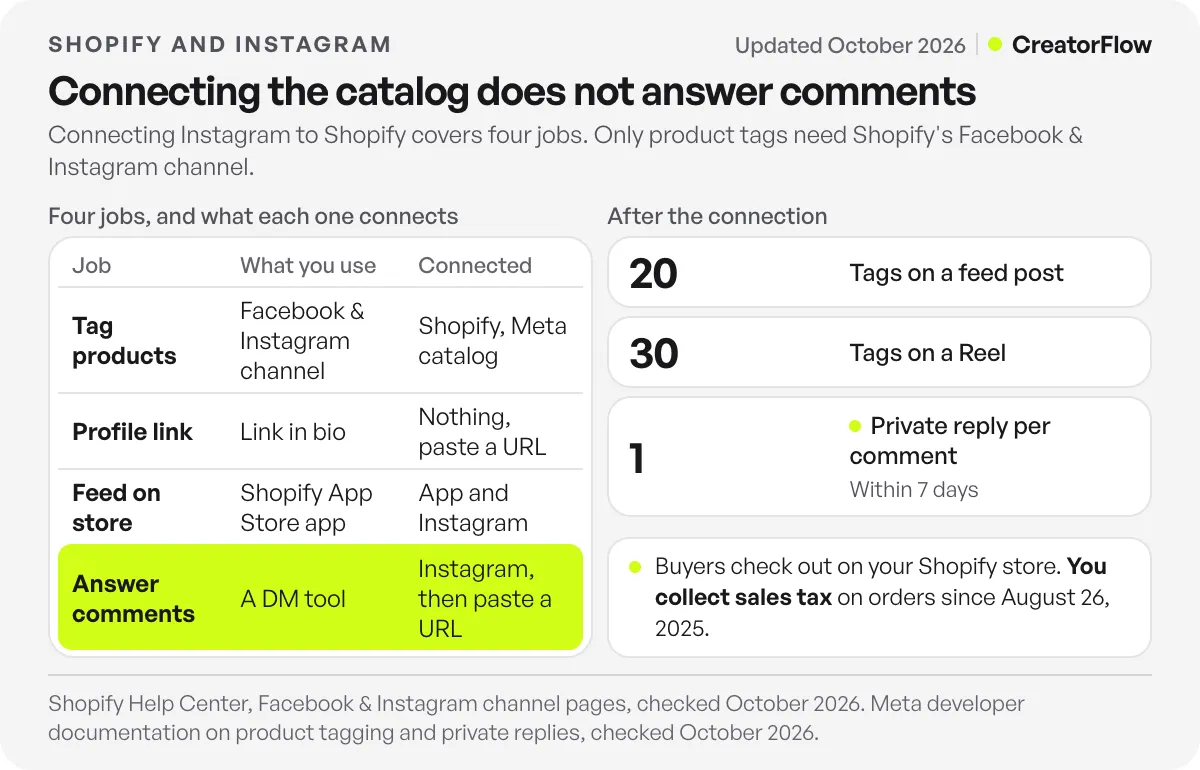
| Job | What you use | Cost | What must be connected |
|---|---|---|---|
| Tag products in posts and Reels | Facebook & Instagram channel | Free, subject to store eligibility | Shopify, Meta catalog and Instagram approval |
| Send profile visitors to the store | Link in bio or a Story link sticker | Free | Nothing, you paste a URL |
| Show Instagram posts on your store | An app from the Shopify App Store | Set by each app | The app and your Instagram account |
| Answer “link?” comments and DMs | A DM tool such as CreatorFlow | CreatorFlow Free $0, Pro $15/month | Your Instagram account, then you paste a Shopify URL |
The order of work follows where your sales come from. If your Reels get product comments every week, build the reply step straight after the catalog. If most orders come from Google and email and you post on Instagram once a month, the catalog is still useful for Meta ads, but Instagram replies come after search and email.
If you run another platform, the same split applies. See the guide to WooCommerce on Instagram for the plugin version of these jobs.
What do you need before you connect Shopify to Instagram?
You need a Shopify online store that is not in private mode, a published Facebook Page, a business portfolio that owns that Page, and an Instagram professional account linked to the Page. Your business must be in a country Meta supports for shops. Set up these accounts first, because the setup screen only offers what you already own.
Shopify’s requirements page lists these points (checked October 2026):
- Your personal Facebook account has full control of the Page and the portfolio.
- Your products can be bought directly from your verified domain.
- Your Page and Instagram account follow Meta’s terms and community standards.
- Your store’s tax settings are ready, under Settings, then Taxes and Duties.
An ad account is optional. You only need one if you plan to run Meta campaigns.
How do you connect Instagram to Shopify, step by step?
Add the Facebook & Instagram channel from your Shopify admin, sign in with the Facebook account that controls your Page, connect your Facebook and Instagram assets, and accept the terms. The admin steps take a few clicks. Instagram approval comes after that, and you cannot tag products until it is done.
These are the desktop steps from Shopify’s setup page (checked October 2026):
- In Shopify admin, go to Settings, then Sales channels.
- Select Shopify App Store.
- Log in if asked.
- Search for Facebook and open the channel.
- Select Add channel or Add app.
- Select Start set up for the feature you want first.
- Select Connect account.
- Sign in to your Facebook account.
- Connect the Facebook assets for that feature.
- Accept the terms and conditions.
- Select Finish setup.
On a phone, open the Shopify app, tap the menu icon, then Sales channels, tap Facebook, then Add Facebook. From there, the steps are the same from step 6.
Then finish the Instagram side. Shopify’s Instagram page says to add your Meta catalog and get approved in your Instagram business profile, then publish your products from Shopify so they exist in both places. Shopify’s page does not give a review time, so do not promise a launch date until the approval arrives. For the Meta side in more detail, including eligibility and catalog errors, use our full Instagram Shop walkthrough.
Does Instagram still have checkout for Shopify stores?
No. Buyers finish on your store. Shopify says Instagram Shopping now redirects customers to your Shopify checkout, and in the app they select “Checkout on seller’s website”. Since August 26, 2025, Meta is no longer the marketplace tax facilitator for new orders, so you collect and remit sales tax yourself.
Many older tutorials still tell you to turn on Instagram Checkout. That advice is out of date. Shopify’s Instagram Shopping article and its channel overview both describe the redirect and the tax change (checked October 2026).
This change makes your product page more important. Every tag, bio link and DM link now ends in the same place, so a slow page or a confusing size selector costs you the sale. It also makes your own reporting simpler, because the order sits in your Shopify admin like any other.
How do you tag Shopify products on Instagram?
Once approved, you tag products while you create a post or Reel, choosing from the catalog Shopify synced. Meta’s developer documentation allows up to 20 tags on a feed post, up to 20 across a carousel with 5 per slide, and up to 30 on a Reel. To change a tagged product’s details, edit the listing in Shopify.
Those limits come from Meta’s product tagging documentation (checked October 2026). It also says an account without an Instagram Shop cannot tag products.
Shopify adds two details on its Instagram page. A product with several variants needs one chosen variant for the tag, and a tagged product must exist in both your Meta catalog and your Shopify store.
Tags work for people who are browsing and willing to tap. They do less for someone who has already typed a question. Our comparison of product tags and DM links looks at that difference from the affiliate side, and the same split holds for a store.
What happens after the connection, when someone comments “link?”
The connection gives you a catalog. It does not reply to anyone. When a person comments on a product Reel, a DM tool can send them one message with text and the exact product link. You set a keyword, write the reply and paste a Shopify URL. Nothing gets installed in your store.
Shopify Instagram guides often leave this step out, and it serves the person who already asked. Tell people the keyword in your caption, such as “comment LINK for the page”. Here is how the common questions map to automations. The store details are illustrative, so write your own.
| Customer asks | Post or trigger | Keyword | Reply text |
|---|---|---|---|
| ”Where can I buy this?” | Comment on a product Reel | LINK | Here is the page for this shirt, with all sizes: [product link] |
| “How much is it?” | Comment on a product Reel | PRICE | This one is $48. See colors and sizes here: [product link] |
| “Do you ship to my country?” | Keyword sent by DM | SHIPPING | We ship to the US, UK and EU. Delivery times are here: [shipping page link] |
| “Any discount?” | Story reply | CODE | Use WELCOME10 for 10% off. This link adds it for you: [discount link] |
Each row is a separate automation with its own keyword. Keywords match whole words and ignore capitals, with up to 20 per automation. So “link” matches “link please” but not “linked”, and “price” does not match “pricing”. Add the variants your customers type, including your second language.
Choose the link by what the person asked. Send a product page for one item and a collection page for a range. Shopify’s cart permalinks can open a cart with a chosen variant, which suits a single-size item. For offers, our guide to sending discount codes by DM covers Shopify’s shareable discount links. More selling tactics sit in the playbook for selling in Instagram DMs.
Meta sets the rules here. Its private replies documentation allows one private reply per comment, within 7 days of the comment, and further messages only after the person replies (checked October 2026). So a follow-up belongs in your email or in Shopify’s own abandoned checkout email, not in a planned DM.
CreatorFlow, a Meta Tech Provider, does this job on a Free plan with 500 DMs a month, or on Pro at $15/month with 5,000 DMs per workspace. See how it works on the page for Instagram DM automation for Shopify stores. If you sell across several platforms, start at the page for ecommerce sellers on Instagram. For examples by product type, see DM automation for ecommerce brands. If you want the wider automation picture for a store, read our guide to automating Instagram for a Shopify store.
How do you measure Instagram sales in Shopify?
Add UTM tags to every link you send, then read two reports: clicks in your DM tool and sessions or orders in Shopify. Clicks tell you which post made people act. Shopify tells you which clicks turned into orders. Neither number alone shows whether a Reel paid for itself, so read them together.
A tagged DM link looks like this: yourstore.com/products/linen-shirt?utm_source=instagram&utm_medium=dm&utm_campaign=linen-reel. Use one campaign name per Reel.
Shopify’s acquisition reports can group sessions by marketing channel and show UTM data, but they show visitors and sessions, not sales. For sales and orders by campaign, use Shopify’s Campaigns feature (checked October 2026). Session counts rely on cookies, so expect them to run below your real traffic where visitors decline tracking.
On CreatorFlow, Pro and Growth add link click tracking and clicks by country and city. If 30% of clicks on a Reel come from a country you do not ship to, change the post or your shipping page.
Why won’t Instagram connect to Shopify?
Most failures trace back to account ownership or eligibility. The Facebook Page may not belong to the portfolio you selected, the Instagram account may not be professional or linked to that Page, the store may be password protected, or the business may sit outside Meta’s supported countries. Check them in that order.
Shopify’s setup page says plainly that a Page must be owned by the selected business portfolio, or it will not appear as an option. If your Page is missing from the list, fix ownership in Meta Business settings first, then run the setup again.
If products are missing, check that they are published to the channel in Shopify and that your store is out of private mode. All products go through Facebook’s review and can be removed for policy reasons, so a missing product may be a rejected one.
FAQ
Is it free to connect Instagram to Shopify?
Yes. Shopify lists the Facebook & Instagram channel as free on all plans, subject to store eligibility (checked October 2026). You still pay your Shopify plan and normal payment fees, and any Meta ads you choose to run.
Can customers buy inside Instagram?
No. They can browse tagged products in the app, then Instagram sends them to your Shopify checkout. Shopify’s help pages describe this as “Checkout on seller’s website”. Plan your tracking and your product pages around that.
Do I need a Facebook Page to connect Instagram to Shopify?
Yes, for the sales channel. Shopify requires a published Facebook Page and a business portfolio connected to it, and your Instagram professional account must be linked to that Page. To send a product link by DM, you connect your Instagram account to the DM tool and paste the URL.
Can I link Shopify to a personal Instagram account?
Not for tagging. Shopify asks for a professional account linked to your business’s Facebook Page, and you can switch account type in the Instagram settings. A link in bio works on any account type.
Can I show my Instagram feed on my Shopify store?
Yes, with an app from the Shopify App Store. This is a separate job from the sales channel. A feed moves people from your store to your content, so it helps most on pages where social proof is the missing piece.
How do I send a Shopify link when someone comments on a Reel?
Create an automation in a DM tool, set a keyword such as LINK, write a one-line reply and paste the product URL. The person gets one DM after they comment. Use a separate automation for each product or question.
Sources and checks
Shopify’s channel, setup, requirement, Instagram, reporting and cart permalink pages on help.shopify.com, and Meta’s product tagging and private replies documentation, were checked in October 2026. Menu names can change, so follow your admin if it differs. Example reply text and the 30% click example are illustrative, not measured results.





