

You can set up Instagram comment-to-DM automation without a flow builder. The job needs four inputs: the post, the keyword, the message and the link. A template form asks for those four things, and the automation is live in minutes. Branching steps can only run after the person replies, because Meta allows one message to a commenter before that.
Flow builders are canvases of boxes and arrows. They are useful for long journeys across several channels. For the most common Instagram job, sending a link to everyone who comments a word, the canvas adds setup time and gives you places to make mistakes.
This guide explains what a comment-to-DM automation needs, why most of a canvas sits idle before the first reply, three ways to set one up without a canvas, and a five-step setup with a test. It is written for creators who want the link sent, not a new skill to learn.
Key Takeaways
- Four fields do the job: Post, keyword, message and link. An optional Email Gate adds one step before the link.
- Meta limits the first move: One private reply per commenter until they respond. A branch that runs before a reply has nothing to branch on.
- Three canvas-free routes: A template form, a quick template inside a bigger tool, or an AI tool that builds the flow from your description.
- Test from a second account: Automations ignore your own comments, so a test from your account shows nothing.
- Keep one job per post: One keyword, one message, one link. A second offer is a second post.
Do you need a flow builder for Instagram comment-to-DM?
No. A flow builder helps when a conversation branches across many steps, but comment-to-DM starts with one message. You choose a post, a keyword and the DM with its link. Meta allows one private reply per commenter before they respond, so the setup that matters fits in a simple form.
The question to ask is what happens after the first DM. If the person taps the link and leaves, the job is done in one message. If you want a long conversation after their reply, across WhatsApp, Messenger and email, a canvas earns its place. Most creator offers are the first kind.
New to the topic? Start with our guide to Instagram DM automation for beginners.
The four fields every comment-to-DM automation needs
Every comment-to-DM automation, in any tool, reduces to the same fields. A canvas draws them as boxes. A form asks for them as fields. The result sent to the commenter is the same.
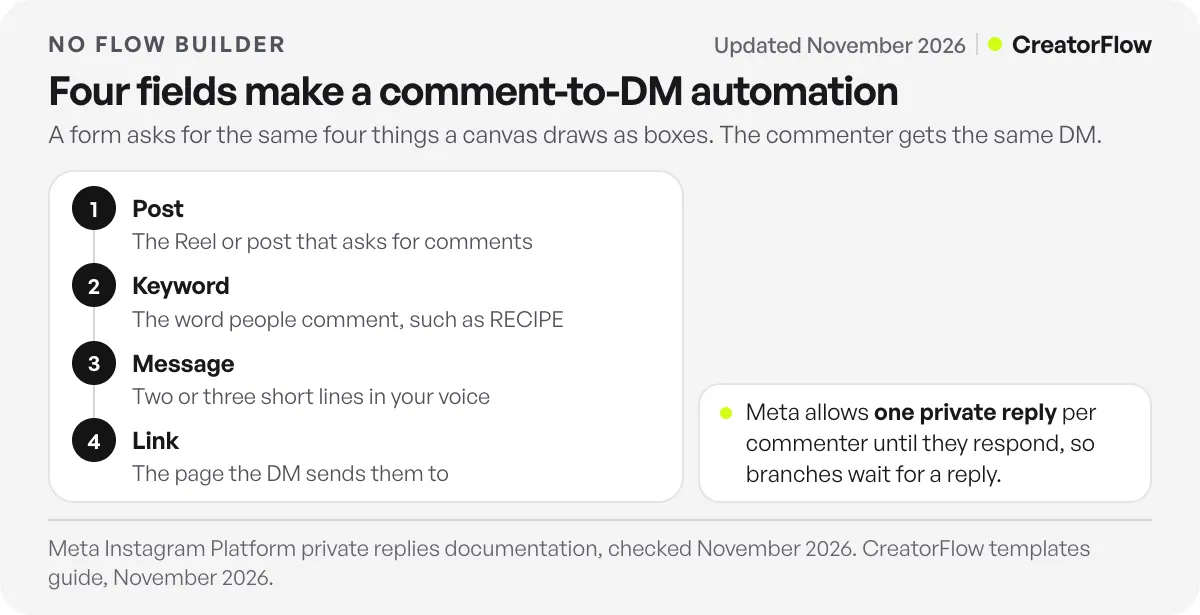
| Field | What you enter | Example |
|---|---|---|
| Post | The Reel or post that asks for comments | Your recipe Reel |
| Keyword | The word people comment | RECIPE |
| Message | The DM text, short and in your voice | ”Here’s the full recipe!” |
| Link | Where the DM sends them | Your recipe page |
An optional fifth step sits between the comment and the link. An Email Gate asks for an email first and sends the link after the reply. A public reply under the comment tells others the DM was sent. Both are settings, not boxes you need to wire.
Why branching waits for the first reply
Meta’s private replies documentation allows only one message to a commenter (checked November 2026). Follow-ups are allowed only if the person responds, within 24 hours of that response. The reply must also go within 7 days of the comment.
So a canvas that shows “send welcome, wait, send offer, ask a question” cannot run that way for a silent commenter. Only the first box runs. Every branch after it waits for the person to write back. That is why a form with one message field covers what most creators need, and why the one message should carry the link.
If you want a reply, ask for one in the first message. An email request is a question. When the person answers, the window opens, and the link follows. The Email Gate works this way in CreatorFlow.
Three ways to set up comment-to-DM without a canvas
There are three common routes. All three end with the same four fields filled in.
- A template form. You pick a ready-made automation and fill in the keyword, message and link. CreatorFlow works this way: its templates are grouped by goal, every step can be changed, and you click Start Automation to go live.
- A quick template inside a flow-builder tool. ManyChat offers an “Auto-DM links from comments” quick automation. ManyChat describes it as a setup that does not need the Flow Builder (checked November 2026). It fits if you already use ManyChat for other channels.
- An AI tool that builds the flow for you. Chatfuel’s comment rules can write replies with AI from your instructions, and you set public and private replies per rule (Chatfuel comment autoreply guide, checked November 2026). AI replies spend Chatfuel credits.
Pick the route that matches what you already use. If you only need Instagram comments to send links, the form route has the fewest moving parts.
How to set up comment-to-DM in CreatorFlow in five steps
CreatorFlow’s live site puts setup at under 2 minutes, and comment-to-DM is on every plan, Free included.
- Connect your Instagram professional account. Use a Creator or Business account. CreatorFlow is a Meta Tech Provider and connects through Meta’s login, without your password.
- Open Templates and pick one. Choose a template that matches your goal, such as sending a link or collecting emails. The template library shows the options.
- Choose the post and the keyword. Pick the post, then add your keyword. Keywords match as whole words, capital letters do not matter, and you can add up to 20 keywords per automation.
- Write the message and add the link. Two or three short lines are enough. Name what they get, then give the link.
- Click Start Automation, then test. Comment the keyword from a second account. The DM should arrive within seconds.
For message ideas, our DM automation templates include ready-to-edit text for links, guides and discount codes.
What to check once it is live
A simple setup still needs a quick check in the first days. Most problems come from the account settings or the keyword, not the automation itself.
- Nothing sends: Check that you tested from a second account and that the automation is not a draft. Then check that the keyword is a whole word in the comment. Our troubleshooting guide covers the rest.
- It fires on the wrong comments: The keyword is too common. Replace “yes” or “love” with a word tied to the offer.
- People miss the DM: DMs to people who do not follow you land in Message Requests, per Meta’s messaging documentation. Say “check your requests” in your caption.
- Clicks are low: Shorten the message so the link sits near the top. One link, one action.
When does a flow builder make sense?
A canvas earns its place when your conversation continues for many steps after the person replies, or runs across several channels at once. Examples are a quiz with five branches, a booking flow that checks availability, or a support bot that hands chats between Instagram, WhatsApp and Messenger.
If your goal is to send a link, a guide, a code or a booking page to everyone who comments a word, you do not need that depth. For a side-by-side of tools in this space, see ManyChat alternatives for Instagram.
FAQ
Can I automate Instagram comments without ManyChat’s flow builder?
Yes. You can use a template-based tool where you fill in the post, keyword, message and link, or use ManyChat’s own “Auto-DM links from comments” quick automation, which ManyChat describes as a setup that does not need the Flow Builder.
What is the easiest way to send a DM when someone comments on Instagram?
Use a comment-to-DM tool with templates. Pick the post, type the keyword, write a short message with your link, and start the automation. Test it by commenting from a second account. In CreatorFlow this is on the Free plan with 500 DMs a month.
Why does a comment automation send only one DM at first?
Meta allows one private reply per commenter. More messages can go only after the person responds, within 24 hours of that response (Meta private replies documentation, checked November 2026). Put the link in the first message, or ask a question so the person’s reply opens the window.
Do I need coding skills for Instagram comment-to-DM automation?
No. Comment-to-DM tools that use Meta’s official API connect through Meta’s login and use forms or templates. You type a keyword, a message and a link. No code is needed.
Can I use more than one keyword for the same automation?
Yes. CreatorFlow takes up to 20 keywords per automation, so LINK, GUIDE and SEND can all trigger the same DM. Multi-word phrases work too, and capital letters do not matter.
How do I test a comment-to-DM automation?
Comment the keyword from a second Instagram account, because automations ignore your own comments. The DM should arrive within seconds. Then comment a different word to check that nothing sends.
Sources and checks
Meta’s private reply rules were checked on the Instagram Platform private replies page and the Requests folder on the Instagram messaging API page in November 2026. ManyChat’s quick automation is described from indexed text of ManyChat’s own help center and blog, checked November 2026. Chatfuel’s comment rules are from its comment autoreply guide, November 2026. CreatorFlow’s templates and keyword rules are from its templates guide and keyword triggers page, November 2026.





