

You can automate Instagram comments without an app answering your personal DMs. A comment-to-DM automation fires only when someone comments your keyword on the post you chose, and it sends one message to that person. Your other chats stay manual. The risk comes from three settings: a common keyword, an “any word” trigger, and a story reply automation left on.
Many creators want the time back that automation gives, and they do not want a bot talking to their friends, their brand contacts or their clients. That worry is fair. A badly scoped automation can answer “hey, are you free Friday?” with a link to your ebook.
This guide shows where the line sits. It covers what an automation can see compared with what it answers, which trigger types can reach a personal chat, a setup that stays in its lane, and a two-minute test that proves it. It is written for creators who run their own inbox.
Key Takeaways
- Triggers decide everything: An automation answers only the events it is set to watch. A comment keyword on one post cannot reply in an unrelated chat.
- Three settings reach personal chats: A keyword DM reply with a common word, any trigger set to “any word”, and a story reply automation on an ordinary story.
- Use rare keywords: A word like GUIDE or PRESET appears only when someone wants the offer. Words like “hi”, “yes” or “love” fire on normal talk.
- Replies come back to you: When someone answers the automated DM, the message sits in your Instagram inbox. You reply yourself, as with any chat.
- Test from a second account: Automations ignore your own comments and DMs, so only a second account shows what a follower sees.
What does “without touching personal DMs” mean?
It means the automation acts only inside the conversation it starts. Someone comments your keyword, the tool sends one private reply, and every other chat in your inbox is left alone. Friends, collaborators and customers who message you directly still reach you, and you answer them yourself, in your own words.
This is the default for comment-to-DM. The trigger is a comment on a post, so a direct message with no comment behind it never matches. The boundary breaks only when you add trigger types that watch your DMs and set them too wide.
If you are new to how these tools work, the Instagram DM automation beginner’s guide covers the basic trigger types first.
What can an automation see, and what does it answer?
To send DMs, a tool needs permission to use Instagram messaging on your professional account. Many tools also need the “Allow access to messages” setting turned on in the Instagram app, under connected tools. That permission lets the tool send, and receive the events it watches. It does not mean the tool answers everything it receives.
What gets answered is set by your triggers. Meta adds its own limits on top. A private reply to a comment must go within 7 days of the comment, and only one message can go to the commenter until they respond, according to Meta’s private replies documentation (checked November 2026).
Meta’s messaging documentation also says new conversations from people who do not follow you land in the Requests folder. So the automated DM to a non-follower appears as a request, and their reply comes back to the same thread. For a full permissions check, use our DM automation permissions checklist.
Which triggers can reach a personal chat?
Comment triggers cannot reach a personal chat, because they need a comment. DM keyword triggers and story reply triggers can, because they watch messages people send you directly. The table shows each trigger type, whether it can answer a personal chat, and how to keep it narrow.
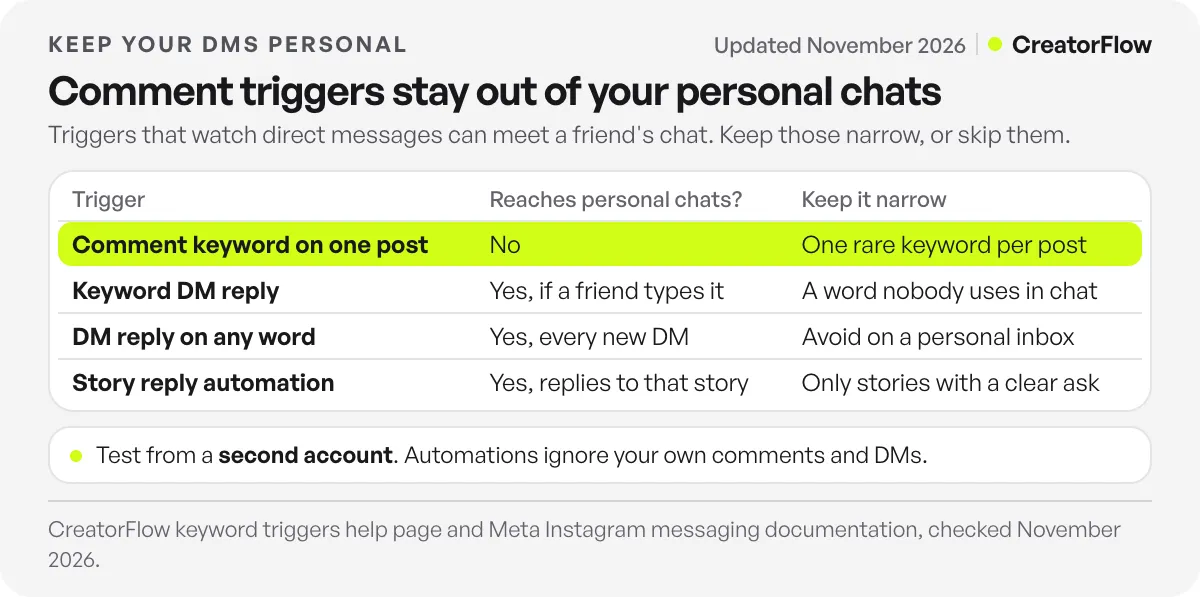
| Trigger type | Can it answer a personal chat? | How to keep it narrow |
|---|---|---|
| Comment keyword on one post | No, it needs a comment on that post | Use one rare keyword per post |
| Comment trigger on “any word” | No, but it answers every comment on that post | Use it only on giveaway or Q&A posts |
| Keyword DM reply | Yes, if a friend types the keyword | Pick a word nobody uses in chat |
| Keyword DM reply on “any word” | Yes, it answers every new DM | Avoid it on a personal inbox |
| Story reply automation | Yes, it answers replies to that story | Run it only on stories with a clear ask |
The pattern is simple. The wider the trigger, the more likely it meets a conversation you meant to keep. Narrow triggers keep the bot inside the offer.
How to set up comment automation that stays in its lane
The safest setup uses comment triggers for offers and keeps DM triggers rare and specific. In CreatorFlow it takes four steps, and comment-to-DM is on every plan, Free included.
- Pick one post per offer. Choose the Reel or post where you ask people to comment. In CreatorFlow, one automation runs on a post at a time, so each post has one clear job.
- Choose a rare keyword. Use a word tied to the offer, such as GUIDE, PRESET or RECIPE. CreatorFlow matches whole words and ignores capital letters, so “guide please” fires and “guided tour” does not.
- Write a DM that ends the job. Deliver the link in the first message. A DM that asks an open question invites a reply that you then answer by hand, which is fine, but plan for it.
- Skip DM triggers you do not need. If your offers live in comments, you may not need a keyword DM reply at all. If you add one, use a word nobody types in normal chat.
Your keyword choice does most of the work. Our list of keyword trigger templates shows words that rarely appear in everyday messages.
How do you test that personal DMs stay untouched?
Test with a second Instagram account, because automations ignore your own comments and DMs. The test takes about two minutes and checks both sides of the line: the automation fires when it should, and stays quiet when it should.
- Comment the keyword on the post from the second account. The DM should arrive within seconds.
- Comment something else on the same post, such as “love this”. No DM should arrive.
- Send a normal DM from the second account: “hey, quick question”. No automated reply should arrive.
- Send a DM with your keyword, if you run a keyword DM reply. Check that the reply is the one you expect.
- Reply to the automated DM. Your reply should sit in your inbox, waiting for you.
If step 2 or 3 triggers a reply, your keyword is too common or a trigger is set to “any word”. Fix it, then run the test again. If nothing sends at step 1, work through our comment-to-DM troubleshooting guide.
What happens when someone replies to the automated DM?
Their reply lands in your Instagram inbox, in the same thread as the automated message. You read it and answer it yourself. Meta’s 24-hour window applies to messages a tool sends through the API. A reply you type in the Instagram app works like any normal chat.
This is where automation and personal attention meet well. The bot delivers the link at once. The people who reply with a real question get you. For ways to keep the automated first message in your voice, see protecting your brand voice in automation.
Keep the boundary over time
Settings drift. A story reply automation from last month’s launch stays on, and a friend’s reply to an ordinary story gets your sales link. Check your active automations once a month.
- Turn off story reply automations when the story with the ask expires.
- Retire launch keywords after the launch, or point them at an evergreen offer.
- Re-run the five-step test after you add any DM-based trigger.
- Check connected apps. Two automation tools on one account can both answer the same event. Keep one tool per job.
FAQ
Can I automate Instagram comments without automating my DMs?
Yes. A comment-to-DM automation fires only on a keyword comment under the post you choose. Direct messages without that comment never trigger it. Your personal chats stay manual unless you also add DM keyword or story reply automations.
Will Instagram automation read my private messages?
The tool receives the message events its triggers need, and it answers only the ones that match. Many tools need “Allow access to messages” turned on in Instagram’s settings to send DMs. Check each tool’s permissions before you connect it.
Why did my automation reply to a friend’s message?
Usually a keyword DM reply with a common word, a trigger set to “any word”, or a story reply automation on an ordinary story. Change the keyword to a rare word, or turn the trigger off, then test from a second account.
Do replies to automated DMs go to my inbox?
Yes. When someone answers the automated DM, the reply appears in your Instagram inbox in the same thread. You answer it yourself. If a keyword DM reply is active and their message contains the keyword, that automation can fire.
Can a comment automation send more than one message?
Not until the person replies. Meta allows one private reply per commenter, sent within 7 days of the comment. After the person responds, you can continue within 24 hours of their response (Meta private replies documentation, checked November 2026).
Is it safe to connect an automation tool to my Instagram?
Tools that use Meta’s official API connect through Meta’s login, without your password. CreatorFlow is a Meta Tech Provider and connects this way. No tool can promise zero risk, so read our guide to whether Instagram automation is safe before you connect one.
Sources and checks
Meta’s private reply rules were checked on the Instagram Platform private replies page, and the Requests folder and 24-hour window on the Instagram messaging API page, in November 2026. CreatorFlow’s keyword matching, “any word” option and one-automation-per-post behaviour are from its keyword triggers help page, November 2026. Instagram menu names vary by app version.





