

To sell AI automation to a client who is not sure, sell a result on one post instead of “AI” on the whole account. Start with Instagram DM automation that sends text the client wrote and approved. Run it for two weeks on a single Reel, agree on one number before you start, and show the client the DM arriving on their own phone. Add AI-written replies later, once the client trusts the first step.
The hesitant client rarely says no to automation. They say “let me think about it” and never come back. Behind that sentence sits one worry: words they did not approve going out under their brand name, to their customers, at 2am.
This guide is for agencies, freelancers and consultants who offer automation to small businesses, coaches and creators. It covers the four worries you will hear, the pilot that answers them, and the rules for adding AI replies later.
Key Takeaways
- Sell the result, not the technology: “Everyone who comments PRICE gets your price list in seconds” closes faster than “an AI agent for your inbox”.
- Start with text the client approved: a fixed-text comment-to-DM removes the biggest worry before you begin.
- Pilot one post for two weeks: one Reel, one keyword, one DM, one number. Small enough to say yes to.
- Agree on the number in writing: booked calls for a coach, product clicks for a shop, emails for a creator.
- Demo on the client’s phone: they comment on a test post and watch the DM arrive.
- Add AI replies with rules: private DMs only, a written knowledge base, a handoff to a person for complaints, and a clear AI disclosure.
How Do You Sell AI Automation to a Hesitant Client?
You make the first step small, visible and reversible. Propose one automation on one post, with DM text the client writes or approves word for word. Show it working on their phone during the meeting. Agree on one number and a review date. If the number moves, expand. If it does not, stop with nothing lost. AI-written replies come later, as a second project.
What the Client Is Worried About
| What the client says | What they mean | What answers it |
|---|---|---|
| ”What if it says something wrong?” | Words they did not approve, under their name | Fixed DM text they sign off on |
| ”My customers will hate talking to a bot.” | Messages nobody asked for | The DM goes only to people who commented asking for it |
| ”Will Instagram ban the account?” | Risk to their main sales channel | The official Meta API, and a tool that is a Meta Tech Provider |
| ”Is it worth the money?” | No way to judge the result | One agreed number and a review date |
Answer the worry, not the sentence. A client who says “it’s too expensive” about a $15 tool is rarely worried about $15. Ask what would have to happen in two weeks for them to call it worth it. That answer becomes the number you agree on.
On the third worry, be exact. CreatorFlow is a Meta Tech Provider and connects through Instagram’s official login, without third-party scraping. No tool can promise zero risk, so do not. Promise that the setup follows Meta’s rules.
Start With Automation the Client Can Read
The safest first project has no AI in it at all. A comment-to-DM automation sends the same message, word for word, to everyone who comments a keyword. The client reads that message before it goes live. Nothing else can be sent.
That removes the “what if it says something wrong” worry completely. It also delivers most of what the client wanted from “AI” in the first place:
- Replies in seconds, at any hour.
- No missed comments on a busy Reel.
- A link, a price list or a booking page in every requester’s inbox.
On CreatorFlow, this runs on every plan, including Free, and each automation takes under 2 minutes to set up. The client sees the exact text in the automation before you press start.
Call it automation in the pitch. If the client asked for “AI”, say what the first step does and when an AI step could come later. Clients trust the agency that slows down a little more than the one that promises everything on day one.
The Two-Week Pilot on One Post
Write the pilot on one page. Five lines are enough:
- The post. The client’s next Reel, or one that is already getting comments.
- The keyword. One word, for example PRICE, GUIDE or BOOK.
- The DM text. Written out in full and approved by the client.
- The number. One metric, with today’s baseline next to it.
- The review date. Two weeks from launch, in the calendar.
Two weeks is long enough for a Reel to collect its comments and short enough that the client does not feel locked in. If the post already has comments, CreatorFlow’s Rewind on Pro and Growth sends the DM to people who commented in the last 7 days, so the pilot starts with results instead of a wait.
A one-page pilot also protects you. If the client later says “it didn’t work”, the page shows what was promised.
For a full written proposal after the pilot, use the Instagram automation proposal template for agencies.
Show It on the Client’s Phone
Describing a DM funnel in a meeting gets polite nods. Showing it gets a yes.
- Before the meeting, set up the automation on a test post with the keyword DEMO.
- In the meeting, ask the client to comment DEMO from their own phone.
- The DM arrives in their inbox in seconds, with the text they will approve.
If the client does not follow the account, the DM lands in their message requests folder. Tell them before they look, so a missing notification does not read as a failure.
Then change one word in the DM text, ask them to comment again, and show the new version. The client now knows they control every word.
Which Number Should You Agree On?
Pick the number closest to money that the automation can move in two weeks.
| Client type | Number to agree on | Where to read it |
|---|---|---|
| Coach or consultant | Booked calls from DM links | The booking tool |
| Shop or product brand | Clicks to the product page | Link click tracking in the tool |
| Creator with a newsletter | Emails collected | Contacts, exported as CSV |
| Local service business | DM replies asking about prices or times | The Instagram inbox |
CreatorFlow Pro and Growth track link clicks and the countries they came from, and the Email Gate collects addresses into contacts. Write the baseline next to the number on day one. “Clicks went from 0 to 140” is a result. “Clicks were good” is not.
For a full report format, see Instagram automation reporting for agencies. After the pilot, the client retention guide covers what keeps the client paying in month three.
When to Add AI-Written Replies
Some clients will want more after the pilot: answers to open questions, product suggestions, booking. That is the moment for AI-written replies, as a separate project with its own rules.
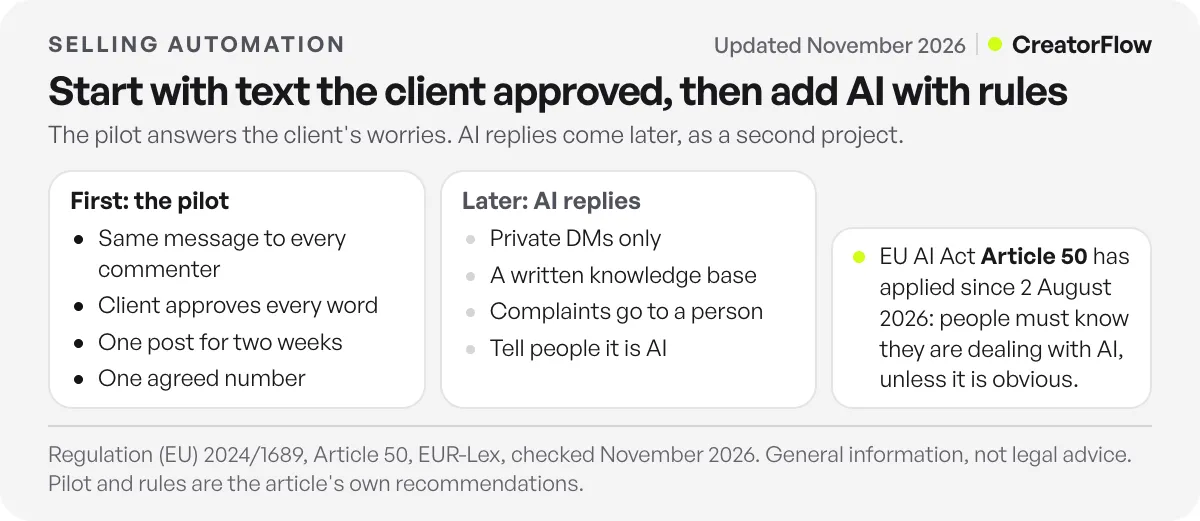
Keep AI in private DMs. Public comment replies stay fixed text. A wrong public answer is a screenshot; a wrong private answer is one conversation.
Give it a written knowledge base. Prices, opening hours, policies, the ten most common questions. The client approves the document the way they approved the DM text.
Send hard cases to a person. Refunds, complaints, health questions and anything about money owed go to a human, with a clear rule for when that happens.
Tell people it is AI. Article 50 of the EU AI Act requires AI systems that talk directly with people to be designed so those people know they are dealing with AI, unless it is obvious, at the latest at the first interaction. It has applied since 2 August 2026 (checked November 2026). Disclosing is simple and builds trust, wherever the client is based. Ask a lawyer how it applies to your client’s setup.
Test before launch. Run 20 real customer questions through it and have the client read every answer.
For the full pitch process with email templates and call scripts, read how to pitch Instagram DM automation to clients. To deliver the setup once the client says yes, follow how to set up Instagram DM automation for clients.
FAQ
How do I pitch AI automation to an existing client?
Propose one automation on one post for two weeks, with DM text the client approves. Show it working on their phone in the meeting and agree on one number to review. Expand after the number moves.
What should the first automation for a client be?
A comment-to-DM on a Reel that already gets comments. Everyone who comments a keyword gets the same approved message with one link. It shows a result in days and carries no risk of unexpected wording.
How do I show a client the ROI of DM automation?
Agree on one number before launch and write down today’s baseline. Booked calls for a coach, product clicks for a shop, emails for a creator. After two weeks, compare the number to the baseline and to the cost of the tool and your fee.
Do we have to tell customers they are talking to AI?
If AI writes the replies, plan to disclose it. The EU AI Act’s Article 50 has applied since 2 August 2026 and requires that people know they are dealing with an AI system unless it is obvious. A fixed message the client wrote is a different case from an AI chatbot. Ask a lawyer for your client’s specific setup.
What if the client wants to keep answering DMs themselves?
Automate only the first message. The comment-to-DM sends the link in seconds, and every reply the person sends after that lands in the client’s inbox for them to answer by hand.
How much does it cost to run DM automation for a client?
On CreatorFlow, Pro is $15 a month for 2 Instagram accounts and Growth is $30 a month for 5 accounts. Your fee for setup and management is separate. For pricing models, see how agencies price Instagram DM automation.
Sources and checks
EU AI Act Article 50 wording and its application date were checked on EUR-Lex and artificialintelligenceact.eu in November 2026; this is general information, not legal advice. CreatorFlow plans, Rewind and Email Gate were checked on creatorflow.so/pricing in November 2026.