

To send an Instagram DM when someone comments, use a comment-to-DM automation. You pick a post, choose a keyword such as LINK, and write the message. When a comment contains the keyword, the tool sends a private reply to that person within seconds. Meta allows one private reply per comment, sent within 7 days, and it needs a Business or Creator account.
You can also do it by hand. On a post with 15 comments, that works. On a Reel with 600 comments, people wait hours, and the ones who asked at 2 a.m. may never get an answer.
This guide compares the four ways to message commenters, the rules Meta sets for all of them, and what to write in the first DM.
Key Takeaways
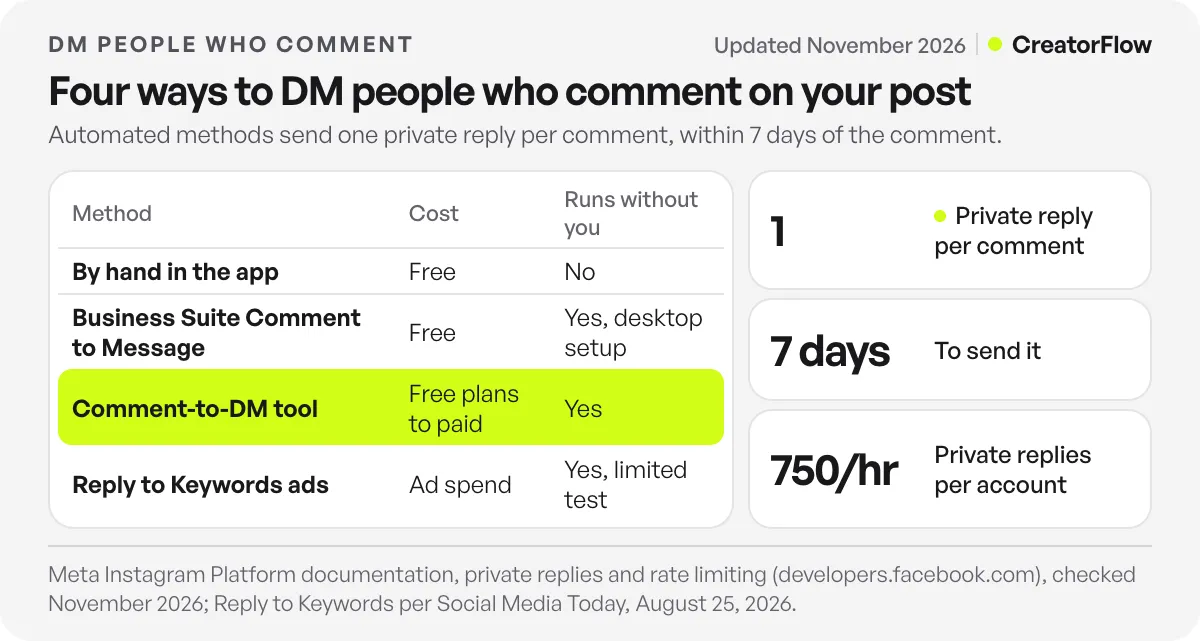
- Four ways exist. By hand, Meta’s free Comment to Message tool, a comment-to-DM tool, and Meta’s ad feature that is still in testing.
- Meta sets the same rules for every tool. One private reply per comment, within 7 days, and follow-ups only after the person replies.
- Non-followers get the DM in Requests. Tell people in the caption to check there.
- A keyword keeps it relevant. Only people who type the word get the message, so compliments do not get a sales link.
- Put everything in the first DM. The link, the next step and a question, because a second message needs a reply first.
- Test from a second account. Your own comments do not start your automation.
Can You Automatically Send a DM When Someone Comments on Instagram?
Yes. Instagram calls this a private reply. A professional account can send one private message to a person who commented on its post or Reel, within 7 days of the comment. Tools do this through Meta’s official API, so you connect your account with Instagram login and share no password. On Instagram Live, the reply has to go out during the broadcast.
Meta’s private replies documentation sets the rules (checked November 2026):
| Rule | What it means for you |
|---|---|
| Within 7 days of the comment | Old comments cannot get a private reply |
| One message to the commenter | The first DM has to carry the link |
| Follow-ups only if they respond | A second message needs a reply from them |
| Follow-ups within 24 hours of the response | The window closes a day after their last message |
| Inbox if they follow you, Requests if not | Non-followers may miss the DM |
Meta’s rate limit page also caps private replies to post and Reel comments at 750 per hour for each professional account (checked November 2026). A post with 3,000 keyword comments in its first hour takes a few hours to answer.
4 Ways to DM People Who Comment on Your Post
| Method | Cost | Keyword filter | Works without you | Best for |
|---|---|---|---|---|
| By hand in the Instagram app | Free | You read each comment | No | Under 20 comments a post |
| Meta Business Suite, Comment to Message | Free | Yes | Yes, desktop setup | Simple replies on a few posts |
| Comment-to-DM tool (API) | Free plans to paid | Yes | Yes | Regular posts with a link to send |
| Meta ads, Reply to Keywords | Ad spend | Up to 5 keywords | Yes | Promoted posts, test only |
1. By hand
Open the comment, tap the person’s profile, and tap Message. Some professional accounts also see a message option when they reply to a comment. This works for a few comments. It does not scale, and the reply arrives when you are free, not when the person asked.
2. Meta Business Suite’s Comment to Message
Meta’s inbox automations include a free Comment to Message option, set up in Meta Business Suite on desktop. It sends a message when a comment matches your words. Meta’s own help pages describe the trigger in two ways (keywords on one page, hashtags on another), so check it in your account. Our breakdown of Instagram’s built-in automation covers all six free tools and their limits.
3. A comment-to-DM tool
A tool connected through Meta’s official API watches your posts and sends the private reply when the keyword appears. You get keyword matching, a public reply under the comment, link click counts and a list of the people who asked.
In CreatorFlow, setup takes under 2 minutes and comment-to-DM is on every plan, including Free (500 DMs a month). Pro is $15 a month for 5,000 DMs per account, with no fee per contact. The comment-to-DM page shows the screens, and our step-by-step setup guide walks through each one.
4. Meta’s Reply to Keywords for ads
Meta is testing an ad option called Reply to Keywords. Advertisers pick up to five keywords, and a comment with one of them on the promoted post starts an automatic DM. Social Media Today reported on August 25, 2026 that only some advertisers can use it, and only in Instagram ad setup.
Which Comments Should Get a DM?
Not every comment. A DM to someone who wrote “love this” feels like spam. A DM to someone who wrote “LINK please” is the answer they asked for.
That is why keyword triggers exist. You tell people the word, they type it, and only they get the message. Three rules:
- One short word: LINK, GUIDE, PRICE, SIZE.
- Not a common word. “Yes” and “love” appear in normal comments.
- Said on screen and in the first line of the caption, so people know what to type.
In CreatorFlow, a keyword matches as a whole word and ignores capitals, so “link pls” and “LINK” both match. For an “every comment” setup, the Any Word option sends the DM on any comment, whatever the person writes. Use it for giveaways, where every comment is an entry.
For word ideas, see our list of comment keywords that convert.
What to Write in the DM
The first private reply is often the only message you can send. Put three things in it:
- What they asked for, as a link or a file.
- One line on what to do first.
- A question, so they can reply and open 24 more hours of conversation.
Product link:
Here’s the blue jacket from the Reel: [product link]
Sizes run small. What size do you usually wear? I’ll tell you which one to pick.
Free guide:
Here’s your checklist: [link]
Start with step 2. Do you post Reels or carousels more?
Booking a call:
Thanks for asking! Here’s my calendar for a free 15-minute call: [booking link]
What’s the one thing you want help with? I’ll prepare for it.
Turn on a public reply as well, such as “Sent! Check your DMs.” It tells the commenter where to look, and other viewers see that the offer works. For non-followers, add “Not following yet? Check your message requests” to the caption.
Test Before the Post Goes Live
- Comment the keyword from a second account
- The DM arrives (in Requests if that account does not follow you)
- The link opens on a phone
- The public reply appears under the comment
- The automation is on, not a draft
Comments from your own account do not trigger your automation. If a test from a second account still gets nothing, our list of comment-to-DM fixes covers the other causes.
FAQ
How do I DM someone who commented on my Instagram post?
By hand, tap their profile and then Message. To do it for every person who comments a keyword, use a comment-to-DM automation, which sends a private reply within seconds of the comment.
Is it allowed to DM people who comment on my post?
Yes. Meta’s API has a private reply feature built for this. The limits are one message per comment, within 7 days, and follow-ups only after the person replies.
Will people who don’t follow me get the DM?
Yes, but it lands in their message requests, not their main inbox. Many people never check that folder, so say it in the caption and in your public reply.
Can I send a DM to everyone who commented on an old post?
Only for comments from the last 7 days. Older comments cannot get a private reply. CreatorFlow’s Rewind feature sends the DM to people who commented in the last 7 days, before the automation was on.
Can I send more than one message after a comment?
Only if the person replies. After the first private reply, Meta allows follow-ups for 24 hours after each response from the person. For what to send next, see our guide to the DM follow-up after a free guide.
Do I need a Facebook Page to send DMs to commenters?
Not with tools that connect through Instagram login. Some older tools still connect through Facebook login, which needs a Facebook Page linked to your Instagram account. Either way, you need a Business or Creator account.
Sources and checks
Private reply rules and the Requests folder rule are from Meta’s private replies documentation, and the 750-per-hour private reply limit from Meta’s rate limiting page, both checked November 2026. Reply to Keywords as reported by Social Media Today on August 25, 2026. CreatorFlow plan details from creatorflow.so/pricing, checked November 2026. DM templates are examples.





