
To follow up on Instagram after someone gets your free guide, earn a reply in the first DM. Meta lets you send one private reply to a person who commented. A second message is allowed only after that person writes back, and only for 24 hours after their reply. So the follow-up starts inside message one: a question, a word to reply with, or an email step.
Many freebie flows you see online look like this: guide now, a check-in six hours later, an offer on day two. On Instagram, the check-in and the offer only send if the person wrote back first. If they took the guide and said nothing, there is no open window for message two.
This guide shows what Meta allows after the guide goes out, three follow-ups that work inside those rules, scripts you can copy, and when to move the conversation to email.
Key Takeaways
- One message, then wait for them. A comment earns one private reply. Every message after it needs the person to reply first.
- Each reply opens 24 hours. When the person writes back, you can send follow-ups for the next 24 hours.
- Build the follow-up into message one. End the guide DM with a question that takes one word to answer.
- A part-two keyword gives you a second touch. “Reply PART2” turns their reply into a new window and a new delivery.
- Email covers day two and later. Ask for the email before the link, then send the nurture emails from your email tool.
- Requests can hide your DM. People who do not follow you get the guide in their Requests folder. Tell them where to look.
Can You Send a Follow-Up DM After a Free Guide on Instagram?
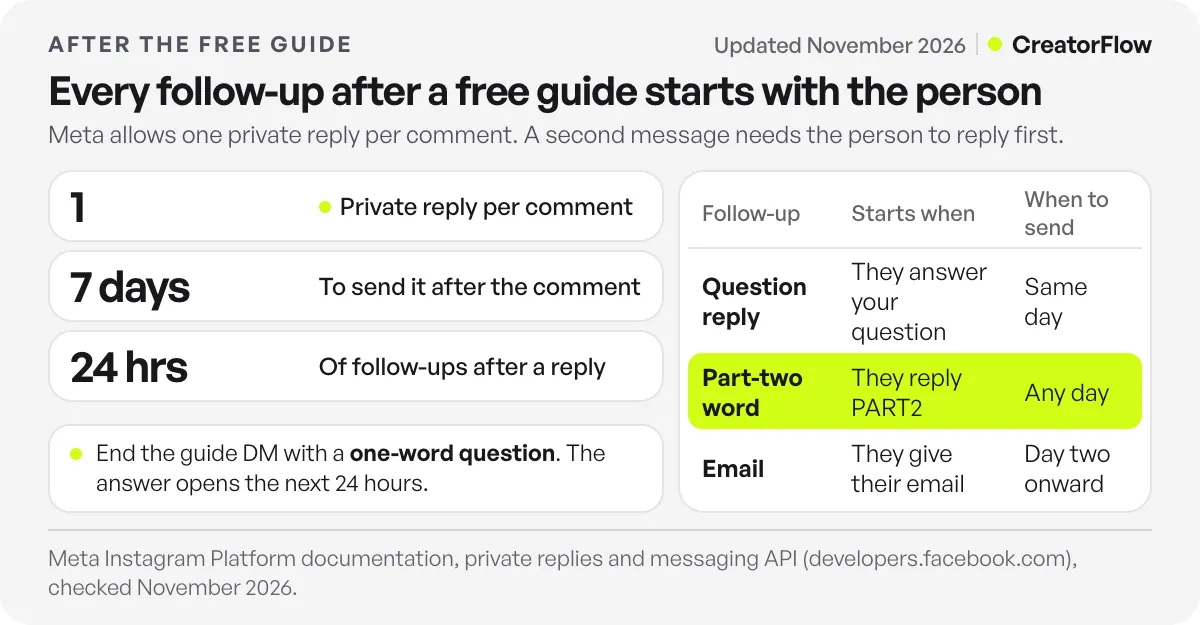
Yes, but only after the person replies. Meta allows one private reply to a comment, sent within 7 days of the comment. After that, an automated follow-up can go out only if the person responds, and only within 24 hours of their response. A follow-up timed for “2 days later” to someone who never replied does not send.
The rules come from Meta’s private replies documentation for the Instagram Platform (checked November 2026). In practice, the timeline after a “comment GUIDE” post looks like this:
| What happens | What you can send | Meta rule |
|---|---|---|
| Person comments GUIDE | One private reply with the guide | Within 7 days of the comment |
| Person says nothing | Nothing more by automation | Follow-ups need a response first |
| Person replies or answers your question | Follow-ups for 24 hours | Window counts from their reply |
| 24 hours pass with no new message | Nothing until they message again | Standard 24-hour window |
| Person comments on a new post | A new private reply | A new comment, a new reply |
| Person replies to your Story | A reply and follow-ups for 24 hours | A Story reply is a message to you |
Two more details from Meta’s messaging API page (checked November 2026). New conversations from people who do not follow you land in their Requests folder. And Meta has a separate 7-day Human Agent window, for a real person on your team who needs more time to answer a message. It covers human replies to a conversation, not automated follow-ups.
Why the First DM Decides the Follow-Up
The guide DM is the only message you are sure to send. Whether a second one is possible depends on one thing: did the person answer? So write message one to get an answer.
There are three ways to do that:
- Ask a question with a one-word answer. “Which part do you need first: content or sales?” People reply to a choice faster than to an open question.
- Ask for the email before the link. Typing an email address is a reply. The person gets the guide, you get the email, and the 24-hour window opens.
- Offer a part two. “Reply PART2 and I’ll send the template that goes with it.” Their reply is the trigger for the next delivery.
A message that only says “Here’s your guide, enjoy!” closes the conversation. Nothing in it asks for an answer, so most people read it and leave.
If you have not set up the delivery itself yet, start with our guide to lead magnet automation by DM. This article picks up after the guide is sent.
Three Follow-Ups That Work Inside Meta’s Rules
Each follow-up below starts with an action from the person. That is what keeps it inside the rules, and it is also why people do not read it as spam: they asked for it.
1. The question follow-up (same day)
End the guide DM with a question. When the person answers, send a short reply that fits their answer, plus one next step.
The next step can be a booking link, a product page or a second resource. Keep it to one link. You have 24 hours from their answer, and the conversation is warm right now.
2. The part-two keyword (any day)
Split your resource in two. The first part goes out with the comment. The second part goes out when the person replies with a word, for example PART2.
In CreatorFlow, the comment automation sends part one. A keyword DM automation on the word PART2 sends part two. Both run on every plan, including Free. Each time the person sends the word, a new 24-hour window opens, so the part-two DM can carry the offer.
Pick a word people will not type by accident. Our guide to keyword triggers in DMs covers how matching works.
3. The email follow-up (day two and later)
Instagram is built for the first hour. Email is built for the next two weeks. If you want a sequence (day 1 tips, day 3 case study, day 5 offer), it belongs in your email tool.
CreatorFlow’s Email Gate asks for the email address before the link goes out. On Pro and Growth you export the collected contacts as a CSV file and import them into Kit, Mailchimp, Klaviyo or another email tool. Our Instagram DM to email list guide shows the import step for each one.
Follow-Up Scripts After the Guide
Copy these and change the details. Each one ends with a question or a word to reply with, so the person’s answer opens the next 24 hours.
Guide DM for a coach (message one):
Here’s the 5-step client check-in guide you asked for: [link]
Quick question so I can send the right next thing: are you stuck on getting clients or keeping them? Reply GET or KEEP.
Reply to GET (sent after their answer):
Makes sense. Most of my clients start there too. Page 3 of the guide is the part to try first.
If you want help with it, here’s my calendar for a free 20-minute call: [booking link]
Guide DM for a creator selling a template:
Here’s your free content planner: [link]
There’s a part two: the 30 caption hooks I use with it. Reply PART2 and it’s yours.
Part-two DM (keyword automation on PART2):
Here are the 30 hooks: [link]
The full planner pack with 12 months of prompts is $19 this week: [product link]
Guide DM with an email step (Email Gate on):
Where should I send the checklist? Type your email below and the link comes right after.
Prices, times and page numbers in these scripts are examples. Use your own offer. For more delivery templates, see CreatorFlow’s ebook delivery template.
What to Do When the 24-Hour Window Closes
The person replied yesterday and went quiet. The window is closed. You have three ways to start again, and each one starts with them:
- Post a second keyword. A new Reel with “comment PART2 for the next step” gives everyone who saw part one a reason to comment again. A new comment earns a new private reply.
- Ask a question on your Story. A question sticker or a poll gets replies. A Story reply is a message to you, so an automated reply and 24 hours of follow-ups can follow. See Story reply automation.
- Send the email. If you collected the address, the follow-up does not need Instagram at all.
Coaches who need follow-ups after calls and no-shows have a separate set of flows in our DM follow-up guide for coaches.
Make Sure People Find the Guide DM
A follow-up only matters if the first DM was seen. Meta puts new conversations from accounts the person does not follow into their Requests folder. Many people never open it.
Three fixes:
- Say it on screen and in the caption: “Comment GUIDE. Not following yet? Check your message requests.”
- Turn on a public reply to the comment, for example “Sent! Check your DMs.” It tells the person to look, and it shows other viewers the offer is real.
- Test from a second account that does not follow you, so you see what a new follower sees.
If people tell you nothing arrived, our guide to message requests not showing lists where Instagram files them.
How to Tell Which Follow-Up Works
Use one keyword per guide and one per follow-up. Then each number belongs to one step:
| Step | What to count | Where |
|---|---|---|
| Comment | Comments with the keyword | The post |
| Guide DM | DMs sent | Your automation stats |
| Click | Link clicks on the guide | Link click tracking (Pro and Growth) |
| Reply | Answers to your question or PART2 | Your DM inbox |
| Emails collected | Contacts, CSV export | |
| Sale | Orders with your code or link | Your shop or booking tool |
If many people comment but few click, the post promised more than the guide gives. If people click but few reply, the question at the end of the DM is too hard. Make it a choice between two words.
FAQ
How long after sending a free guide can I follow up on Instagram?
Only for 24 hours after the person replies to you. If they never reply, an automated follow-up is not allowed after the first private reply. A new comment, a Story reply or a new DM from them starts a new window.
Can I schedule an automatic follow-up DM two days after the guide?
Not to someone who stayed silent. Meta allows one private reply per comment, and follow-ups only within 24 hours of a response. For a day-two or day-five message, collect the email in the first DM and send the follow-up from your email tool.
What should the first follow-up message say?
Answer what the person told you, point to one part of the guide, and give one next step with one link. Keep it under 60 words. A long message after a one-word reply reads as a sales pitch.
Does every reply open a new 24-hour window?
Yes. The 24 hours count from the person’s latest message. Each time they write back, you get another 24 hours to answer them.
Is it spam to follow up after a free guide?
Not when the person started the conversation and you answer what they said. Send one link per message, keep the tone of a person, and stop when they stop replying. A string of pitches to someone who went quiet is what people report.
Should I move leads from Instagram DMs to email?
Yes, for anything longer than one day. Instagram’s window resets only when the person messages you. Email has no window, so a 5-day sequence works there.
Sources and checks
Private reply limits, the 24-hour window, the Human Agent window and the Requests folder rule are from Meta’s Instagram Platform documentation on private replies and the messaging API, checked November 2026. CreatorFlow plan details from creatorflow.so/pricing, checked November 2026. Scripts are examples, not measured results.





