

Claude video generation does not happen inside the chat. Claude has no video model, and its file uploads take documents and images, not video. What Claude can do is direct: in Claude Code it writes each scene as HTML or React, renders it to MP4 with a framework such as HyperFrames or Remotion, and checks the finished file. For Instagram Reels, that makes Claude the director and editor, not the camera.
We make CreatorFlow’s Reels this way. Our studio is one folder on a laptop, opened in Claude Code. Since September 25, 2026 it has produced 187 video project folders. Most of the time we lost was not in rendering. It was rework: a rejected script sends you back to research, the plan and the build.
This guide shows the setup behind those Reels: what the folder holds, which renderer to pick, the five stages every Reel passes, the checks before a file ships, and the numbers from our own account that changed how we write. It is for creators and small brands who already post Reels and want Claude to do more than write the caption.
Key Takeaways
- Claude does not generate video pixels. It writes code that a renderer turns into video, and it calls image or video models through tools when a scene needs footage.
- Claude Code is the place to do it. Free does not include Claude Code; Pro at $20 a month does, according to Claude’s pricing page (checked November 2026).
- HyperFrames and Remotion are the two main renderers. HyperFrames renders HTML and is Apache-2.0. Remotion renders React and needs a paid license for companies over 3 people.
- Every stage writes a file. A brief, a scored script, a timed storyboard, the build and a check sheet. A gate script blocks the render until each file is complete.
- The script is the hard part. On our account, Reels that sold an outcome reached 1.41x to 2.1x our median views. How-to Reels reached 0.05x to 0.07x.
- Check the delivered file, not the preview. Frame sheets, loudness, the H.264 level and the first second of sound catch problems the preview hides.
Can Claude Generate Video?
No, not directly. Claude has no video model, and Anthropic’s vision documentation covers images, not video. Claude makes video by writing code: HTML or React scenes that a renderer such as HyperFrames or Remotion turns into an MP4. For footage, Claude calls a separate image or video model through a connector. Claude plans, builds and checks; other tools make the pixels.
The same limit applies to watching. Claude’s file upload guide lists documents and images (JPEG, PNG, GIF and WebP), not video (checked November 2026). To “watch” a Reel, Claude Code extracts frames with ffmpeg and reads them as stills. That is how our studio reviews every render: as contact sheets, two frames per second.
If your goal is to cut footage you already filmed, that is a different job. Our guide to editing video with Claude covers silence cuts, captions and ffmpeg. This article is about making a Reel from a blank folder.
What Is a Claude Code Video Agent?
A Claude Code video agent is a folder that Claude Code opens with instructions, tools and checks already inside. You type what you need. Claude answers the brief from the folder’s defaults, builds the video, renders it and checks it. The folder holds the know-how, so each new session starts at the same level.
Ours has six parts:
| Folder or file | What it holds | Why it matters |
|---|---|---|
| CLAUDE.md | The operating rules, read at the start of every session | Each rule names the mistake that created it |
| Skills | 5 skills: launch film, Reel series, screen tutorial, AI presenter, portfolio study | Claude loads the method for the job, not everything at once |
| Agents | 5 reviewers: film analyst, stranger reader, pitch judge, frame QA, reference judge | Each one does one check and never sees the writer’s opinion |
| Tools | Scripts for a new project, the gate, the render, frame QA and file checks | A rule that a script enforces gets followed |
| Library | 387 HyperFrames motion blocks, indexed in one catalog file | Claude reuses a tested move instead of writing one |
| Projects | One folder per video, one file per stage | You can reopen any Reel and see why it looks the way it does |
Claude Code reads skills from a SKILL.md file and only loads one when the job calls for it. Hooks run a command at set points, for example before a tool call (checked November 2026). Our render guard is a hook: any render that skips the gate script stops. We explain the format in more depth in Claude Skills for social media.
HyperFrames vs Remotion: Which Renderer Should Claude Use?
Both turn code into an MP4. The difference is the language you write and the license you need.
| HyperFrames | Remotion | |
|---|---|---|
| Who makes it | HeyGen | Remotion |
| You write | HTML, CSS and JavaScript animation | React components |
| License | Apache-2.0, no per-render fees | Free for individuals and companies of up to 3 people |
| Paid tiers | None listed | Creators $25 a month per seat; Automators $0.01 per render, $100 a month minimum |
| Built for agents | Yes, ships a Claude Code plugin and skills | Works with Claude Code; React knowledge helps |
Sources: the HyperFrames repository and Remotion’s license page (both checked November 2026).
We use HyperFrames. Three reasons. HTML is the language Claude writes most reliably. The Studio preview runs on a local port, so you can watch a scene change while Claude edits it. And a solo creator never has to count seats. Remotion is a strong pick if you already build in React or need its larger ecosystem of examples.
How Does Claude Code Make an Instagram Reel?
Claude Code makes a Reel in five stages, and each stage writes a file before the next one can start. A brief, a scored script, a timed animatic, a gated build and render, and a check of the delivered file. The order matters more than any single tool. Skipping a stage is how most bad videos we made got through.
- Brief. One file names the job, the format (9:16 for Reels), the length, the one ask at the end and every product fact with the page that proves it. A fact with no source goes in as “proof needed” and stays out of the Reel.
- Script. Five quotes from the audience first, in their own words. Then a share sentence: “A ___ sends this to ___ because ___.” Then the lines. A fresh agent scores the script on six points out of 30. Below 25, or any point under 4, Claude rewrites it.
- Storyboard and animatic. Every frame gets a time, a move and its text, timed to the beats of the music. The animatic is grey boxes plus music, played in HyperFrames Studio.
- Build and render. Scenes come from the motion catalog, restyled to the brand. The render only runs through the gate script, which checks that every earlier file is complete.
- Check and deliver. Frame sheets of the delivered MP4, loudness, file format and the first second of sound. Then the cover and the caption go into one folder with the video.
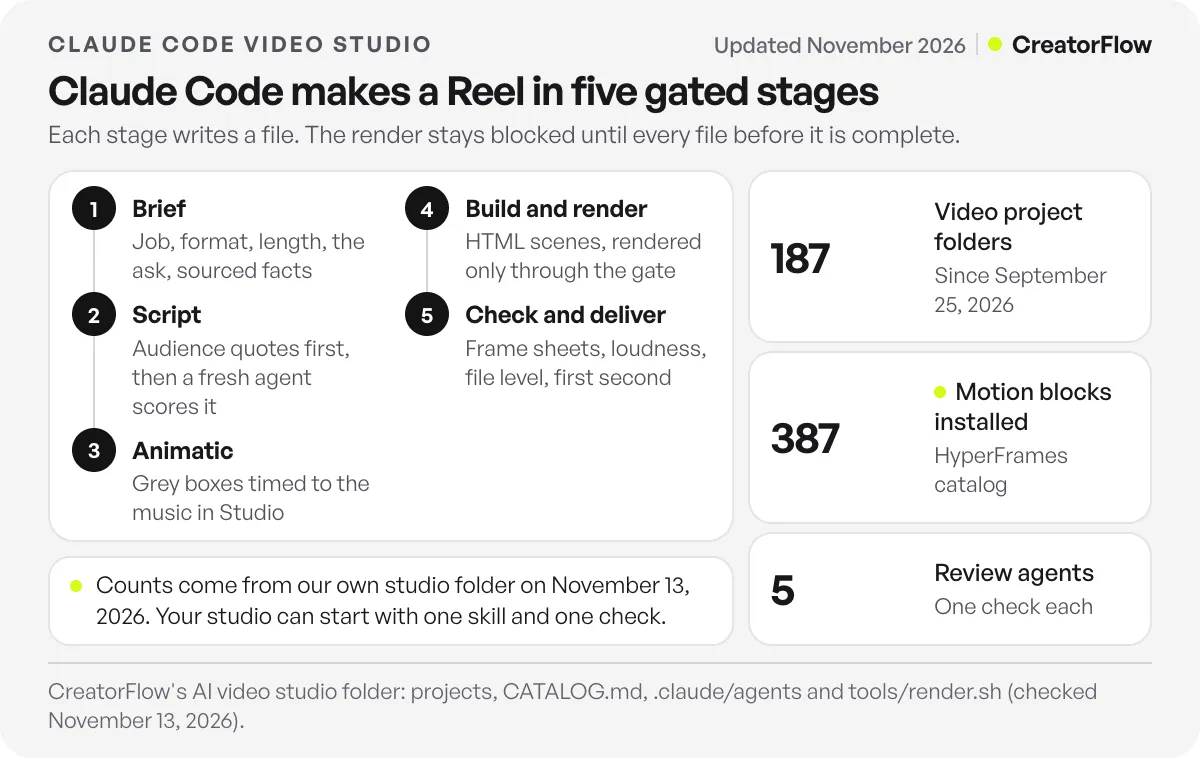
The animatic step saves the most time. Changing a line on grey boxes costs a minute. Changing it after the render costs a render, a QA pass and a new check of the sound.
Why Is the Script the Hard Part, Not the Render?
Because the render does what the code says, and the script decides whether anyone watches. Our first how-to Reels from this studio rendered cleanly and still lost. They explained how the product works. The Reels that won named what the viewer gets: time back, money, a sale. A gate now checks the script before any render runs.
Our own numbers make the case. In November we pulled every Reel on @creatorflow.so through the Zernio API and compared views to our own Reel median of 229 views across 18 Reels. The top Reels by views opened on an outcome: “One comment. One auto-DM. Zero typing.” reached 2.1x the median, and “Get paid in your DMs while you sleep” reached 1.45x with 24 seconds watched of 34. The bottom ones taught a mechanism: “How to send your link by DM when people comment on Instagram” reached 0.05x.
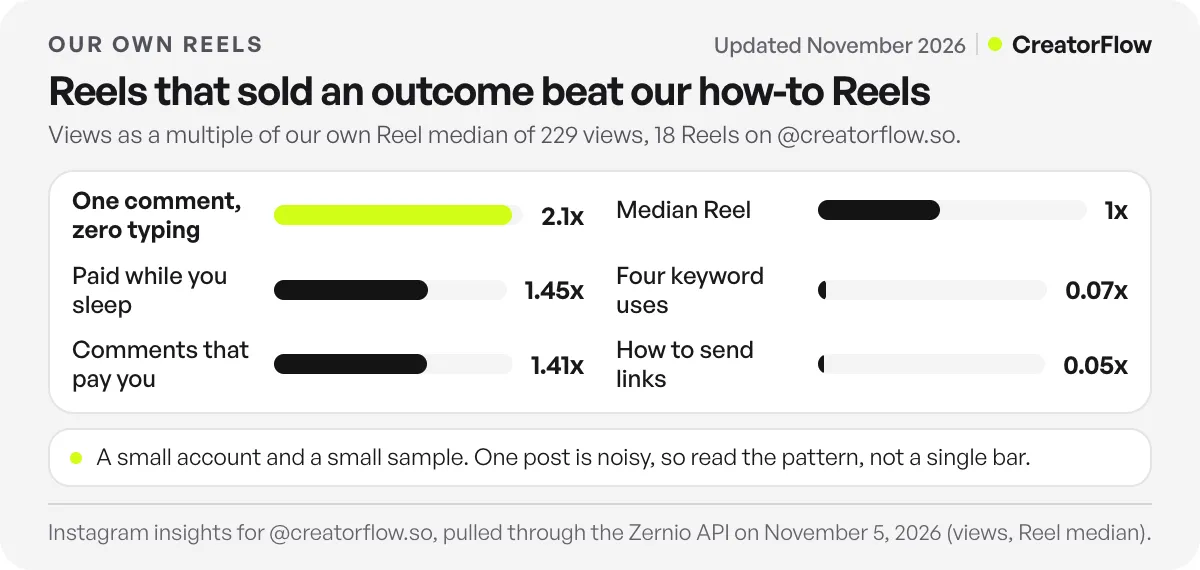
This is a small account and a small sample, so treat it as a pattern, not a law. The outcome Reels came before the studio; the two how-to Reels came out of it. The gap changed three rules:
- No mechanism words in the first two lines. For us that means no “DM”, “automation” or “keyword” before the viewer knows what they get.
- The writer never scores its own script. A new agent reads only the script and the scoring rules. An agent that sees the writer’s reasoning agrees with it.
- Research comes before the first line. The script check fails without five sourced audience quotes. We once wrote a script while the reference research was still running. It shipped and failed.
Instagram also tells you what to write for. Adam Mosseri’s ranking explainer lists reels you have reshared as a Reels ranking signal, so the share sentence is the most useful line in the brief. Claude helps most when you give it a test to pass, not a style to copy. Our guide to choosing a Claude model covers which model to use for the writing itself.
What Does a Reel Made With Claude Code Look Like?
Here is one we shipped. “After one comment” is a 16.5-second Reel with music and no voice. Claude Code wrote it, built each card as an HTML scene in CreatorFlow’s Ink and Lime look, and rendered it with HyperFrames. Every screen is a drawn product moment, every number inside an app screen is marked as example data, and the photos are real stock photos, not generated people.
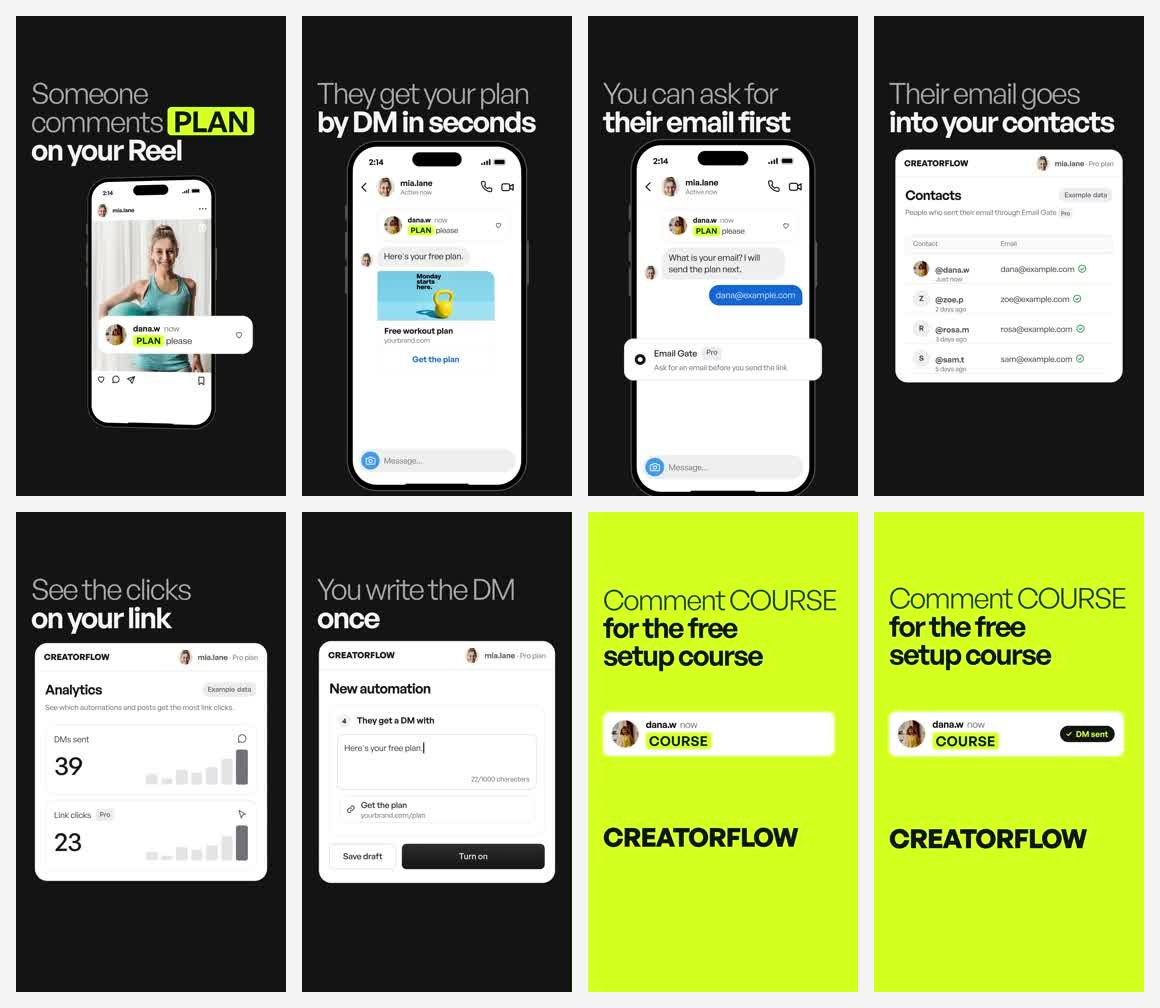
Each card carries one idea, and the cards read as a story with the sound off: someone comments, they get the plan, you can ask for their email first, you see the clicks, you wrote the DM once. The ask comes last. Its keyword buys something the viewer keeps (a free setup course), not “the link”.
The second Reel in the series, “Missed the comments?”, uses the same kit for a different job: showing that old comments can still get a reply.
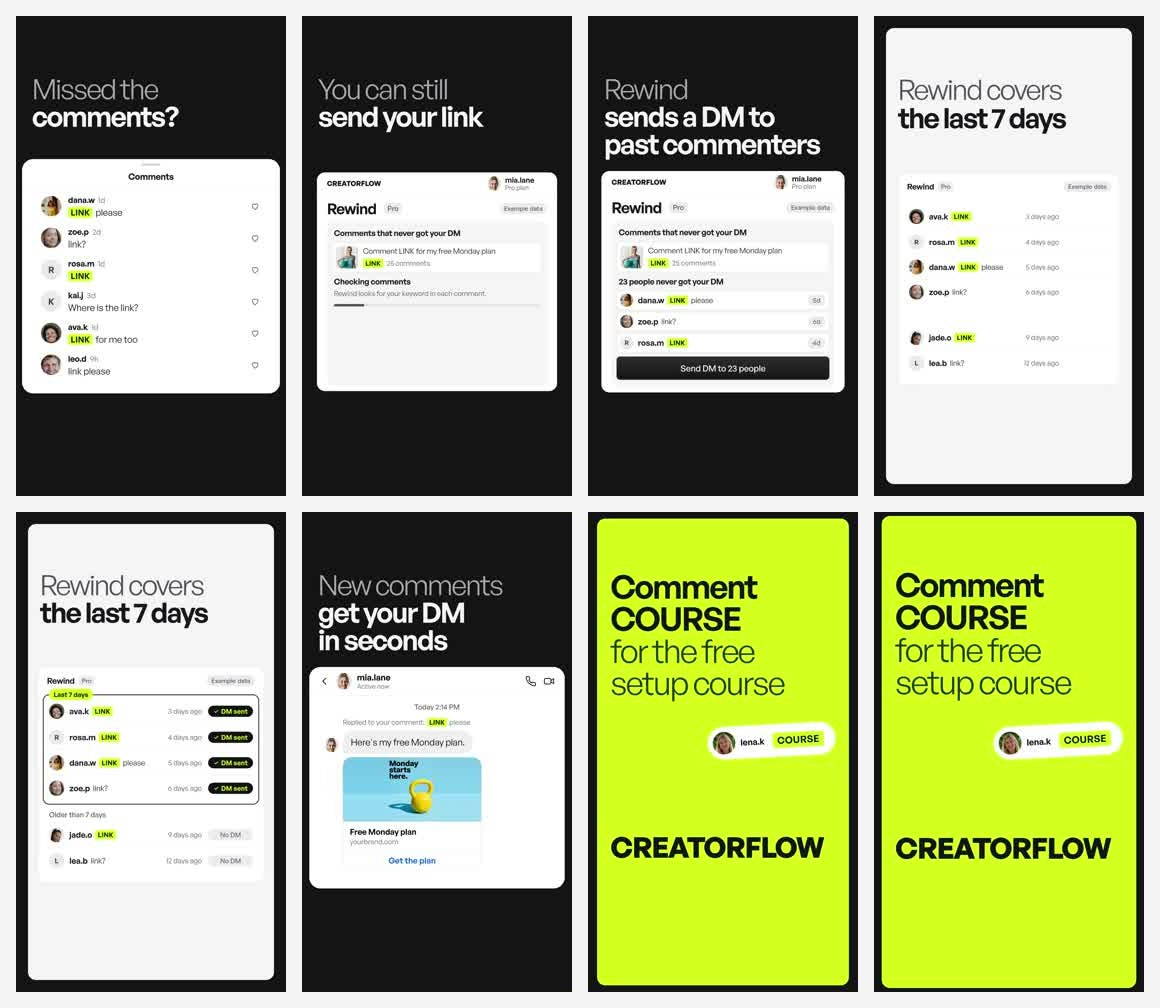
Rewind, on Pro and Growth, sends the DM to people who commented before the automation was on, inside Instagram’s 7-day window for comment replies. The Rewind page shows how it works. Both Reels share one kit: the same scenes, type and music grid. That is where a Claude Code studio saves time. The second video, not the first.
What Should You Check Before Posting a Reel Claude Made?
Check the delivered MP4, not the preview. The preview hides problems that only appear in the encoded file: a stuck element between scenes, quiet sound, a click in the first frame, or a format your phone will not open. Our last step runs one script on the file and fails it if any check misses.
| Check | What we look for | Why |
|---|---|---|
| Frame sheets | 2 frames per second, plus close-ups at every scene change | Catches stuck text, empty frames and overlaps |
| Text safe zone | Captions clear of the top and bottom app overlays | Instagram’s buttons and caption cover the edges |
| Loudness | Near -14 LUFS, true peak at -1 dB or lower | A common target for phone playback; quiet Reels lose to the next one |
| First second of sound | A spectrogram of the opening | Generated audio often starts with a click or hiss |
| File format | H.264, level 4.1, 1080 wide or more, fast start | Our first high-level file did not open in QuickTime |
| Length | Under 3 minutes | Instagram recommends Reels of 3 minutes or less to new viewers |
Two notes on those numbers. Meta does not publish a loudness target; Meta’s engineering blog describes loudness metadata read at playback, with no figure given. The -14 LUFS level is a common practice, not a Meta rule. The 3-minute guidance comes from Instagram’s creator tips on reach (checked November 2026).
Then watch it once on your phone, with the sound on and off. That one watch still finds things no script does.
How Do You Start Your Own Claude Code Video Studio?
Start small. One folder, one renderer, one rule file and one check. Add a rule each time a video fails, and write down the mistake that caused it. Our rule file grew one failure at a time, which is why it works: each line exists because a real video broke without it.
- Install Claude Code on a Pro plan or higher, and open an empty folder.
- Add a renderer. For HyperFrames, the repository gives the Claude Code plugin command. Ask Claude to scaffold a 9:16 project and render a 5-second test card.
- Write a short CLAUDE.md. Your brand colours and font, the Reel size, “every product fact needs a source”, and “render only through the render script”.
- Make one stage file per step. BRIEF.md, SCRIPT.md and STORYBOARD.md, each with fields Claude must fill. A check script that fails on an empty field does more than a long instruction.
- Add one review agent. A script judge that sees only the script and your scoring rules is the highest-value first agent.
- Check the delivered file. Ask Claude to extract frames from the MP4 and show you a contact sheet before you post.
Your first Reel will take longer than editing by hand. The tenth will not, because the kit, the rules and the checks carry over. For more on running Claude across an Instagram workflow, see Claude AI for Instagram creators.
What Happens After the Reel Goes Live?
A Reel that names a keyword in its ask creates work: every comment wants a reply. Our Reels end with “Comment COURSE for the free setup course”, so the same studio that saves hours on the edit would lose them again in the DMs. CreatorFlow sends the course link to everyone who comments COURSE, in seconds, on every plan including Free.
Set up comment-to-DM on Instagram before you post, then link the Reel to the automation. If the Reel takes off a day before you turned it on, Rewind can still reply to the people who commented in the last 7 days.
FAQ
Can Claude make videos?
Yes, through code. Claude Code writes HTML or React scenes and renders them to MP4 with a framework such as HyperFrames or Remotion. Claude has no video model of its own, so footage comes from a separate image or video model that Claude calls through a connector.
Is there a free way to generate video with Claude?
The renderers are free to start: HyperFrames is Apache-2.0, and Remotion is free for individuals and companies of up to 3 people. Claude Code itself needs a paid plan; Pro costs $20 a month billed monthly, or $17 a month billed annually, according to Claude’s pricing page (checked November 2026).
Can Claude watch a video?
Not as a video file. Claude’s uploads accept documents and images. Claude Code works around this by extracting frames with ffmpeg and reading them as images, which is how our studio reviews every render.
Is HyperFrames better than Remotion for Claude Code?
It depends on your stack. HyperFrames uses HTML and is built for agents, with a Claude Code plugin. Remotion uses React and has a larger set of examples. If you write neither, HyperFrames is the shorter path; if your team already writes React, Remotion fits.
How long does it take to make a Reel with Claude Code?
The first Reel takes the longest, because you build the kit. Later Reels reuse the scenes, the music grid and the checks, so a new Reel in an existing series is mostly the script and the render. Expect the script to take more time than the build.
Can Claude Code post the Reel to Instagram?
Claude Code can call a scheduling tool through an API or a connector, and our studio exports a folder with the video, the cover and the caption. We still post and watch each Reel ourselves before it goes out.
What size should a Reel made with Claude be?
Build at 9:16. Most creators render at 1080 by 1920, keep text clear of the top and bottom app overlays, and keep the Reel under 3 minutes so Instagram can recommend it to new viewers.
Sources and checks
Claude plans and file types verified from claude.com/pricing and support.claude.com; HyperFrames from github.com/heygen-com/hyperframes; Remotion from remotion.dev/docs/license/pricing; Instagram guidance from about.instagram.com and creators.instagram.com; Meta audio from engineering.fb.com, all checked November 13, 2026. CreatorFlow Reel results are from our own Instagram insights pulled on November 5, 2026, a small sample of 18 Reels. Individual results vary.





