

The answer to how many hashtags you should use on Instagram is 3 to 5 on most posts, and 5 is the most Instagram allows on a post or Reel. Instagram announced the cut from 30 on December 18, 2025. Each tag should name the topic of that post. Use fewer when only 1 or 2 fit, because the head of Instagram has said hashtags do not raise reach.
Most hashtag advice online was written for the old limit. Guides still tell you to paste 15 to 30 tags, hide them in the first comment, or rotate big sets. That plan no longer fits on a post. A Meta developer page also still lists 30, so the old number keeps coming back.
This guide covers what Instagram wrote in its announcement, how the limit treats carousels, comments and Stories, and what the data says about reach. It also gives you a way to fill the 5 slots, plus two free CreatorFlow tools that give you a starting set of tags.
Key Takeaways
- The limit: Instagram allows up to 5 hashtags on a post or Reel. Its @creators account announced this on December 18, 2025. The old limit was 30.
- How many to use: Use 3 to 5 when that many fit the post, and fewer when they do not. Instagram says fewer targeted tags can improve performance, compared with many generic ones.
- Comments: Instagram’s Help Center lets you add hashtags in the caption or the comments, and it states the limit per post. Put them in the caption.
- Carousels and Stories: A carousel is one post with one caption, so plan for 5. We found no number for Stories on Instagram’s own pages.
- Reach: Adam Mosseri has said hashtags do not raise reach. Two vendor datasets disagree on the effect, and neither proves a cause.
- Bottom line: Treat hashtags as labels for people who search a topic. Write them last, after the video and the caption.
How many hashtags can you use on Instagram?
You can use up to 5 hashtags on an Instagram post or Reel. Instagram announced the limit on December 18, 2025, through its @creators account, and the old limit was 30. Instagram described the rollout as gradual. Reels and feed posts are the two formats it named. Carousels, comments and Stories take a closer read, and the table below separates them.
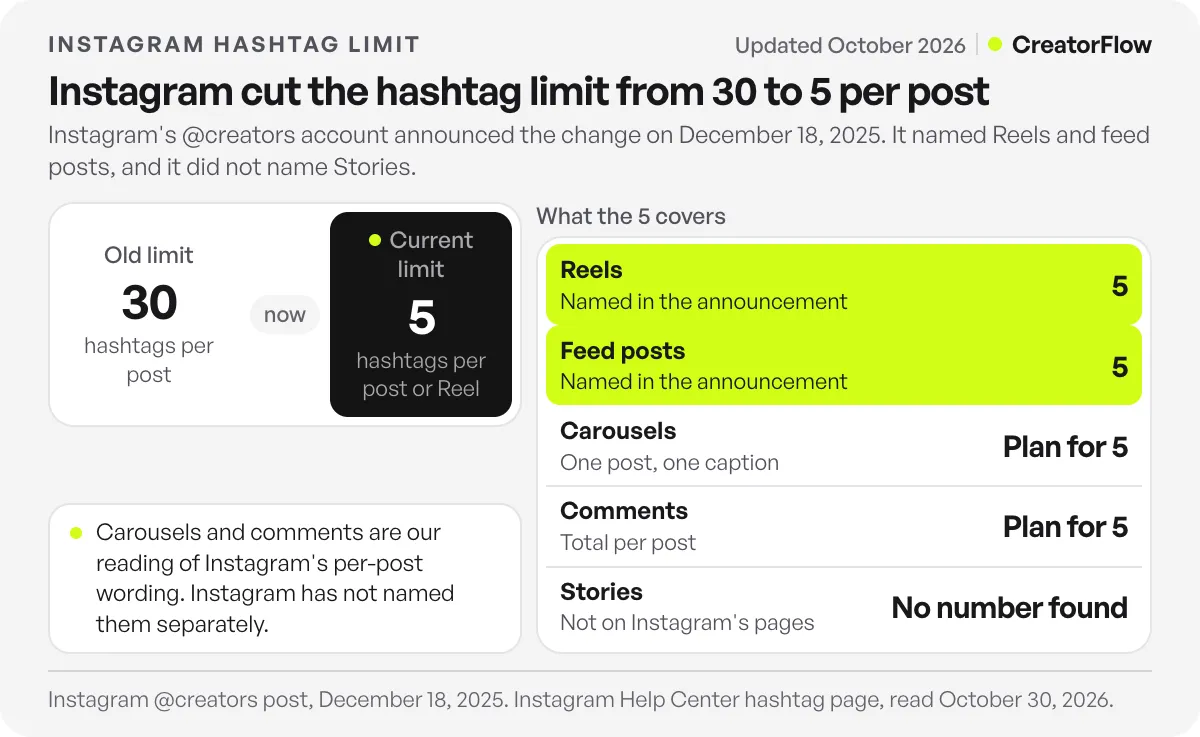
The @creators announcement on Instagram opens with one line: “Starting today, Instagram will allow up to 5 hashtags in a reel or post.” A slide in the same post says the number you can include in a caption will change gradually. Instagram’s Help Center page on hashtags gives the same number. It also says a comment will not post if it takes one photo or video over 5 tags (checked October 2026).
| Where | Limit | What Instagram has said |
|---|---|---|
| Reels | 5 | Named in the December 2025 announcement |
| Feed posts | 5 | Named in the December 2025 announcement |
| Carousels | Plan for 5 | Not named separately. A carousel is a post. |
| Comments | Plan for 5 per post, in total | The Help Center gives 5 per photo or video. It does not explain how caption and comment tags add up. |
| Stories | No number found | Not named in the announcement or on the Help Center hashtag page |
You may also still see 3 in older articles. Social Media Today reports that Instagram tested a limit of 3 in the year before it settled on 5.
How many hashtags should I use on Instagram?
Use 3 to 5 hashtags when that many describe the post, and fewer when they do not. Five is a ceiling, and nothing Instagram has published says a post needs all 5. Its guidance is to use fewer targeted tags in place of many generic ones, and to choose tags that fit the post you are publishing right now.
The second and third slides of the announcement give the reasoning. Instagram says a small set of targeted tags can improve both a post’s performance and the experience of people who see it. It also gives an example. A beauty creator should use beauty tags, so people who like beauty content can find that creator.
The same slides warn about tags such as #reels and #explore. Instagram says these do not help a post appear in places like Explore, and that they could hurt the post’s performance. So a generic tag in your fifth slot could cost you, and an empty fifth slot carries no such risk.
Here is our rule of thumb. It is our judgment, and Instagram has not published a number per post type.
| Your post | Hashtags to use |
|---|---|
| Tutorial or how-to with a clear topic | 4 to 5 |
| Local business post | 3 to 4, with one for the place |
| Product or offer post | 3 to 4, named for the product type |
| Joke, trend or personal Reel with no searchable topic | 0 to 2 |
Do hashtags still help reach on Instagram?
Hashtags help people find a post by topic, but the head of Instagram says they do not raise reach. Adam Mosseri has repeated this for years, while Instagram’s announcement says targeted tags can help performance. Read together, a hashtag works as a label for search and hashtag pages. It will not push a weak post to more people.
The evidence is thin, and it points in two directions.
| Source | Type | What it says | Limit of the evidence |
|---|---|---|---|
| @creators, December 2025 | Fewer targeted tags, up to 5, can improve performance and experience | No numbers published | |
| Adam Mosseri, 2025 | Head of Instagram | Hashtags do not raise reach or visibility. They tell people what a post is about and connect posts. | A statement, with no data |
| Metricool 2026 study | Vendor’s own data | Posts with at least one hashtag got 31.70% fewer views and 33.89% fewer interactions than the platform average | Correlation across all posts |
| Fanpage Karma | Vendor’s own data | Posts with 5 hashtags got 2% more reach than posts with none, and more than 5 got 3% less | Correlation, with no time window stated |
Social Media Today reports Mosseri’s remarks from February and May 2025. He made a similar point in a 2022 Story, according to Hootsuite. Metricool’s study covers 24,364,803 posts from 375,118 accounts, comparing January and February 2025 with the same months of 2026. Fanpage Karma’s analysis covers 1.6 million posts.
Neither dataset controls for who uses hashtags or what they post, so neither shows that tags cause the gap. Do not expect a tag to fix a falling number. If your views dropped, start with why Instagram reach drops, and read how the Instagram algorithm ranks posts for what recommendations depend on.
Hashtag pages still exist. Instagram’s Help Center says the order of posts in hashtag results can depend on when the post was shared, how people engage with it, and whether it meets the Recommendation Guidelines. So a tag gives a public post a place on that page, and it does not fix the post’s position there.
How do you choose your 5 hashtags?
Give each hashtag one job. Name the topic, then the specific angle, then the person or problem, then the place if it matters. Keep the last slot for a community or campaign tag. Leave a slot empty when nothing fits. Instagram warns that generic tags can hurt a post, so an empty slot is the safer choice.
We call this the five-slot test. The example is illustrative, for a Reel by a skincare creator in Manchester about a routine for oily skin.
| Slot | What it names | Example | Leave it empty when |
|---|---|---|---|
| 1. Topic | The subject of the post | #skincareroutine | The post has no clear subject |
| 2. Angle | The specific version of that subject | #oilyskinroutine | It repeats slot 1 |
| 3. Person or problem | Who it helps or what it solves | #oilyskintips | It repeats slot 2 |
| 4. Place | The city or area | #manchesterskincare | You do not work with local customers |
| 5. Community or campaign | A group or your own campaign | Your campaign tag | No group or campaign uses it |
Search each tag in Instagram before you use it. Read the top posts on its page and ask whether your post belongs there. Instagram says a hashtag may not be searchable if its text or content keeps breaking the Community Standards, so drop any tag that shows no results.
Blogs often quote a best tag size, such as a range of post counts. We found no such number from Instagram, so use the fit test and not a size rule. The Help Center gives a few fixed rules. Numbers are allowed, spaces and special characters such as $ or % do not work, and posts from private profiles do not appear publicly on hashtag pages.
For a first draft, CreatorFlow’s free Instagram hashtag generator gives you 5 tags from your content type and category. The trending hashtags tool shows what is trending in more than 50 countries. Then replace anything generic with a tag that names this post, and skip a trending tag if the post is not about that topic.
Should hashtags go in the caption or the comments?
Put hashtags in the caption. Instagram’s Help Center allows both the caption and the comments, so a comment still works. Do not count on a first comment for extra room, because the Help Center states the limit per post and per photo or video. The caption also keeps your words and your tags together in one place.
The Help Center does not say how tags in the caption and tags in comments add up. Its wording is per post, so we treat 5 as the total. You also tag only your own posts. A hashtag you type under another person’s post does not add that post to the hashtag page.
Your caption words matter too. Social Media Today reported in August 2026 that Instagram told creators captions help search engines understand a post. For how to write that text, see our guide to getting Reels into Google search, and for Instagram’s own search, our guide on how to show up in Instagram search.
Does the 5 hashtag limit apply to carousels and Stories?
Plan for 5 on a carousel. Instagram’s pages say “post”, and a carousel is one post with one caption, even with up to 20 slides. Stories are different. Neither the announcement nor the Help Center hashtag page gives a number for Stories, so we do not state one here.
Meta’s developer reference says captions are not supported on the individual images or videos inside a carousel (checked October 2026). So you do not get 5 tags per slide. Our carousel posts guide covers the rest of the format.
Some blogs quote 10 hashtags for Stories, and others say Stories have no limit. We could not find either claim on an Instagram page. If you tag a Story, use 1 or 2 tags that fit. That advice is our opinion and not an Instagram rule.
Why do some guides and tools still say 30?
The number 30 survives for three reasons. Articles written before December 2025 still rank. Instagram described the rollout as gradual. And Meta’s developer reference for publishing through the API still lists 30 hashtags for the caption field. None of this changes what Instagram’s announcement and Help Center say, so plan for 5.
The same developer reference lists a caption maximum of 2,200 characters, 30 hashtags and 20 @ tags (checked October 2026). We did not test what happens to a sixth tag sent through the API. If a scheduler lets you enter more than 5, do not read that as permission. Send one test post and check what appears.
Old advice to retire:
| Old advice | What to do now |
|---|---|
| Use 15 to 30 tags in small, medium and large sizes | Use up to 5 specific tags |
| Hide tags in the first comment | Put them in the caption |
| Rotate saved sets of tags | Write tags for each post |
| Grow by getting people to follow your hashtag | Instagram removed hashtag following, so aim for search and shares |
Instagram removed the option to follow hashtags in late 2024, and told Social Media Today that hashtags still work for posting and searching.
What should you do when a hashtag brings someone to your post?
Give that person one clear next step in the caption. Someone who finds you through a hashtag may not know you yet, so tell them what they get and how to get it. One plain option is a comment keyword. You ask them to comment a word, and they receive the link by DM.
CreatorFlow does this with comment-to-DM automation. You write the message once, and it goes out when someone comments your keyword. The Free plan includes it.
FAQ
Is the Instagram hashtag limit 5 or 30?
The limit is 5. Instagram’s @creators account announced it on December 18, 2025, and the Help Center now gives the same number. Older articles and a Meta developer page still mention 30.
Is it better to use 5 hashtags or none?
The data does not settle this. Metricool’s data shows lower views on posts with hashtags, and Fanpage Karma’s shows a 2% gain at 5 tags. Both are correlations. Use tags when they describe a topic people search, and skip them when they do not.
Do hashtags in comments count toward the limit?
Plan on yes. The Help Center states the limit per post and says a comment will not post if it takes a photo or video over 5 tags. It does not spell out how caption and comment tags add up, so keep the total at 5.
What happens if I add more than 5 hashtags?
The Help Center says a comment with too many tags will not post. It does not describe what happens to a caption. Remove tags until you have 5, and check that your post or comment appears.
Should I edit old posts that have 30 hashtags?
Neither the announcement nor the Help Center asks you to change older posts. The Help Center does say you can add a hashtag to an existing post by editing its caption. We would leave old posts alone unless you are editing them for another reason.
Can I still follow hashtags on Instagram?
No. Instagram removed that option in late 2024, according to Social Media Today. You can still search a hashtag and open its page.
Does the limit apply to Threads?
Threads has its own rule. Social Media Today reports that Threads allows one tag per post, which is stricter than Instagram’s 5.
Sources and checks
Checked October 30, 2026: the @creators post and its slides, dated December 18, 2025; Instagram’s Help Center pages on using hashtags, hashtag results and hashtags you cannot search; and Meta’s developer reference. The Help Center pages load their text by script, so we read them in a browser. Metricool and Fanpage Karma figures are each vendor’s own and show correlation only. Instagram can change these rules, so check the Help Center before you plan a campaign around them.