

To make an outfit collage, pick one finished outfit of four to eight pieces. Place each piece on a plain background, number the pieces, and export the image at 1080 x 1350 pixels for an Instagram carousel. ShopLook, Canva and Amazon’s Storefront collage tool all handle the layout. The shop links live in an LTK, ShopMy or Amazon list that you send by DM.
A collage shows six things a reader can buy. Instagram gives you one link in your bio. So the comments fill with “link?”, “where is the bag from?” and “size?”, and every one of those people wants a different piece.
This guide covers the tools, a layout that reads on a phone, which product photos you are allowed to edit, and how to get every piece’s link to the reader in one message. It is built for curation pages and outfit-inspiration accounts that earn on LTK, ShopMy or Amazon. It also uses data from 1,115 public outfit posts we read in November 2026.
Key Takeaways
- One outfit, four to eight pieces: fewer pieces look empty, more pieces get too small to read on a phone screen.
- Number every piece: the numbers in the image match the numbered links in your DM, so nobody has to ask “which one is number 3?”
- Amazon product photos cannot be cut out: Amazon’s Associates policy says you may not alter its product images. Resizing is allowed if the proportions stay the same.
- Put everything in the first DM: Meta allows one private reply per comment, so the first message must carry the whole outfit.
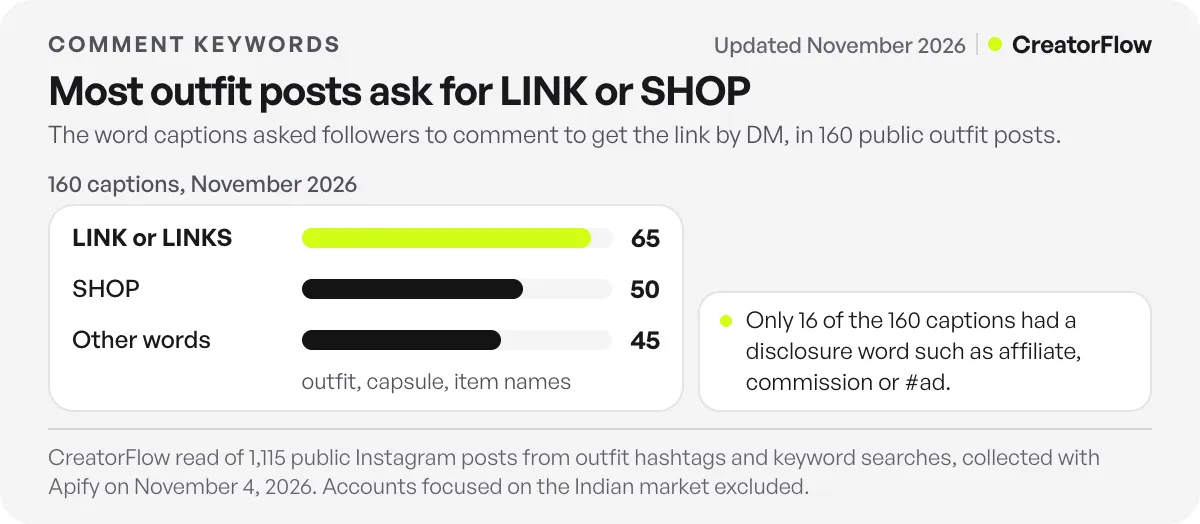
- LINK and SHOP are the standard keywords: of 160 outfit captions that asked for a comment, 65 used LINK or LINKS and 50 used SHOP.
- Disclose in the caption: only 16 of those 160 captions had a word like “affiliate” or “#ad” in the text.
What Is an Outfit Collage?
An outfit collage is one image that shows a complete outfit as separate pieces: top, bottom, shoes, bag, jewelry and outerwear, each on a plain background. Some collages put a model photo in the center with the pieces around it. Others are flat lays with no person at all. The format answers “where is each piece from?” before anyone asks, which is why outfit-inspiration pages post it every day.
On Instagram the collage is usually the first slide of a carousel. The next slides show the outfit worn, other colors, or the same piece styled a second way.
Which App Makes Outfit Collages?
Five tools cover what most creators need. The right one depends on where your links live.
| Tool | Best for | Cost | What it does |
|---|---|---|---|
| ShopLook | Mixing pieces from any store | Free, with paid Premium in the app | Free-form canvas, background removal, a community library of 70M+ images, items you can make shoppable |
| Canva | Branded layouts you reuse every week | Free plan, paid Pro | Fashion collage templates, your fonts and colors |
| Adobe Express | Quick templates on desktop or phone | Free plan, paid Premium | Fashion collage templates |
| Amazon Storefront Collages | Amazon Influencer Program creators | Free inside the Storefront | Builds the collage from Amazon products, and every product stays shoppable |
| Your phone’s photo app | Your own flat-lay photos | Free | Lift a piece off its background and paste it into any layout |
ShopLook’s App Store listing describes “a free-form creative canvas”, background removal and a library of more than 70 million images, with Premium sold as an in-app purchase (ShopLook on the App Store, checked November 2026). Amazon added collages to influencer Storefronts, built from templates and from products in your orders, Idea Lists and browsing history, as Lindsey Gamble reported.
Is there a Polyvore alternative?
Polyvore, the site most people learned outfit sets on, closed on April 5, 2018, after the online retailer SSENSE bought it, according to Wikipedia’s Polyvore entry. ShopLook is the closest replacement for the set-building canvas. If your sets are only for Instagram and never need a shop button inside the app, Canva does the same job with your own branding.
How to Make an Outfit Collage, Step by Step
- Pick one outfit, not a theme. “Fall weekend outfit” is a collage. “Fall jackets” is a list. A reader buys an outfit.
- Choose four to eight pieces. Six pieces work for most outfits: top, bottom, shoes, bag, one accessory, one layer.
- Get each piece on a plain background. Use product images your affiliate program gives you, your own photos, or a background-removal tool on images you are allowed to edit (see the next section).
- Set the canvas to 1080 x 1350 pixels. That is Instagram’s 4:5 portrait size, and it takes the most space in the feed.
- Place the anchor piece first. Put the item people will ask about most (usually the coat, the dress or the bag) at the top or in the center, at the largest size.
- Number every piece. Small numbers in one corner of each item. These match the numbered list in your DM.
- Add one line of text, or none. A short title like “Fall weekend, under $200” works. Prices and brand names belong in the DM, because they change.
Make the first slide the collage and the second slide the outfit worn, if you have that photo. People who save the post come back to the worn version, and people who want to buy go to the collage.
Which Product Photos Can You Use in an Outfit Collage?
You can always use photos you took yourself of pieces you own. For retailer images, the affiliate program’s rules decide. Amazon’s Associates policy forbids changing its product images: you “will not add to, delete from, or otherwise alter any Program Content in any way”. It allows resizing that keeps the original proportions. Cutting a product out of its background is an alteration.
That rule comes from the Participation Requirements in Amazon’s Associates Program Policies (checked November 2026). The same page says Amazon images come through its Creators API or Product Advertising API, and must not be stored or cached. For an Amazon outfit, the safe way is the collage tool inside your Storefront, which uses Amazon’s images the way Amazon allows.
For LTK and ShopMy, read your creator terms before you cut out a retailer’s photo. If you are unsure, photograph the pieces yourself as a flat lay. Your own photo is the one image no retailer can ask you to remove.
How Do You Link Every Piece in an Outfit Collage?
You have two options. Send one collection link (an LTK post, a ShopMy collection or an Amazon Idea List) that holds every piece. Or send a numbered list with one link per piece, matching the numbers in the image. One collection link is shorter and works for any outfit size. A numbered list is better when people ask about single pieces, such as the bag.
Whichever you pick, it has to arrive in one message. Meta’s private replies documentation says “only one message can be sent to the commenter”, within 7 days of the comment. Follow-up messages are allowed only if the person replies, and only within 24 hours of that reply (checked November 2026). So a DM that says “here’s the coat, the rest is coming” never gets a second message.
A DM for a six-piece collage can look like this:
Here’s the full outfit 🤍
- Camel coat: [link]
- Knit sweater: [link]
- Straight jeans: [link]
- Loafers: [link]
- Tote bag: [link]
- Gold hoops: [link] Or shop all six here: [collection link]
Amazon’s policy also covers this part. It allows its links “in emails, SMS and direct messaging from your social media Sites”, provided the messages are solicited, which means the person opted in. A follower who comments your keyword to get the link is asking for the message.
What Keyword Should Your Outfit Collage Caption Ask For?
Use LINK or SHOP. In November 2026 we read 1,115 public Instagram posts from outfit hashtags and outfit searches. 160 of the captions asked people to comment a word to get the link by DM. 65 of them used LINK or LINKS, 50 used SHOP, and the other 45 were spread over words like “outfit”, “capsule” or the item’s name.
Asking works. Among those posts with at least 50 likes, the ones that asked for a comment got a median of 22.7 comments per 100 likes, and posts without an ask got 3.6. Inside the same accounts the gap was smaller, about 1.6 times, and some of the extra comments are automated “sent” replies. Our list of outfit captions for Instagram has 60 captions built on that data.
A common word is easy for followers to remember. Two details matter more than the word itself:
- Add the plural as its own keyword. Many tools match whole words, so “link” does not catch “links”. In CreatorFlow, a keyword matches the whole word, ignores capital letters, and each automation takes up to 20 keywords. Add LINK, LINKS and SHOP to the same automation.
- Say what they get. “Comment LINK and I’ll DM you all six pieces” sets the right expectation. “Comment below!” does not.
Only 16 of the 160 captions had a word like “affiliate”, “commission” or “#ad” in the text. Some of those accounts may disclose in another way, but the caption is where a reader sees it first. Our guide to Instagram affiliate disclosure rules covers the wording.
How to Send Collage Links Automatically
Copying six links into hundreds of DMs by hand takes more of a curation page’s time than making the collage. Here is the setup in CreatorFlow:
- Connect your Instagram professional account. CreatorFlow is a Meta Tech Provider and connects through Meta’s official Instagram API, with no password shared.
- Create a comment automation on the collage post. Add LINK, LINKS and SHOP as keywords.
- Paste your DM. Use the numbered list above, or one LTK, ShopMy or Amazon collection link.
- Turn on the public reply. A short comment reply like “Sent! Check your DMs” tells the reader the message is on its way.
- Post the collage. Every matching comment gets the DM within seconds, day and night.
On the Pro plan ($15/month), CreatorFlow tracks clicks on the links you send and shows which countries the clicks come from. Over a few weeks you can see which outfits get clicks, not only comments. For the wider strategy, see how outfit posts turn into link requests, and the platform setups for LTK links in DMs and ShopMy on Instagram.
Curation pages rarely show a face, which makes the collage the whole brand. If you are starting one, our guide to a faceless Instagram account covers the niche and posting side.
FAQ
What app do people use to make outfit collages?
ShopLook is the most common app built only for outfit collages. It has a free canvas, background removal and a large image library. Many creators use Canva for branded layouts instead. Amazon Influencer Program creators can build collages inside their Amazon Storefront, which keeps every product shoppable.
How do I make an outfit collage on my phone?
Open ShopLook, Canva or Adobe Express on your phone and start from a collage template. Add each piece on a plain background, and number the pieces. Export at 1080 x 1350 pixels. For pieces you photographed yourself, your phone’s photo app can lift the item off its background.
Can I remove the background from Amazon product photos?
Amazon’s Associates policy says you may not alter its product images in any way. It allows only resizing that keeps the original proportions. Removing the background changes the image. To make an Amazon collage, use the collage tool in your Amazon Storefront, or photograph the products yourself.
How many pieces should an outfit collage have?
Four to eight pieces work best. Six covers a full outfit: top, bottom, shoes, bag, one accessory and one layer. With more than eight pieces, each item gets too small to read on a phone screen, and the DM list gets long.
How do I send all the links from an outfit collage?
Send them in one DM, either as one collection link or as a numbered list that matches the numbers in the image. Meta allows one private reply per comment. Follow-up messages are allowed only after the person replies, so the first message must hold every link.
Do outfit posts that ask for a comment get more comments?
In our sample of 400 outfit posts with at least 50 likes, yes. Posts that asked people to comment a word to get the link by DM had a median of 22.7 comments per 100 likes, against 3.6 without the ask. Inside the same accounts the gap was about 1.6 times.
What is a good Polyvore alternative?
Polyvore closed in April 2018. ShopLook is the closest replacement for building outfit sets from products. Canva and Adobe Express work well if you only need the image for Instagram and keep the shop links in LTK, ShopMy or Amazon.
Sources and checks
Sources: tool features from the ShopLook App Store listing; image and DM rules from Amazon’s Associates Program Policies; one-message rule from Meta’s private replies documentation; Storefront collages as reported by Lindsey Gamble; Polyvore’s closure from Wikipedia. All checked November 2026. Caption counts come from 1,115 public Instagram posts collected with Apify on November 4, 2026, from outfit hashtags and outfit keyword searches; accounts focused on the Indian market were excluded.





