

Instagram lead ads are paid ads that collect a person’s contact details without sending them to a website. You create them in Meta Ads Manager with the Leads objective, and the person answers either an Instant Form or an automated chat. Form leads stay available to download for 90 days, so the ad pays off only if someone follows up in time.
A form lead is a name in a spreadsheet until someone contacts it. The person who filled the form sees an ending screen and then waits. Ads Manager can also show more leads than you can download, because its count includes leads older than 90 days. Most setup guides stop at the publish button, so these problems appear later.
This guide compares the three ways to collect a lead from Instagram: Instant Form, click-to-DM ad and comment-to-DM. It covers what each one captures, where the data goes, how long you have to reply and what each one costs. The setup details come from Meta’s Business Help Center, checked in October 2026.
Key Takeaways
- What they are: Paid ads built in Meta Ads Manager with the Leads objective. The person answers an Instant Form or an automated chat without leaving Instagram.
- The deadline: Meta keeps form leads available to download for 90 days from submission. After that you cannot download them, even though Ads Manager still counts them.
- The three routes: An Instant Form collects contact details from a paid ad. A click-to-DM lead ad collects answers in a chat from a paid ad. Comment-to-DM collects from people who already engage with your posts, with no ad spend.
- The follow-up: Meta recommends a connected CRM or Leads Center, because manual downloads slow your reply.
- The cost: Meta’s lead ad pages give no average cost per lead, so every benchmark is a vendor’s. Compare cost per booked call or sale instead.
- Bottom line: Use an Instant Form if someone will phone or email leads quickly, a chat ad if you need to qualify people first, and comment-to-DM if your posts already get comments.
How Do the Three Ways to Collect a Lead on Instagram Compare?
An Instant Form collects prefilled contact details from a paid ad. A click-to-DM lead ad collects answers in an automated chat, also from a paid ad. Comment-to-DM sends a private message to people who comment a keyword on your post, with no ad spend. They differ most in what the person receives next and in how long you have to act.
| Instant Form | Click-to-DM lead ad | Comment-to-DM | |
|---|---|---|---|
| Starts with | A paid ad. The person fills a form | A paid ad. The person answers in a chat | Your post or Reel. The person comments a keyword |
| Ad spend | Yes | Yes | None |
| What you collect | Contact details, often prefilled, plus your questions | Answers to your questions, plus an open chat | Instagram username, plus an email if the person types it |
| Your deadline | 90 days to download the lead | Up to 7 days from the first message to keep messaging | One private reply within 7 days of the comment |
| What the person does next | Sees your ending screen, then waits for you | Keeps talking in the same chat | Gets the link in the DM |
| Fits best | Cold audiences, calls and quotes | Questions before buying, qualifying people | An audience that already comments |
The row most guides skip is what the person does next. Someone who fills a form has told you who they are, and then the conversation stops until you restart it. Someone in a chat already has the thread open, so your answer arrives where they are looking. Choose by your follow-up plan first and by format second.
How Do You Create an Instagram Lead Ad With an Instant Form?
Create the campaign in Meta Ads Manager and choose Leads as the objective. Choose Instant forms as the conversion location, make sure the placements include Instagram, then build the form. Meta says a lead ad for Instagram must be created in Ads Manager, with Advantage+ placements on or with Instagram chosen manually.
These steps come from Meta’s guide to creating a lead ad in Ads Manager (checked October 2026):
- In Ads Manager, click + Create, select Leads, then click Continue.
- At the ad set level, find the Conversion section and select Instant forms.
- Choose a performance goal. Maximize number of leads is the plain option.
- Keep Advantage+ placements on, or choose Instagram manually.
- At the ad level, select a single image or video, or a carousel, and write the ad.
- In the Destination section, create your form, then publish.
Meta’s page on lead ads for Instagram lists the differences from Facebook (checked October 2026). Lead ads appear only in the Instagram mobile app, not on desktop. Store locator and appointment request questions do not show on Instagram, although the ad still runs.
The same Ads Manager guide says that since April 2026, the qualified leads goal is unavailable for new campaigns without a Conversions API integration. An account with no CRM connection will likely start on Maximize number of leads.
Which Instant Form type should you pick?
Meta’s form types page lists three (checked October 2026). More volume is the default and is quick to submit on a phone. Higher intent adds a review screen and a line saying your business may follow up. Rich creative adds your colors, images and longer text.
If you plan to phone every lead, start with Higher intent, because Meta says its review step helps keep out people who are only slightly interested. Meta notes that it runs only in Facebook Feed and Instagram feed on mobile, so it will not appear in Stories or Reels. More volume fits a low-stakes offer such as a free PDF.
What Can You Ask in an Instagram Lead Form?
Ask for contact details with prefill questions, then add custom questions that decide who you follow up with first. Meta fills contact fields from the person’s Facebook or Instagram profile where it can, and people can edit most of them. Some questions are banned, including income, health details and government ID numbers.
Custom questions and conditional logic work only when you build the form in Ads Manager, according to Meta’s Instant Form overview (checked October 2026). The same page lists phone number checks by one-time password, work email validation, and gated content that shows a PDF, JPEG or PNG of up to 10MB inside the form. With gated content, the person gets the file at once and the wait after the form becomes shorter.
Meta’s list of prohibited questions includes criminal history, financial details such as income and net worth, government ID numbers, health details, political views, race, religion and sexual orientation (checked October 2026). A coach who wants to screen by income needs a different question.
Add a privacy policy link even if a screen says optional. Meta’s overview says a policy is required to run these forms, while its requirements page labels the link optional. That page also tells advertisers to message people only for the purpose they collected the details for, so if you plan to send a newsletter, say so in the form. Our guide to what consent you need before you store an address covers the rest.
Where Do Instagram Leads Go After Someone Submits the Form?
Form leads stay inside Meta until you collect them. You can download them as a file from Ads Manager, from the Instant forms page or from Leads Center in Meta Business Suite, or you can send them to a connected CRM. Each lead is available for download for 90 days from submission. Meta does not make it available after that.
Meta’s page on expired leads explains why your numbers may not match (checked October 2026). The Results column counts every lead in the period you select, while the download holds only the last 90 days. Messages people send your business stay in your inbox and are not removed after 90 days.
Meta’s download guide also covers access. Before anyone customizes permissions, only people with full control of the Facebook Page or with messaging permissions can download leads. If a freelancer set up your ad, check your own access this week, while the leads are still there.
What is the follow-up routine with no CRM?
Pick one person and one fixed time each day. In Meta Business Suite, open All tools, then Instant forms, then click Download next to your form. The Download new leads option exports only the leads you received since your last download. Save the file outside Meta on the same day.
Meta’s follow-up best practices say manual downloads can slow your reply, and they suggest running ads during business hours (checked October 2026). The same page describes lead nurturing, a setting in Ads Manager that starts follow-up chats on Messenger, Instagram or WhatsApp after someone submits a form. Use your ending screen too. It can hold text, a promotional code and a button, so say who will contact the person, on which channel and when.
How Do Click-to-DM Lead Ads Work?
A click-to-DM lead ad uses the same Leads objective, but the conversion location is Instagram instead of a form. The tap opens a message thread, and an automated question-and-answer flow collects the details. You can end the flow for people who do not fit, and you can keep talking to the rest in the same thread.
Meta’s guide to lead ads that click to Instagram Direct describes the template (checked October 2026). You write a welcome message and your questions, and each answer can go to another question, to completion or to disqualification. If you already run a form, the Convert to chat option turns it into a message template, which makes a first test cheap to set up.
Meta’s page on lead ads that click to message says six questions or fewer is usually best, and that you need no third-party integration or support bot to start (checked October 2026). A connected CRM receives these leads too. Without one, you use the spreadsheet download in Ads Manager.
The longer reply window is the newest difference. Meta’s Messenger Platform changelog records that since September 28, 2026, the messaging window may extend up to 7 days for chats that start from Click-to-Direct ads, counted from the person’s first message. Chats from other entry points stay at 24 hours. Treat 7 days as the outer limit, because Meta’s messaging policy still encourages replying as soon as possible.
Readers in Europe should check one thing first. Meta’s guide carries a notice that certain messaging-related metrics, ad campaigns and organic messaging features for ads delivered to and from Europe and Japan will be unavailable. Open Ads Manager and confirm your options before you plan around a chat ad. If the chat’s job is to sell a product, our guide to selling with Instagram click-to-DM ads covers the message sequence.
When Does Comment-to-DM Make More Sense Than a Lead Ad?
Comment-to-DM fits when your posts already get comments and you have no ad budget. Someone comments a keyword, a tool sends a private reply, and the person gets the link in the DM. You pay no ad spend, but you reach only people who see your post. A lead ad buys reach to people who have never seen you.
Meta’s private replies documentation sets the rules (checked October 2026). The reply must go out within 7 days of the comment, and only one message can go to the commenter until they respond. After they respond, you have 24 hours to send follow-up messages.
Email works differently here. Meta’s Instagram Platform changelog shows that email quick replies were disabled on October 5, 2026, so the person types the address. That takes more effort than a prefilled form, and it means the person chose to give you that address at that moment.
CreatorFlow’s comment-to-DM automation runs this route. The Free plan includes comment-to-DM. Pro costs $15 a month or $144 a year, and it adds Email Gate, which asks for the address in the DM before the link goes out, plus link click tracking. For the wording of the ask, see how to collect emails through Instagram DMs. For the full path with one person, read about Instagram lead generation without ad spend.
How Much Do Instagram Lead Ads Cost?
Instagram lead ads have no fixed price, because each ad goes through Meta’s auction. Meta’s lead ad help pages give no average cost per lead, so any number you read is a vendor’s or an example. Compare cost per booked call or sale, because a cheap lead who never replies earns you nothing.
The numbers you will see come from sellers. Meta’s online forms page says advertisers who ran both Instant Form and website form campaigns saw an average 60% lower cost per lead than website forms alone (checked October 2026). Its messaging page reports 8% lower cost per lead and a 48% increase in reach for the “Instant forms and Messenger” location. That figure describes Messenger, and the 48% is reach, although some vendor guides repeat it as 48% more leads.
Spur, a vendor of DM ad tools, uses $5 per form lead against $8 per DM conversation as an example in its Lead Ads vs DM Ads guide, and says DM ads often win per qualified lead (checked October 2026). This table shows how that can happen. The booking rates are placeholders for illustration, not measured results.
| Illustrative $300 budget | Instant Form | Click-to-DM lead ad |
|---|---|---|
| Cost per lead or chat (Spur’s example) | $5 | $8 |
| Leads or chats | 60 | 37.5 |
| Share who book a call (placeholder) | 10% | 20% |
| Booked calls | 6 | 7.5 |
| Cost per booked call | $50 | $40 |
Change the placeholders and the winner can change. For your own numbers, Meta suggests an A/B test in Ads Manager with the same audience, budget and placements. To set your ceiling first, work out the most you can pay per lead from your profit and close rate.
Which Method Should You Use?
Choose by who follows up and how fast. If you have a person who can phone or email within a day, an Instant Form is the simplest paid route. If you need to sort people before you talk to them, use a click-to-DM lead ad. If your posts already get comments and you have no ad budget, start with comment-to-DM.
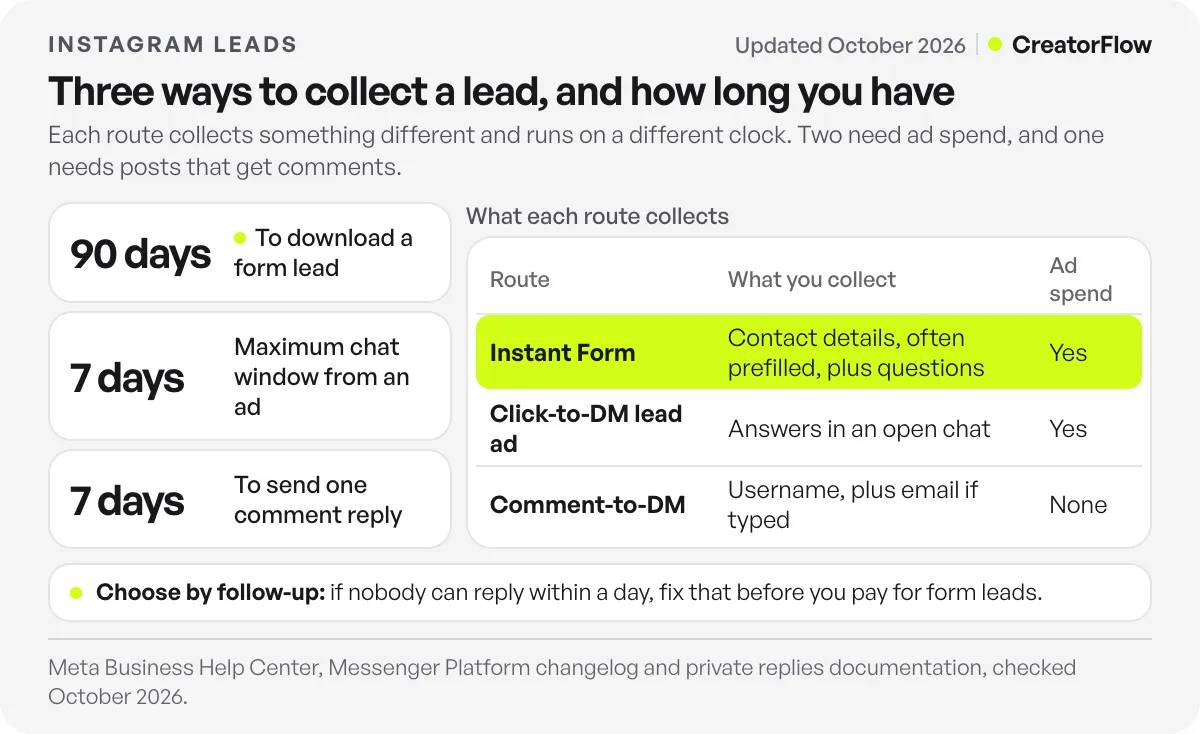
Some guides treat a low cost per lead as the goal. We disagree. If nobody can reply within a day, hold off on form ads, because you would be paying for names that go cold. Fix the follow-up first, then spend.
The routes also work together. Comment-to-DM can handle the people who already follow you, while a paid form or chat ad reaches people who have never seen your account. Our comparison of Instagram lead generation software lists the tools for each route, with prices.
FAQ
How long can you download leads from an Instagram lead ad?
You can download a form lead for 90 days from the moment the person submits it. After that, Meta does not make it available, even if Ads Manager still counts it in your results. Download often or connect a CRM.
Where do I find my Instagram leads?
In Ads Manager, open the Ads tab, find your lead ad and click On-Facebook leads in the results column. You can also use the Instant forms page or Leads Center in Meta Business Suite.
Do Instagram lead ads appear on desktop?
No. Meta says lead ads are available only in the Instagram mobile app and will not appear on the desktop version of Instagram. Check your ad on a phone before you publish.
Can you run Instagram lead ads without a website?
You do not need a landing page, because the form or chat opens inside Instagram. You should still have a privacy policy on a web page, because the form needs a link to it. Meta says you can use an existing policy URL.
How many questions should an Instagram lead form have?
Meta asks for at least one question on an Instant Form. For automated chats, Meta says six questions or fewer is usually best. Use the same ceiling for forms, and ask only what changes who you contact first.
Can I collect leads on Instagram without paying for ads?
Yes. Comment-to-DM collects from people who comment on your posts and Reels. The automation sends one private reply, and the person types their email if you ask for it. CreatorFlow’s Email Gate does this on the Pro plan, at $15 a month or $144 a year.
Sources and checks
Checked on October 30, 2026 on Meta’s own pages: Instagram lead ads, expired leads, lead ads that click to Instagram Direct, Messenger Platform changelog and private replies. Meta’s settings change often, so confirm them in Ads Manager before you spend. The Spur figures are that vendor’s own, and the booking table is an illustration, not a test.





