

Yes, you can schedule Instagram Stories in three ways. Meta Business Suite does it for free on a computer or in its mobile app. The Instagram app schedules Stories up to 30 days ahead, but only on a Meta One Advanced, Expert or Max plan. Third-party schedulers publish Stories automatically through Meta’s API, without link, poll or location stickers.
A Story lasts 24 hours, so the default is to post it live, from your phone, every day. That works until a launch falls on a Saturday, or the Story you planned for 9 a.m. goes up at 4 p.m. Scheduling fixes the timing. Each route keeps different parts of a Story, though, and that difference decides which route fits which Story.
This guide walks through all three routes step by step, using Meta’s own help pages as they read in November 2026. Then it shows how to pick a route by what the Story needs, and how to handle the replies a scheduled Story brings in while you are away. For feed posts and Reels, see the separate guide to scheduling Instagram posts and Reels.
Key Takeaways
- Three routes: Meta Business Suite (free), the Instagram app with Meta One Advanced or higher, and third-party schedulers built on Meta’s Content Publishing API.
- The free in-app scheduler covers posts, not Stories: Instagram’s scheduling page lists reels, photos and carousels. Story scheduling inside the app comes with a Meta One plan.
- Business Suite is the free route: it takes up to 10 photos or videos per Story, with text, mentions, stickers and a link.
- API schedulers publish on their own, with rules: Meta’s API does not publish link, poll or location stickers on Stories, and it accepts JPEG images only.
- Pick the route by what the Story needs: a tappable link points to Business Suite, a poll or music points to posting live, and a plain image Story works anywhere.
- Plan for the replies: a reply to a scheduled Story lands in your DMs like any other, so set up the answer before the Story goes live.
Can You Schedule Instagram Stories?
Yes. You can schedule Instagram Stories from Meta Business Suite for free, from the Instagram app with a paid Meta One plan, or from a third-party scheduler that publishes through Meta’s Content Publishing API. Each route posts the Story automatically at the time you pick. A scheduled Story then stays up for 24 hours from the moment it goes live, like any other Story.
| Route | Cost | Where you schedule | How far ahead | Best for |
|---|---|---|---|---|
| Meta Business Suite | Free | Computer or the Business Suite app | ”A month of stories”, in Meta’s words | Stories with a link or a mention |
| Instagram app with Meta One | $49.99/month (Advanced) | Instagram app | Up to 30 days | Scheduling from your phone |
| Third-party scheduler | The tool’s plan | The tool’s web or mobile app | Set by the tool | Stories next to posts on other platforms |
The in-app question confuses people because two Meta pages word it differently. Instagram’s guide to Stories says scheduling is open to accounts that meet its eligibility requirements. Meta’s Story scheduling help page names the requirement: “Only eligible Instagram accounts with a Meta One subscription can schedule stories.” The free scheduler on Instagram’s scheduling help page covers reels, photos and carousel posts, 25 a day, up to 30 days ahead (checked November 2026).
How to Schedule Instagram Stories for Free in Meta Business Suite
Meta Business Suite is Meta’s free tool for managing Facebook Pages and Instagram accounts. Open it on a computer or in its mobile app, click Create story, add your media, then choose Schedule and pick a date and time. You need full control of the Instagram account, or Content permission for it, to create a Story there.
These steps follow Meta’s help page on Stories in Business Suite (checked November 2026):
- Go to business.facebook.com and click Create story, from the home page or the Content tab.
- Under Post to, select your Instagram profile. If your Facebook Page is connected, it is selected too. Untick it for an Instagram-only Story.
- Under Media, click Add photo/video and upload up to 10 photos or videos.
- Click Edit on each one to crop it, trim a video, or add text, mentions or stickers. Click Add link to attach a URL people can visit.
- Under Scheduling options, select Schedule, then pick the date and time.
- Click Schedule.
To change a scheduled Story, open the Content tab, click Stories, then Scheduled. Select the Story and click the three-dot icon to publish it now, reschedule it or delete it. The Planner view shows scheduled Stories on a weekly or monthly calendar next to your posts and Reels.
On a phone, the Business Suite app does the same job: tap Content, choose Stories at the top, then tap Create. Meta’s own Business Suite course puts the benefit plainly: “You can schedule a month of stories at once instead of making it a daily task.”
One check before you batch a week of Stories: open the editor and confirm the sticker you need is there. If a Story depends on a poll, quiz or music and the editor does not offer it, post that Story live from the app.
How to Schedule Instagram Stories in the Instagram App
Inside the Instagram app, Story scheduling comes with Meta One Advanced, Expert and Max. Create a Story, tap the Share arrow, select Schedule, then pick a date up to 30 days ahead and a time. Advanced costs $49.99 a month. Meta’s help page says the feature is not available to teen accounts.
The steps, from Meta’s Story scheduling help page (checked November 2026):
- Tap + Create in the top left, then tap Story. Or tap the plus icon on your profile picture, then Add to story.
- Select a photo or video, or capture something new.
- Tap the Share arrow.
- Select Schedule, then tap Share.
- Choose a Date (up to 30 days ahead) and a Time, or tap one of the Follower active times.
- Tap Schedule.
Instagram sends you a notification when the Story goes live. To change it, open the Story composer, tap Add to story, then the Schedule tab, open the Story and tap the three-dot Options button. You can share it now, reschedule it or delete it. The suggested times use your followers’ activity over the last 28 days.
Advanced is priced at $49.99 a month on Instagram’s Meta One creator plans page (checked November 2026), and it bundles more than Story scheduling, such as posts and Reels scheduled up to a year ahead. Read whether a Meta subscription pays off for creators before you pay for it to schedule Stories alone.
How to Auto-Publish Stories With an Instagram Story Scheduler
A third-party Instagram story scheduler publishes through Meta’s Content Publishing API, which accepts Stories as a media type. You upload the Story in the tool, pick a time, and the tool posts it for you. The API works with Instagram professional accounts, meaning Business and Creator accounts, and caps each account at 100 API-published posts in a rolling 24 hours.
Both facts come from Meta’s Content Publishing guide, last updated October 20, 2026. The guide also tells tool makers to enforce that cap themselves when they let people schedule posts.
Some schedulers also offer a reminder mode. The tool sends the Story to your phone at the set time, and you post it yourself in the Instagram app, with any sticker you like. Sprout Social’s help page on its Instagram mobile publishing workflow describes this route (checked November 2026). A reminder keeps every sticker, but someone still has to tap Share.
From our team: PostNext’s Instagram scheduler schedules posts, Reels, image Stories and carousels from one composer and publishes them through Instagram’s official API. It plans Instagram next to TikTok, X, LinkedIn, YouTube, Threads and Bluesky on one drag-and-drop calendar. Premium costs €19 a month, or €11 a month billed annually, for 15 connected accounts, 1,000 posts a month and 150 AI credits. Every plan starts with a 7-day free trial that asks for a card, and if you cancel before it ends you keep a free plan of 1 channel, 10 posts and 10 AI credits a month (PostNext’s pricing page, checked November 2026). Disclosure: PostNext is built by the same team as CreatorFlow.
Which Story Features Survive Scheduling?
Meta’s API does not publish link, poll or location stickers on Stories, though it can mention another account without a sticker. Meta Business Suite’s Story editor offers text, mentions, stickers and a link. So pick the route by what each Story needs, and post a Story with a poll, quiz or music live from the app.
The API rule sits in the Story limitations of Meta’s IG User Media reference (checked November 2026): “Publishing stickers (i.e., link, poll, location) is not supported.” Meta’s Content Publishing guide adds that JPEG is the only image format the API accepts.
| What the Story needs | Route that keeps it |
|---|---|
| A link people can tap | Meta Business Suite, with Add link |
| A poll, quiz, question box or music | Post live in the Instagram app, unless the Business Suite editor offers that sticker |
| An @mention of another account | Any route. The API supports mentions without a sticker |
| A plain image or video, no stickers | Any route |
| The same Story on Facebook | Meta Business Suite, which can post to both at once |
| An image exported from Canva or Photoshop | Export it as JPEG for API schedulers |
For Stories you post live, the full set of options is in the guide to every Story sticker and setting, including how to add a link sticker from the app.
The text call to action that replaces a link sticker. When a Story goes out through an API scheduler, write the ask on the image itself: “Reply to this Story and I’ll send you the link.” Everyone who replies then gets the link by DM. That only works if something answers the replies while you are away, which is the next section.
What Happens When a Scheduled Story Gets Replies?
A reply to a scheduled Story arrives in your Instagram DMs, the same as a reply to a Story you posted live. If you scheduled the Story so you could be offline, those replies wait until you are back. Story reply automation solves this: it sends a DM back to everyone who replies, at any hour, with the message you wrote in advance.
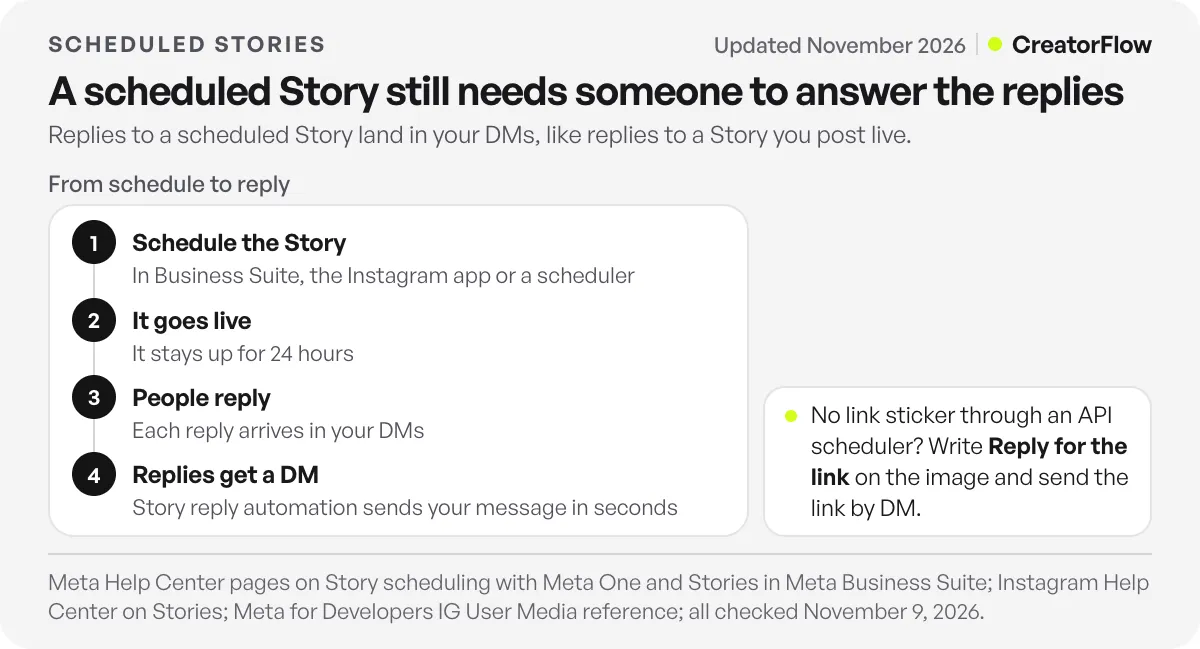
CreatorFlow’s story reply automation answers every reply to your Story by DM in seconds, through Meta’s official Instagram API. It is on every plan, including Free. You write the message once: the link, the discount code, the booking page. Paired with the “reply and I’ll send the link” line from the section above, a scheduled image Story can deliver a link without a link sticker.
A typical week looks like this:
- Sunday: make five Stories and schedule them in Business Suite or your scheduler, one per weekday.
- Each morning: the day’s Story goes live on its own and stays up for 24 hours.
- All day: everyone who replies gets your link or offer by DM in seconds.
- Friday: read which Story drew the most replies, and plan the next batch around it.
The setup steps, triggers and message templates are in the guide to Instagram story reply automation. For examples by niche, see how creators use story replies.
Why a Scheduled Story Did Not Post
When a scheduled Story does not appear, check the account type first, then the image file, then how many posts the tool has published that day. Each cause below comes from Meta’s own documentation.
- The account is personal. Meta’s Content Publishing API works with professional accounts only, so API schedulers cannot post a Story to a personal account.
- The image was a PNG or WebP. The API accepts JPEG images only. Re-export the file as JPEG and schedule it again.
- The account hit the daily cap. Meta allows 100 API-published posts per account in a rolling 24 hours. A tool queue with many feed posts can reach it.
- The Facebook Page needs Page Publishing Authorization. If the connected Page requires it, Meta’s guide says nothing can be published to the Instagram account until it is completed.
- The account belongs to a teen. Meta’s help page says in-app Story scheduling with Meta One is not available to teens.
To post a Story from the Scheduled list right away, use Share now in the Instagram app or Publish in Business Suite.
FAQ
Can you schedule Instagram Stories for free?
Yes, in Meta Business Suite. It is free on a computer and in its mobile app, and it schedules Stories with text, mentions, stickers and a link. The Instagram app’s free scheduler covers posts, photos, carousels and Reels. Story scheduling inside the app comes with Meta One Advanced, Expert or Max.
Can you schedule Instagram Stories on the Instagram app?
Yes, with a Meta One Advanced, Expert or Max plan. Create the Story, tap the Share arrow, select Schedule and pick a date up to 30 days ahead. Advanced costs $49.99 a month and also schedules posts and Reels up to a year ahead.
How far in advance can you schedule an Instagram Story?
Up to 30 days in the Instagram app with Meta One. Meta’s Business Suite course says you can schedule “a month of stories” at once there. Third-party schedulers set their own windows, so check the tool you use.
Can you schedule an Instagram Story with a link?
Yes, in Meta Business Suite: click Add link while you edit the Story. Meta’s API does not publish link stickers, so a Story sent through a third-party scheduler carries its call to action in the image. Ask people to reply, and send the link by DM to everyone who does.
Can you schedule Instagram Stories from a computer?
Yes. Meta Business Suite runs in any browser at business.facebook.com and schedules Stories for free. Third-party schedulers also have web apps that publish Stories through Meta’s API.
Can you edit or delete a scheduled Instagram Story?
Yes. In the Instagram app, open the Schedule tab in the Story composer, tap Options, then Share now, Reschedule or Delete. In Meta Business Suite, open Content, then Stories, then Scheduled, and use the three-dot icon to publish, reschedule or delete it.
How long does a scheduled Instagram Story stay up?
24 hours from the moment it goes live, the same as any Story. To keep it on your profile after that, add it to a Highlight.
Sources and checks
Sources checked November 9, 2026: Instagram’s Help Center pages on scheduling and Stories; Instagram’s guide to Stories and Meta One creator plans page; Meta’s help pages on Story scheduling with Meta One, Meta One plans, Stories in Meta Business Suite, scheduling in the Business Suite app and the Business Suite Planner; Meta’s Business Suite course on Stories; Meta for Developers on content publishing (updated October 20, 2026) and the IG User Media reference; and PostNext’s Instagram scheduler and pricing pages. Instagram is a trademark of Meta Platforms, Inc. CreatorFlow is not affiliated with Meta Platforms, Inc.





