

To send a free guide from Instagram comments, ask people to comment one word, such as GUIDE, and connect that word to a comment-to-DM automation. When someone comments the word, the tool sends them a private message with the guide as a link or a PDF, usually within seconds. It runs on Meta’s official API, so you share no password.
The delivery is the easy part. It takes a few minutes to set up and then runs on its own. The part that decides how many people get your guide is the post: what the guide promises, which word you pick, and where people see that word.
This guide covers both halves. First the post (the guide, the word, the call to comment), then the delivery (file or link, the DM itself, the test).
Key Takeaways
- The post decides the numbers. A clear promise and a visible word get more comments than a better guide nobody understood.
- Pick a guide people can use in 10 minutes. Checklists, templates and short lists get finished. Long ebooks get saved and forgotten.
- One short word per guide. GUIDE, PLAN or HOOKS. Easy to type on a phone, rare in normal comments.
- Say the word in three places. On screen in the first seconds, in the first line of the caption, and in a pinned comment.
- Send a link, not only a file. A link can be updated and tracked. Meta also allows a PDF attachment up to 25MB.
- Test from a second account. Comments from your own account do not start your automation.
How Do You Send a Free Guide When Someone Comments on Instagram?
You need three things: the guide hosted online, a post that asks for one word, and a comment-to-DM automation on that post. Meta lets a business or creator account send one private reply to each comment within 7 days. The automation uses that reply to send the guide the moment the word appears.
The setup in five steps:
- Upload the guide and copy a link anyone can open.
- Create the automation: pick the post, add the word, write the DM.
- Paste the link into the DM and turn the automation on.
- Test it with a comment from a second account.
- Publish the post with the word on screen and in the caption.
In CreatorFlow, setup takes under 2 minutes and works on every plan, including Free. The full screen-by-screen walkthrough is in our comment-to-DM setup guide. The private reply rules are in Meta’s Instagram Platform documentation (checked November 2026).
Pick a Guide People Will Comment For
People comment for a guide when they can picture using it today. The best free guides solve one small problem fast.
| Guide type | Example | Time to use | Fits |
|---|---|---|---|
| Checklist | ”Before you post: 12-point Reel checklist” | 5 minutes | Creators, coaches |
| Template | ”Client onboarding email, fill-in-the-blanks” | 10 minutes | Coaches, freelancers |
| Swipe file | ”30 caption hooks for product posts” | 10 minutes | Shops, creators |
| Resource list | ”The 9 tools I use to edit Reels” | 5 minutes | Creators, affiliates |
| Mini plan | ”7-day meal prep plan with a shopping list” | 15 minutes | Fitness and food creators |
| Short guide | ”How to price your first offer, 6 pages” | 20 minutes | Coaches, course creators |
Name the guide after its result, not its format. “Free PDF” tells people nothing. “The 12 checks I run before every Reel” tells them what changes after they read it.
Choose the Comment Word
The word is what the automation listens for, so it needs to be easy to type and rare in normal comments.
Good comment words:
- Short. One word of 4 to 8 letters. GUIDE, PLAN, HOOKS, LIST, PRICE.
- Tied to the guide. HOOKS for a hook list tells the reader what arrives.
- Unusual in normal comments. “Love” or “yes” appear in compliments, so every compliment would get the guide.
- One per guide. If you run three guides, use three words. Then each number in your stats belongs to one guide.
In CreatorFlow, matching is whole-word and ignores capitals. “guide please” and “GUIDE!” both match. “guides” does not, so add it as a second keyword if people tend to type the plural. You can add up to 20 keywords to one automation.
Our list of comment keywords that convert has more word ideas by niche.
Where to Say the Word in Your Post
Most people decide to comment while the Reel plays, not after reading the caption. Put the word where they look.
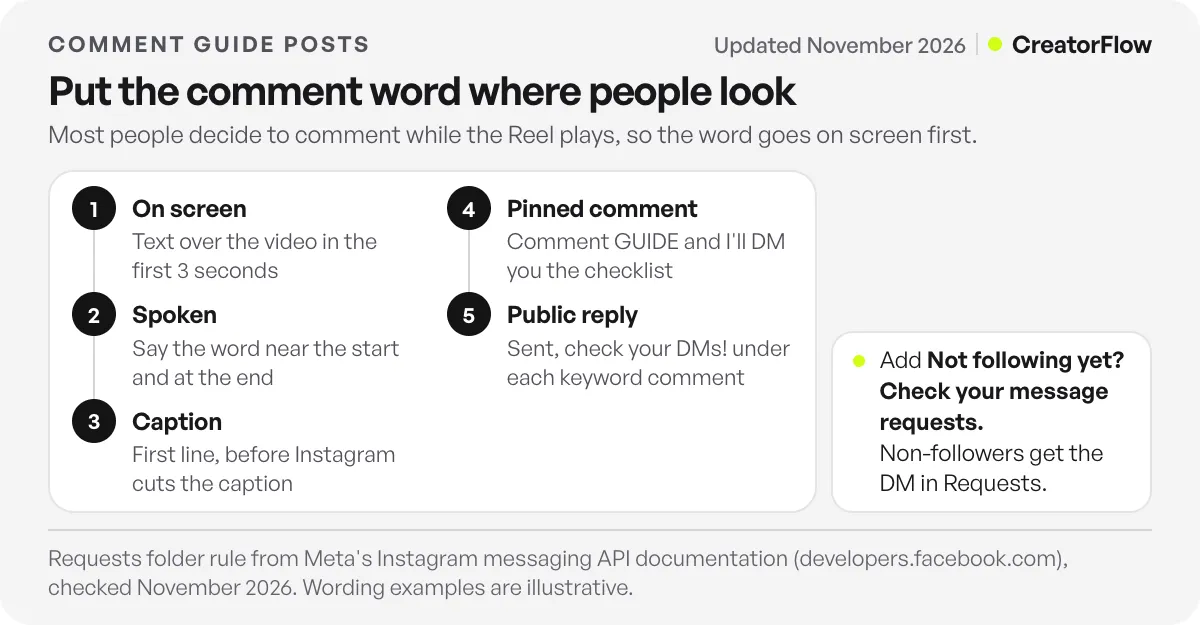
- On screen, in the first 3 seconds. “Comment GUIDE for the free checklist” as text over the video.
- Spoken. Say it once near the start and once at the end.
- First line of the caption. Instagram cuts the caption after one or two lines, so the word goes before the cut.
- Pinned comment. Pin your own comment: “Comment GUIDE and I’ll DM you the checklist.”
- A public reply. Turn on an automatic public reply such as “Sent, check your DMs!” Each reply shows other viewers that the guide is real.
Add one line for people who do not follow you: “Not following yet? Check your message requests.” Meta’s messaging documentation says new conversations from non-followers land in the Requests folder (checked November 2026). People who never open it think nothing arrived.
Send the PDF or a Link?
Meta’s messaging API accepts a PDF file attachment up to 25MB (checked November 2026). A link to a hosted file works too. For most guides, the link is the better choice.
| PDF attachment | Link to the guide | |
|---|---|---|
| Opens on a phone | In the Instagram chat | In the browser |
| Update after posting | No, the file is already sent | Yes, change the file behind the link |
| See who opened it | No | Yes, with link click tracking |
| Size limit | 25MB | None from Instagram |
| Works for Notion, Canva, Google Docs | No | Yes |
Host the file on Google Drive, Dropbox, Notion or your own site. Set sharing to “Anyone with the link can view”, then open the link in a private browser window to check that it works without a login.
CreatorFlow tracks link clicks on Pro and Growth, so you can compare comments to clicks for each guide. The analytics page shows clicks by post, country and city.
The Delivery DM: Three Templates
The DM has one job: give the guide and tell the person what to do first. Keep it under 50 words with one link.
Short version:
Here’s your free Reel checklist: [link]
Start with check 4. It’s the one most people skip.
With a question (so the person can reply):
Here’s the caption hook list: [link]
Which kind of posts do you write most, product or personal? I’ll send the hooks that fit.
With an email step:
Want the checklist? Type your email and I’ll send the link right after.
The second template matters if you plan to follow up. Meta allows one private reply per comment, and further messages only after the person answers. Our guide to the DM follow-up after a free guide shows what to send next.
The third template uses CreatorFlow’s Email Gate (Pro and Growth), which asks for the email before the link. Our lead magnet automation guide covers that email flow from start to finish.
Test It Before You Post
Run this check every time you start a new guide:
- Comment the word from a second account that does not follow you
- The DM arrives (look in Requests on that account)
- The link opens on a phone without a login
- The public reply appears under the comment
- The automation is turned on, not saved as a draft
Comments from your own account do not trigger your automation, which is the most common reason a test “fails”. If the DM still does not arrive, our list of comment-to-DM fixes covers the other causes.
FAQ
Can I send a PDF directly in an Instagram DM?
Yes. Meta’s messaging API accepts PDF attachments up to 25MB. A link to the file is often better, because you can update the guide later and see who opened it.
What word should I ask people to comment?
One short word tied to the guide, such as GUIDE, PLAN or HOOKS. Avoid words people type anyway, like “love” or “yes”. Use a different word for each guide so you can compare them.
Why didn’t the person get my free guide?
Check three things. The DM may be in their message requests if they do not follow you. The automation may still be a draft. And the comment may not contain the exact word, for example “guides” when the keyword is “guide”.
Do I need a Business or Creator account?
Yes. Comment-to-DM automation works with Instagram professional accounts, Business or Creator. Switching from a personal account is free in the Instagram settings.
How fast does the guide arrive?
Usually within seconds of the comment. On a post that gets thousands of comments at once, messages go out in order, so some arrive later.
Can I send the guide on an old post?
Yes. Meta allows a private reply within 7 days of a comment. Add the automation to an older post and it replies to new comments with the word. CreatorFlow’s Rewind feature on Pro also sends the guide to people who commented in the past 7 days, before the automation existed.
Sources and checks
Private reply rules, the Requests folder rule and the 25MB PDF limit are from Meta’s Instagram Platform documentation on private replies and the messaging API, checked November 2026. CreatorFlow plan details from creatorflow.so/pricing, checked November 2026. Guide titles and templates are examples.