

You can type or paste a link into an Instagram comment, but nobody can tap it. Instagram shows it as plain text, so people must copy it or type it again. Clickable links work in your bio (up to 5), in Story link stickers, in DMs, and in posts on some paid Meta One plans. To get a link to the people who comment, send it to them by DM.
You post a Reel, and the comments fill with “link?”. If you paste the URL in a reply, most people will not copy it. If you write “link in bio”, they have to leave the Reel, open your profile, tap the link and find the right item. Each extra step loses some of them.
This guide is for creators, coaches and shop owners who get link requests in the comments. It covers where Instagram makes links clickable, how to copy a link from a comment, and how to set up “comment for link” so the link reaches the person’s DMs in seconds.
Key Takeaways
- Links in comments are plain text: you can paste a URL into a comment or a reply, but Instagram does not make it tappable.
- Four places carry clickable links: your bio (up to 5 links), the Story link sticker, DMs, and posts or Reels on Meta One Advanced and higher plans.
- Copying a link from a comment: take a screenshot and copy the text with Live Text on iPhone or Google Lens on Android, then paste it in your browser.
- Comment for link moves the link to DMs: someone comments a word like LINK, and a tool sends them a private reply with the link, where one tap opens it.
- Meta sets the rules: one private reply per comment, sent within 7 days of the comment, and up to 750 private replies an hour per account on posts and Reels.
- Setup is short: connect your account, pick a post, add the keyword, write the DM. Comment-to-DM works on every CreatorFlow plan, including Free.
How to Put a Link on an Instagram Comment
To put a link on an Instagram comment, open the comments, type or paste the full URL into the comment box, and post it. The comment will show the address as plain text. People cannot tap it. They have to press on the comment, copy the text if their app allows it, and paste it into a browser. Most people will not do that, so a pasted link gets few visits.
The same is true for a reply to someone else’s comment. A reply is a comment, so a URL in it stays plain text too. Instagram and Meta document link tools for your profile, your Stories and Meta One posts. They document none for comments.
So when people ask for a link, point them to a place where links work, or send the link to their DMs. A link inside a DM is clickable. This is what “comment for link” posts do.
Where Are Links Clickable on Instagram?
Instagram makes links clickable in four places: your profile bio, Story link stickers, direct messages, and posts or Reels on paid Meta One Advanced plans and higher. Comments and normal captions show URLs as plain text. If you want people to tap your link, it has to sit in one of those four places, or reach them by DM after they comment.
| Place | Clickable? | What to know |
|---|---|---|
| Profile bio | Yes | Up to 5 links. Only the first one shows before people tap for more |
| Story link sticker | Yes | Open to all creators and businesses, except new accounts and repeat rule breakers |
| Direct messages | Yes | One tap opens the link in the chat |
| Posts and Reels with Meta One | Yes, with limits | Advanced plan: 4 posts and 4 Reels with links a month |
| Normal captions | No | A typed URL stays plain text |
| Comments and replies | No | A typed URL stays plain text |
The bio limit of five links started in April 2023, as TechCrunch reported at launch. Instagram opened the link sticker to everyone in its October 2021 announcement, with the two exceptions in the table.
Post links are a paid feature. Meta’s help page on adding links to posts and reels with Meta One gives Advanced 4 posts and 4 Reels with links a month, up to 12 of each on Max (checked November 2026). It says nothing about comments.
How to Copy a Link From an Instagram Comment
If someone pasted a link into a comment, copy the text from a screenshot and paste it into your browser. Both iPhone and Android can read text inside a picture, so this works on any comment you can see.
Instagram’s Help Center does not describe a copy option for comments, and menus differ by app version, so the screenshot route is the one that always works.
On iPhone (Live Text):
- Take a screenshot of the comment.
- Open the screenshot in Photos.
- Press and hold a word in the link, then drag the handles to select the whole address.
- Tap Copy, then paste it into Safari.
Apple’s guide to copying text from photos says Live Text needs an iPhone XS, iPhone XR or later with iOS 15 or later, and you turn it on in Settings, General, Language & Region.
On Android (Google Lens):
- Take a screenshot of the comment.
- Open it in Google Photos.
- Tap Lens, then tap and select the words you want.
- Tap Copy, then paste it into Chrome.
These steps come from Google Photos Help. Menu names can differ by phone.
The faster route: if the post says “comment LINK” or something similar, comment that word. The creator’s tool sends the link to your DMs, where you tap it.
What Does “Comment for Link” Mean on Instagram?
“Comment for link” is a post that asks you to comment a word, such as LINK, GUIDE or SHOP, to get a link. When you comment that word, software connected to the creator’s account sends you a private reply. The link arrives in your DMs, where it is clickable. You do not need to visit the creator’s profile.
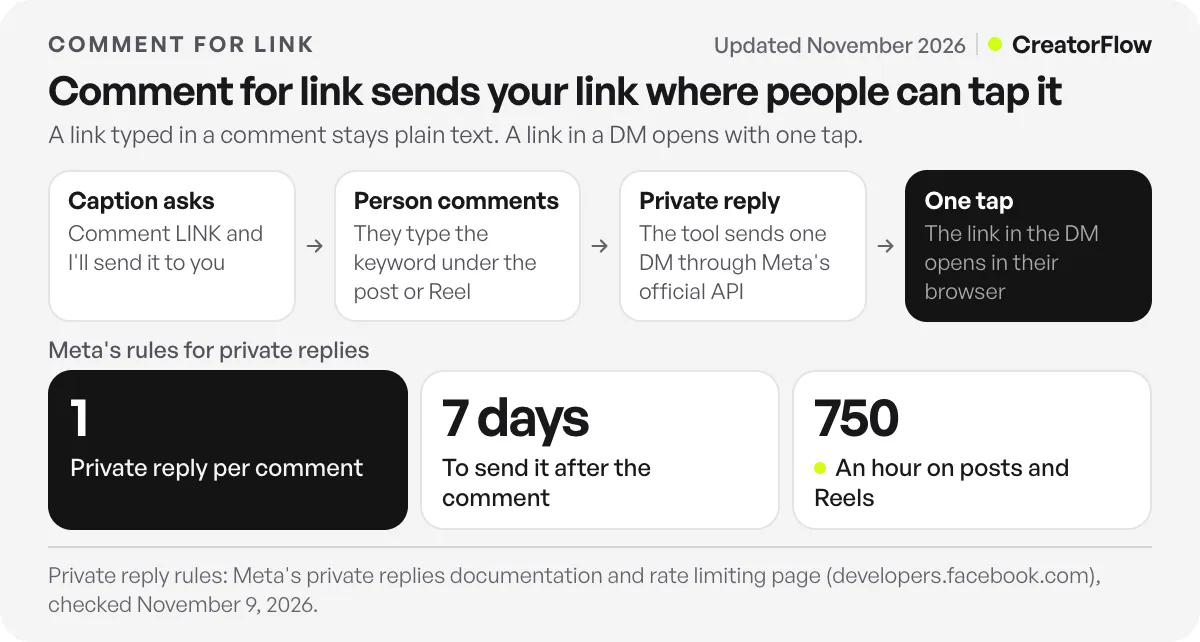
The tool watches new comments on the post. When a comment contains the keyword, it sends a DM through Meta’s official API. On CreatorFlow, the DM arrives in seconds, and the creator no longer answers each “link?” by hand. Affiliate creators feel this most, and our comparison of affiliate programs for Instagram shows why delivery to the DM matters more than the commission rate. The comment-to-DM setup guide walks through the full flow, with templates and fixes for common errors.
How to Set Up Comment for Link on Instagram
You need an Instagram Business or Creator account and a comment-to-DM tool that uses Meta’s official API. On CreatorFlow, the comment auto-reply setup has three steps and takes under 2 minutes:
- Connect Instagram. Sign in with Meta’s login. You do not share your password.
- Pick the post or Reel and add your keywords. You can add up to 20 keywords per post, so “link”, “LINK” and “send it” can all work.
- Write the DM and press Start. Put the link in the message, with one short line that says what it is.
Before you post:
- Say the keyword in the caption. For example: “Comment LINK and I’ll send you the product page in DMs.” Say it in the video too, if you talk on camera.
- Test it from a second account. Comment the keyword and check that the DM arrives with a working link.
Pick a word that is short and easy to spell. LINK, GUIDE and PRICE work because people type them without thinking. Our list of Instagram comment keywords that convert covers which words fit which offer.
A good DM is short. It names what is inside the link and gives one action:
“Here’s the link to the linen shirt from today’s Reel: [link]. Sizes XS to XL are in stock.”
The link goes to everyone who comments LINK, and only to them. People asked for it, so the message is welcome. Comment-to-DM works on every CreatorFlow plan, including Free with 500 DMs a month. Pro is a flat $15 a month with no fee per contact, and all plans are on the pricing page.
What Are Meta’s Rules for Comment-to-DM?
Meta allows one private reply per comment, and it must be sent within 7 days of the comment on a post, Reel or ad post. For Instagram Live, private replies only work during the broadcast. More messages are allowed only after the person replies, within 24 hours of their reply. Each account can send up to 750 private replies an hour on posts and Reels.
These rules come from Meta’s private replies documentation and its rate limiting page (checked November 2026). In practice:
- Put everything in the first DM. Since you get one message per comment, the link and the key detail both go in that message.
- Old comments run out. After 7 days, a comment can no longer get a private reply. Turn on the automation before you post. If comments already pile up, see how to never miss an Instagram comment.
- A big post can queue. If a Reel gets thousands of keyword comments in an hour, some DMs wait for the next hour.
CreatorFlow is a Meta Tech Provider and sends every DM through Meta’s official API, inside these rules. For a wider view of what automated replies can and cannot do on Instagram, see our guide to Instagram auto reply.
FAQ
Can you put a clickable link in an Instagram comment?
No. A URL in a comment shows as plain text that nobody can tap. Clickable links work in your bio, Story link stickers, DMs, and posts on Meta One Advanced plans and higher. To send a link to someone who commented, use a private reply by DM.
How do I copy a link from an Instagram comment?
Take a screenshot of the comment. On iPhone, open it in Photos, press and hold the text and tap Copy (Live Text). On Android, open it in Google Photos, tap Lens, select the text and tap Copy. Then paste the link into your browser.
What does “comment for link” mean on Instagram?
It means the creator asks you to comment a word, such as LINK, to get a link. When you comment that word, a tool connected to their account sends you the link in a DM. In the DM, the link is clickable.
How do I set up comment for link on Instagram?
Use a comment-to-DM tool on Meta’s official API. Connect your Business or Creator account, pick a post or Reel, add the keyword and write the DM with your link. Then say the keyword in your caption and test it.
Is comment for link allowed on Instagram?
Yes, when it runs through Meta’s private replies feature: one private reply per comment, within 7 days of the comment, and more messages only after the person replies.
Does comment for link work on Reels?
Yes. Meta’s private replies cover comments on posts, Reels and ad posts, with the same 7-day window. On Instagram Live, a private reply only works while the broadcast is still running.
Sources and checks
Link places checked on Meta’s Meta One links help page, Instagram’s link sticker announcement and TechCrunch’s report on bio links; private reply rules and the 750-per-hour limit on Meta’s developer documentation; copy steps on Apple Support and Google Photos Help; CreatorFlow setup on creatorflow.so. All checked November 9, 2026. Individual results vary.