

An Instagram boost post is an existing post, Reel or Story that you pay to show as an ad. You need a professional account and must be over 16. Tap Boost, choose a goal, audience, daily budget and duration, then wait for ad review. Boost fits profile visits, website visits and messages. Ads Manager fits sales and leads.
The button is easy to press, and that causes the two usual mistakes. People pay for a result Boost does not offer, or they publish a Reel that cannot run because of its music or stickers. Budget advice is confusing too. Guides quote $1 or $3 a day, Meta suggests at least $5, and the Instagram help pages we read give no fixed minimum.
This guide starts with a goal-by-goal choice between Boost and Ads Manager. Then come the steps from Instagram’s own help pages, the format rules for posts, Reels and Stories, and what each error means. It also covers the ad account choice that is hard to reverse. It is written for creators, coaches and small shops spending their own money.
Key Takeaways
- What it is: A boosted post is an ad made from content you already published. Meta bills it as an ad and reviews it before it runs.
- Who can do it: You need a creator or business account and must be over 16.
- Three goals: Instagram’s Ad tools offer profile visits, website visits and messages. Sales, leads and app installs belong in Ads Manager.
- Reels have the most rules: 90 seconds or less, 9:16, no licensed music, no effects or interactive stickers, and not already shared to Facebook.
- Budget: The Instagram help pages we read state no fixed minimum for boosting. Meta recommends at least $5 and more than six days for ads, and at least 7 days on its boost page.
- Bottom line: Boost a post that already worked unpaid when you want profile visits, site visits or messages. Use Ads Manager when you need to count sales or leads.
Boost or Ads Manager: Which Should You Use?
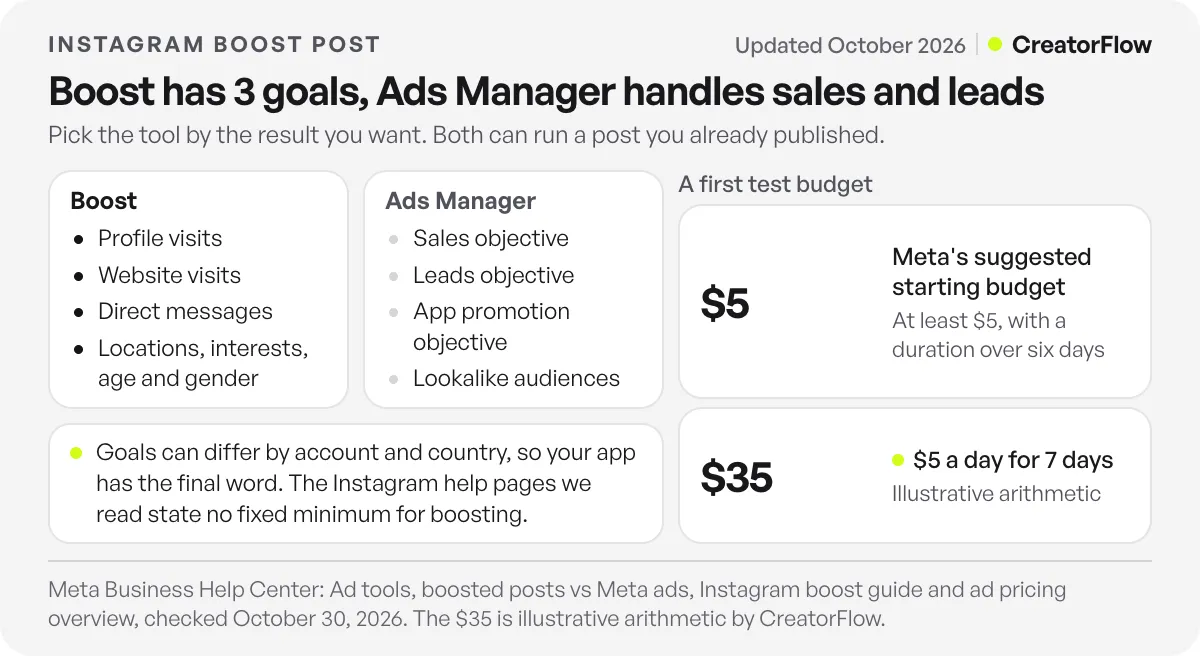
Use Boost when your goal is profile visits, website visits or messages and the post already exists. Use Ads Manager when you need a sales, leads or app objective, lookalike audiences, or a carousel built for the ad. Both can run a post you already published, so the choice comes down to your goal and the controls you need.
| What you want | Use | Why |
|---|---|---|
| More profile visits | Boost | Profile is one of the three goals in Ad tools |
| More people on a website page | Boost | The Website goal sends people to your page |
| More DM conversations | Boost | The Direct messages goal opens a chat |
| More people see a post that did well | Boost | Meta names engagement and awareness as boost uses |
| Sales | Ads Manager | It has a Sales objective |
| Leads from a form or signup | Ads Manager | It has a Leads objective |
| App installs | Ads Manager | It has an App promotion objective |
| Lookalike or overlapping audiences | Ads Manager | Boost offers locations, interests, age and gender |
| A carousel made only for the ad | Ads Manager | Meta lists carousel ads among its Ads Manager options |
A Boost goal is a ready-made package. Meta’s ad objective guide says goals such as more messages or more website visitors set the campaign objective, conversion location and performance goal in the background. In Ads Manager, you choose each of those yourself.
Meta’s pages do not list the same goals. Its Ad tools page names profile visits, website visits and messages. Its wider comparison of boosted posts and Meta ads, which also covers Facebook, mentions engagement, website clicks and local promotions. Go by the list you see in your app (checked October 2026).
Website is the goal that causes the most confusion for shops. Meta’s Instagram boost guide suggests it for online sales and bookings, and insights can show purchases when you connect Meta’s business tools. Ads Manager adds the Sales objective, which looks for people likely to buy.
Ads Manager can also run a post you already published. Meta’s guide to existing Instagram posts covers Feed, Reels and Stories through the Use existing post option. Stories must be active there, while Boost also accepts Stories in your highlights or reposted from your archive. If you want evidence before you pay, Trial Reels can show which cut holds strangers.
How to Boost a Post on Instagram
Open the post on your profile and tap Boost. Set a goal, audience, daily budget and duration, then preview the ad and tap Boost post. You need a professional account and must be over 16. Meta reviews the ad before it starts, so it does not run the moment you tap the button.
Instagram’s boost help page gives these steps for the app (checked October 2026):
- Go to your profile.
- Tap the post you want to boost.
- Tap Boost below the image.
- Set your goal, audience, daily budget and duration, then tap Next.
- Tap Preview ad to check the placements.
- Tap Boost post.
On a computer, go to your profile on instagram.com, select the post and click Boost. The details are the same. Instagram’s page on ways to advertise says instagram.com has the same boost features as the app. You can also make a new media ad that stays off your grid, according to Meta’s boost guide.
You can start from another route too. Meta’s Ad tools page goes through Professional dashboard, Ad tools, then Choose a post. For audience, you pick Suggested audience, which finds people similar to those who engage with you, or Create your own, which uses locations, interests, age and gender.
Pay on instagram.com if you use an iPhone. Instagram says an Apple service fee of 30% of your total ad payment may apply in most regions when you add funds in the iOS app. On a $100 payment, 30% is $30. Boosting on instagram.com avoids that fee.
Check three things first. If your account is personal, switch to a professional account before you start. If you are based in the US or target US audiences, ads about credit, employment, housing, social issues or politics need a Special Ad Category. In the EU, the EEA and Switzerland, Instagram says your ability to advertise is limited if your account has a subscription to use Meta products without ads, or a less-personalized ad experience.
A boost starts from a published post, so the time to fix it is before you publish. CreatorFlow’s free Instagram post preview shows how a post will look in your grid.
Why Can’t I Boost My Post or Reel on Instagram?
Most blocks come from the content. Reels must run 90 seconds or less in 9:16, with no licensed music, effects, GIFs, product tags or interactive stickers. Stories cannot use music or link stickers. If the Boost button does not appear, the post may not be eligible, or your account may not be set up to boost.
| Rule | Feed post | Reel | Story |
|---|---|---|---|
| Music | Not listed | No licensed music | No music |
| Product tags | Allowed | Not allowed | Not listed |
| Stickers | Not listed | No interactive stickers | One allowed type; no polls, quizzes or link stickers |
| Effects and GIFs | Not listed | No face or camera effects, GIFs or third-party filters | Instagram effects only; avoid GIFs |
| Format | Follow Meta’s ad specs | 90 seconds or less, 9:16 | One card only |
| Other limits | Not listed | Not shared to Facebook; posted on or after October 15, 2021 | Active, in highlights, or reposted from archive |
These rules come from Instagram’s pages on boosting a Reel, boosting a Story and boosting a post (checked October 2026). “Not listed” means the page gives no rule for that row, so the app has the final word.
Music is the rule to check before you publish. Instagram says licensed music blocks a Reel from boosting, and it recommends original audio or royalty-free tracks from its Sound Collection. Meta’s pages do not say Ads Manager lifts this rule, and its page on existing posts also says to avoid music stickers. Music access also varies by account, which is one of the differences between creator and business accounts.
Order matters with Facebook. A Reel already shared to Facebook cannot be boosted, according to the Reel page. Instagram’s page on Reels shared to Facebook describes doing both at once: tap Share on Facebook before you post, then choose Boost reel when Instagram asks.
Meta’s troubleshooting page explains the errors you are most likely to see:
| Error | Cause | What to do |
|---|---|---|
| Reels with tappable elements cannot be boosted | Effects, GIFs, product tags, interactive stickers, translations or auto-generated captions | Remove captions and translations from the posted Reel. For the others, make the ad with new media |
| Resolution too low | The Reel is below the minimum. Meta requires 9:16, at most 4GB and at least 250 pixels wide | Use new media or another post. Meta recommends 1440 x 2560 |
| Boosting unavailable in the app | Your app store currency and country differ from your ad account | Match the settings, or boost on instagram.com |
| Something went wrong when you tap Boost | A technical problem on Instagram’s side | Use instagram.com, Ads Manager or Meta Business Suite |
| Unable to connect to your Meta ad account | A policy or connection problem | Check for account restrictions. Then switch to a personal account and back to professional |
Auto-generated captions are easy to miss. They count as tappable elements, and you can remove them from the posted Reel without making new media.
How Much Does It Cost to Boost a Post on Instagram?
You set the spend, and no fixed price applies. Instagram’s steps ask for a daily budget and a duration, and the help pages we read state no fixed minimum for boosting. Meta’s advice for ads is at least $5 and more than six days, and its boost guide recommends at least 7 days. At $5 a day for 7 days, you spend $35.
Third-party guides quote different floors. RivalIQ’s 2022 guide and Hootsuite say $1 a day, and Shopify’s October 2025 guide says $3. Meta’s minimum budgets page, written for Ads Manager, says Meta requires a minimum budget and that the amount varies by country and objective. The number your app accepts is the one that counts.
Meta’s $5 advice comes from its ad pricing overview, which does not say whether the amount is per day or in total. Instagram’s boost steps describe the budget as daily, while Meta’s comparison page describes a total for the campaign. Read the total on the review screen before you confirm.
No official price per click exists for a boost either. Our comparison of Instagram ads cost benchmarks found five vendor pages between $0.20 and $2.00 per click and between $2.50 and about $15 per 1,000 impressions. This table applies that spread to three budgets. It is illustrative arithmetic, the rates are vendors’ and not specific to boosts, and your results will differ.
| Budget for 7 days | Total | Clicks at $2.00 and $0.20 | Impressions at $15 and $2.50 per 1,000 |
|---|---|---|---|
| $5 a day | $35 | 17 to 175 | 2,333 to 14,000 |
| $10 a day | $70 | 35 to 350 | 4,667 to 28,000 |
| $20 a day | $140 | 70 to 700 | 9,333 to 56,000 |
The width of that range is the reason to run a small test before you plan around any number. A small test also has a limit. Meta’s boost guide refers to a learning phase, and its learning phase page, written for ad sets, says this usually ends after about 50 results in a week. A $35 boost reaches 50 results only if each one costs $0.70 or less, so treat its results as a rough signal.
Do You Need a Facebook Ad Account to Boost on Instagram?
Not always. If you are boosting for the first time, Instagram lets you continue without a Facebook ad account and enter payment details in the app. Meta recommends connecting one. That gives you your Facebook payment account, ad settings and saved audiences. To connect, you log in to a Facebook account with admin access to the ad account.
This choice is hard to reverse. Instagram’s ad account page says that if you move from boosting without an ad account to using one, you lose access to the ads you already made and cannot pause any that are running. Pause them first, under Professional dashboard, Ad tools, Edit, then Pause ad.
Think about who else can log in. Instagram’s page on ad account options says anyone with access to your professional profile can use the connected ad account and see your payment information. If an assistant or agency uses your Instagram login, settle that before you connect a card.
What Happens After You Boost a Post?
Your ad goes to review and starts only after approval. Meta says most ads are reviewed within 24 hours, though some take longer. You get a notification at each stage. Results appear under Ad tools in your Professional dashboard, where you can open Past ads and tap View insights for each boost.
Meta’s ads in review page adds that ads may be reviewed again after they go live. If you think a rejection is wrong, you can request another review in Meta Business Support Home. Changing the creative or the targeting of a running ad starts a new review in Ads Manager.
Plan for few changes. Meta’s boost guide says that to change a boosted ad, you delete it and boost the post again. It also advises against pausing early, because that interrupts the learning phase. So check the caption, link and audience on the review screen.
Read the result that matches your goal. Link clicks answer a Website goal, profile activity answers a Profile goal, and messaging conversations started answer a Messages goal. Meta counts a messaging conversation only when someone starts messaging after at least three days of inactivity. Engagement counts actions such as likes, saves, shares and comments, so a high number there does not show that a Website goal worked.
If you sell products and your goal is messages, plan what you send after the first reply. Our click-to-DM ads playbook for ecommerce covers that sequence.
Is Boosting an Instagram Post Worth It?
Boosting is worth it when a post already works unpaid and your goal is one Boost offers. Set a limit before you start. With a $60 product at a 50% gross margin, you can pay up to $30 per sale, so a $35 boost needs about two sales to cover its cost. This example is illustrative.
A common view says to skip Boost and always use Ads Manager. It has a fair point, since Meta itself says boosts have fewer targeting and creative options. Meta’s pages checked here publish no comparison of results between the two, so treat both sides as opinion. If you have never run an ad, a $35 boost is a cheap way to learn how review, billing and insights work.
Three situations call for a different plan:
- The post did little unpaid. Meta’s page on boosted Facebook posts treats comments, likes and shares as a sign that a post connected with people. Without those signs, change the post first.
- The ad links to Amazon with your affiliate tag. Amazon’s change log for April 14, 2026 disqualifies purchases from customers referred through a paid or boosted ad linking to Amazon, with limited exceptions.
- You need to count sales or leads. Use the matching Ads Manager objective, so the campaign is set up around that result.
Also answer the people you already reach before you pay for new ones. If followers comment on your organic posts asking for a link, comment-to-DM on Instagram sends it when they comment a keyword. Meta allows one private reply per comment, within 7 days of the comment, and only one message until the person replies. CreatorFlow has a $0 Free plan, and Pro is $15 a month or $144 a year.
FAQ
Can I boost a post without a professional account?
No. Instagram says you need a professional account, either creator or business, and you must be over 16. You can switch in your account settings and then boost posts you already published.
Is a boosted post the same as an ad?
Yes. Meta says boosted posts are ads because they need a budget, and your bill shows them as ads. The difference is the set of controls. A boost uses simple goals and audiences, while Ads Manager gives you the full list of objectives and targeting tools.
Can I boost a Reel with trending music?
Not if the track is licensed. Instagram says Reels with licensed music are not eligible, and it suggests original audio or royalty-free music from its Sound Collection. Check this before you publish, because a Reel you plan to promote needs the right audio from the start.
Why don’t I see the Boost button?
Instagram says the post may not be eligible, or your account may not be set up to boost. Check that you have a professional account and that your birthday shows you are over 16. Then check the format rules above. You can also try instagram.com, Ads Manager or Meta Business Suite.
Can I edit a boosted post after it starts?
Meta’s boost guide says to delete the ad and boost the post again if you want to change it. Plan the caption, audience and budget before you confirm. In Ads Manager, changing the creative or targeting of a running ad starts a new review, while changing the budget does not.
Does boosting a post hurt organic reach?
The Meta help pages checked for this guide do not say that a boost lowers or raises the organic reach of your other posts. Treat claims in either direction as opinion. Compare your own insights for the weeks before and after a boost if you want an answer for your account.
How long should I run a boost?
Meta’s boost guide recommends starting with at least 7 days, so its delivery system has time to find the right people. Its ad pricing page gives similar advice, with a duration over six days. A shorter boost can suit a dated event, but you give the system less time to learn.
Sources and checks
Checked October 30, 2026: Instagram’s help pages on boosting a post, a Reel, a Story, ways to advertise, ad account options and troubleshooting, plus Meta’s pages on boost basics, boosted posts vs ads, ad review and pricing. Click and impression ranges are vendor figures, and the worked examples are illustrative arithmetic, not measured results. Options can differ by country and account, so your app has the final word.





