

Since November 16, 2026, eligible US creators can add Amazon affiliate links on Instagram Reels and feed posts. You connect your Amazon Influencer account under Professional dashboard, Monetization, Affiliate programs, then tap “Add products” before you share. Instagram takes no cut, and Amazon pays the commission under its own terms. Product links now also work on feed posts and carousels in 26 countries and regions.
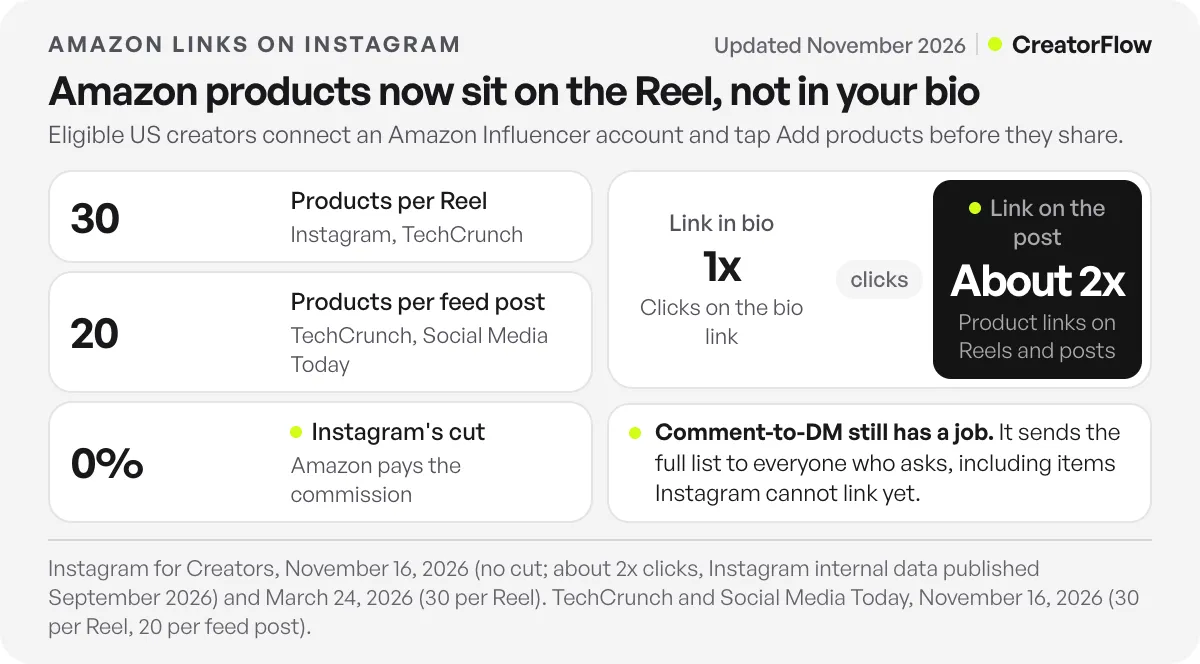
Until November 16, an Amazon pick in a Reel meant “link in bio” or “comment LINK and I’ll send it”. Instagram’s own numbers say the first option was losing clicks. Its November 16 announcement for creators says product links on creators’ Reels and posts drew about twice as many clicks as the links in their bio, based on Instagram internal data published in September 2026.
This guide covers who qualifies, the exact setup, the product limits, what viewers see, disclosure, and how a native Amazon link and a comment-to-DM link split the work on one post. It is written for US creators in the Amazon Influencer Program, and for creators in other markets who want to know what changed for LTK, ShopMy and feed posts.
Key Takeaways
- Amazon is now an official affiliate program on Instagram. Eligible US creators connect an Amazon Influencer account and add links to Reels and feed posts (announced November 16, 2026)
- Instagram takes no cut. Amazon tracks qualifying purchases and pays commission under its program terms
- Up to 30 products per Reel and 20 per feed post, as reported by TechCrunch and Social Media Today
- Feed posts and carousels are linkable too, for eligible creators in 26 countries and regions
- LTK and ShopMy collection links load their products in one paste, in the US and Canada
- Links on the post drew about 2x the clicks of bio links, according to Instagram’s internal data
- A product link is not a disclosure. Keep a clear commission line in the caption
What did Instagram announce on November 16, 2026?
On November 16, 2026, Instagram made three changes for creators who earn from affiliate links. Amazon became an official affiliate program inside Instagram for eligible US creators. Product linking moved beyond Reels to feed posts and carousels in 26 countries and regions. LTK and ShopMy collection links now add all their linkable products in one paste, for creators in the US and Canada.
| Change | Who gets it | Where it works |
|---|---|---|
| Amazon as an official affiliate program | Eligible US creators with an Amazon Influencer account | Reels and feed posts |
| Product links on feed posts and carousels | Eligible creators in 26 countries and regions | Reels, feed posts, carousels |
| LTK and ShopMy collection links | Eligible creators in the US and Canada | Any post with “Add products” |
| Links from other affiliate programs | Eligible creators, when the product can be linked | Paste into “Add products” |
Source: Instagram for Creators, “More ways to earn”, November 16, 2026.
The groundwork came earlier in the year. Instagram’s March 24, 2026 post on shoppable Reels added “Add products” to the Reels share screen, first in the US, Brazil, India, Indonesia and Thailand, and said Amazon and Shopee affiliate options would follow. By October 2026 the same page said the feature covered feed posts across 26 markets, including the US, Canada, the UK, Germany, France, Spain, Italy and Australia.
Amazon is the piece that changes the most for US creators. Before November 16, a pasted Amazon link was one more URL. Now Instagram reads it as an affiliate program with your account attached. For every other place a link can sit, see all five Instagram placements for affiliate links.
Who can add Amazon affiliate links to Instagram Reels?
Amazon links on Instagram Reels are open to eligible US creators who connect an Amazon Influencer account. Instagram’s announcement says requirements vary by program and region, and it gives no follower number. The Reels product-linking feature was reported in April 2026 to need a public professional account, age 18 or older, and more than 1,000 followers, and it was not live for every creator who met that bar.
That April report comes from Retail Dive’s coverage of shoppable Reels, not from an Instagram rule page, so confirm it against what your own dashboard shows. One more point is open. Instagram’s post names only the Amazon Influencer Program, while TechCrunch’s launch story says a connected Amazon Associates account also gets affiliate attribution. If your dashboard lists only the Influencer Program, that is the path open to you today.
Before you start, check this list:
- A US-based professional Instagram account (creator or business)
- An approved Amazon Influencer account. Amazon’s guide to the Influencer Program says creators need a qualifying YouTube, Instagram, TikTok, Pinterest or Facebook account to apply, and it reviews content quality, engagement and follower count (checked November 2026)
- Good standing under Instagram’s Partner Monetization Policies
- An “Affiliate programs” item under Monetization in your Professional dashboard. If it is missing, the feature has not reached your account yet
How do you add Amazon affiliate links to a Reel or post?
To add Amazon affiliate links to a Reel or feed post, tap “Add products” on the share screen and paste an Amazon product link. The first time, Instagram asks you to connect your Amazon Influencer account. After that, your affiliate attribution is applied to the products you add. You review the list and share. You can also connect the account in advance from the Professional dashboard.
- Connect once. Go to Professional dashboard, then Monetization, then Affiliate programs, then Amazon Influencer Program. You can also skip this and connect at step 4.
- Make the content. Film or upload the Reel, or build the feed post or carousel.
- Open the product picker. On the share screen, tap “Add products”.
- Paste the Amazon link. If your account is not connected yet, follow the prompt to connect it now.
- Add the rest. Paste a link for each product that appears on screen.
- Review and share. Check the product list and your caption disclosure, then share.
TechCrunch reports two extras for connected accounts: image previews for your links, and an estimated commission rate shown before you post. Both help you catch a wrong product before it goes live.
LTK and ShopMy work in a different way. You paste one collection link into “Add products”, and Instagram adds the linkable products from that collection. Links from any other program can be pasted too, but Instagram warns that some finds will not be available to link yet.
How many products can you add, and what do viewers see?
Creators can add up to 30 products per Reel and 20 per feed post, according to the launch coverage from TechCrunch and Social Media Today. Instagram’s own March 2026 post confirms the limit of 30 for Reels. Viewers see the product links in the bottom left of the Reel or post. When a viewer taps a product, it opens in the Amazon app.
| Item | Detail | Reported by |
|---|---|---|
| Products per Reel | Up to 30 | Instagram (March 2026), TechCrunch |
| Products per feed post | Up to 20 | TechCrunch, Social Media Today |
| Where links appear | Bottom left of the Reel or post | Social Media Today |
| What a tap opens | The product in the Amazon app | |
| Instagram’s cut | None | |
| Who pays commission | Amazon, under its program terms |
Sources: Instagram for Creators, TechCrunch and Social Media Today, November 16, 2026.
Thirty is the upper limit. A viewer who taps the link expects to find the item they saw on screen. Tag what appears in the video, in the order it appears, and keep the rest for the list you send by DM.
Do you still need a link in bio for Amazon products?
Yes, for a smaller job. Instagram says product links on Reels and posts drew about twice as many clicks as bio links, based on its internal data published in September 2026. Each new post should carry its own products. The bio stays useful for your full Amazon storefront and for older posts you made before you connected the account.
Read that 2x figure for what it measures. Instagram compared a link on the post with a link in the bio. It did not measure a link sent in a DM, and it published no conversion or commission numbers. What it supports is moving products out of the bio and onto the post. Our breakdown of native product tags against DM links covers that comparison.
Where does comment-to-DM fit next to native Amazon links?
A native link serves the viewer who taps while watching. A comment-to-DM link serves the viewer who asks. Someone who comments “GIFTS” on a gift guide wants the list in their inbox, to open later on the right device. They often want items that are not on Amazon too. One post can serve both: tag the products, and ask for a keyword in the caption.
The DM does the jobs that sit outside the November update:
- Products Instagram cannot link yet. Instagram’s own post says some finds are not linkable. A DM sends any URL.
- More products than the limit. A gift guide with 40 items fits in one link to your storefront list.
- Creators outside the US. Amazon linking on Instagram is US only for now. LTK and ShopMy collection links cover the US and Canada.
- Stories. The November update covers Reels, feed posts and carousels. CreatorFlow can answer every story reply with the link.
- A conversation. A DM can be answered. A viewer can ask “does it come in black?” and you see it.
CreatorFlow sends your link to everyone who comments the word you choose, in seconds. Comment-to-DM is on every plan, including Free with 500 DMs a month. Pro is a flat $15 a month with no fee per contact, and setup takes under 2 minutes. The CreatorFlow page for Amazon affiliates shows the setup. Before you put Amazon links in DMs, read what Amazon’s Operating Agreement says about links in DMs.
A caption that serves both viewers:
Gift ideas under $50. Tap the products to shop on Amazon, or comment GIFTS and I’ll send you the full list. I earn a commission on purchases from these links.
Do you still need to disclose Amazon affiliate links?
Yes. Instagram’s announcement says nothing about an automatic affiliate label, and a product link alone does not tell viewers you earn money from it. The disclosure stays your job. Write a plain line such as “I earn a commission on purchases from these links” in the caption of every post with tagged products, where viewers can see it.
The law firm Ballard Spahr made the same point when shoppable Reels launched. Its May 2026 alert on affiliate Reels says Instagram’s Paid Partnership label does not necessarily satisfy the creator’s own disclosure duty under the FTC Endorsement Guides. Our guide to FTC disclosure rules for Instagram affiliate posts covers wording and placement.
Example: one gift-guide Reel set up both ways
This is an illustration of the steps above, not a measured result. A US creator films a Reel with eight gifts, five from Amazon and three from a small brand’s own shop.
- Dashboard, once: connect the Amazon Influencer account under Affiliate programs.
- Share screen: tap “Add products” and paste the five Amazon links, in the order the gifts appear. That is well under the limit of 30.
- Caption: the commission line, then “Comment GIFTS for the full list”.
- CreatorFlow: an automation on the keyword GIFTS sends one DM with the full gift list, including the three items from the small brand.
- Bio: the storefront link stays as the place for older posts.
- After seven days: compare Amazon’s commission report with the link clicks in CreatorFlow (link click tracking is on Pro and Growth), and keep the split that earned more.
FAQ
Can I add Amazon affiliate links to Instagram Reels?
Yes, if you are an eligible US creator with an Amazon Influencer account. Connect it under Professional dashboard, Monetization, Affiliate programs, then tap “Add products” before you share. Instagram announced the feature on November 16, 2026, and it works on Reels and feed posts.
Do I need the Amazon Influencer Program or Amazon Associates?
Instagram’s announcement names the Amazon Influencer Program. TechCrunch reported that a connected Amazon Associates account also gets affiliate attribution. Check which option your Professional dashboard shows under Affiliate programs, and use that one.
How many Amazon products can I tag in one Reel?
Up to 30 per Reel and 20 per feed post, according to TechCrunch and Social Media Today. Instagram’s March 2026 post confirms the limit of 30 for Reels.
Does Instagram take a cut of Amazon commissions?
No. Instagram says adding product links is free and it takes no cut of affiliate earnings. Amazon tracks qualifying purchases and pays commission under its program terms.
Why don’t I see “Add products” or Affiliate programs?
The Amazon connection is open to eligible US creators only. Retail Dive reported in April 2026 that Reels product linking needs a public professional account, age 18 or older and more than 1,000 followers, and that it was not live for every creator who met those criteria. Check Instagram’s help center for your account.
Can creators outside the US use this?
Amazon linking on Instagram is US only for now. Product links on Reels, feed posts and carousels work for eligible creators in 26 countries and regions. LTK and ShopMy collection links work in the US and Canada.
Can I still send Amazon links by DM?
Instagram’s update does not change how comment-to-DM tools work. A tool like CreatorFlow sends your link to everyone who comments your keyword. Whether Amazon allows a link in a DM depends on its program rules, so read our Amazon Influencer Program guide before you set it up.
Sources and checks
Feature details verified on November 24, 2026 from Instagram’s November 16 creator announcement and March 24 shoppable Reels post, with launch coverage from TechCrunch, Social Media Today and Retail Dive. Eligibility criteria from Retail Dive (April 2026) and Amazon. Disclosure point from Ballard Spahr (May 2026). CreatorFlow plans from creatorflow.so/pricing, November 2026. Rollout varies by account. Individual results vary.