

Instagram comment automation for course creators sends a DM the moment someone comments a keyword like COURSE under your post. The DM carries the next step: a free lesson, a waitlist form or the checkout page. Meta lets that first DM be one message only, so it must hold the link or ask one question. The right choice depends on your course price.
Most course posts already ask for comments. “Comment COURSE and I’ll send you the details” is a common call to action. The problem is the gap after the comment. You reply hours later, the person has moved on, and the post did its job for nobody.
This guide shows how to close that gap. It covers the one-message rule that shapes every course DM, which link to send at each price point, a five-step setup, and how to move the lead into Kajabi, Teachable or Thinkific. It is written for solo course creators and coaches who sell on Instagram without a team.
Key Takeaways
- One message first: Meta allows one private reply per commenter. You can send more only after the person replies, within 24 hours of that reply.
- Match the link to the price: A low-price course can go straight to checkout. A high-price program should send a free lesson, a waitlist or a call booking first.
- Ask one question to open the window: An email request counts as a question. When the person replies, the 24-hour window opens and you can send the link.
- One keyword per offer: Use a short, plain word such as COURSE or LESSON, and change it when the offer changes.
- Plan the handoff before launch: Your course platform and email tool need the lead too. Decide how it gets there before the post goes live.
What does Instagram comment automation do for a course?
Comment automation watches a post for a keyword and sends a DM to each person who comments it. For a course, the DM delivers a free lesson, a waitlist link or the sales page within seconds of the comment. It works while you teach, film or sleep, and it treats the 400th comment the same as the first.
The value is speed at the moment of interest. A comment is a hand raised in public. If the answer arrives while the person is still on Instagram, the next tap is easy. If it arrives the next day, it competes with everything else in their inbox.
If you are still deciding where your course link should live on Instagram, our guide to selling an online course on Instagram covers bio links, Stories and DMs side by side.
The rule that shapes every course DM: one message first
Meta’s documentation for private replies sets three limits (checked November 2026). You must send the reply within 7 days of the comment. Only one message can go to the commenter. Follow-up messages are allowed only if the person responds, and only within 24 hours of that response.
This rule decides your design. Many course funnels online show a chain of DMs: a welcome, two qualifying questions, then the offer. That chain cannot start on its own. Before the person replies, you have exactly one message to work with.
So the first DM has two possible jobs:
- Deliver the link. The message holds the free lesson, waitlist or checkout link. The person taps it, and the job is done.
- Ask one question. The message asks for an email or a short answer. When the person replies, the 24-hour window opens, and the link follows.
Option 2 costs one extra step, and it gives you something option 1 does not: the person’s email, saved before they leave Instagram. For a course, that email is often worth more than the click. Our article on AI DM agents for course creators goes deeper into what can and cannot happen inside the 24-hour window.
Which link should the first DM send?
Send the link that matches how much thinking the buyer needs. A cheap, simple course can go straight to checkout. A program over a few hundred dollars needs trust first, so the first DM should give value or book a call. The table below matches the first DM to the price.
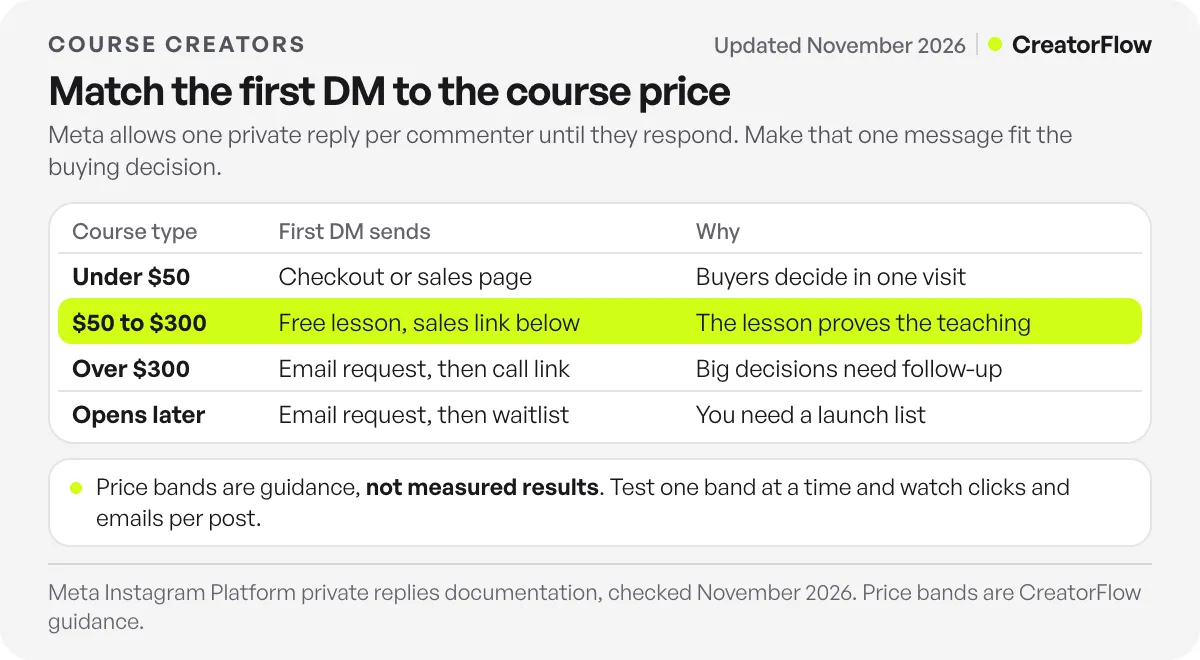
| Course type | What the first DM sends | Why |
|---|---|---|
| Mini course or template under $50 | The checkout or sales page | Low risk, so buyers decide in one visit |
| Course from $50 to $300 | A free lesson, with the sales page link under it | The lesson proves the teaching before the ask |
| Program over $300 | An email request, then a call booking or webinar link | Big decisions need a follow-up sequence |
| Course that opens later | An email request, then the waitlist confirmation | You need a list to email on launch day |
These bands are a starting point, not a rule from data. Your audience and your proof change where the lines sit. Test one band at a time, and watch link clicks and emails collected per post.
How to set up comment-to-DM for a course in five steps
The setup takes one post, one keyword, one message and one link. In CreatorFlow the comment-to-DM automation is on every plan, Free included, and the live site puts setup at under 2 minutes. The steps below work the same way in most comment-to-DM tools.
- Connect your Instagram professional account. Use a Creator or Business account. Personal accounts cannot use Meta’s messaging API.
- Pick the post. Choose the Reel or post where you ask for comments. One post, one offer.
- Choose one keyword. Pick a short word that matches the offer, such as COURSE, LESSON or WAITLIST. In CreatorFlow keywords match as whole words and capital letters do not matter, so “course please” triggers COURSE and “Course” does too.
- Write the first DM. Thank the person, name what they get, and add the link. Keep it under 3 short lines. If you use an Email Gate, the first DM asks for the email instead, and the link follows the reply.
- Test from a second account. Comment the keyword from an account that is not yours. Automations ignore your own comments, so a test from your account shows nothing.
Here is a first DM for a $97 course that sends a free lesson first:
“Thanks for asking! Here is Lesson 1, free: [link]. If it helps, the full course is here: [link].”
And one for a program that collects the email first:
“Happy to send it. What is the best email for the workshop invite? I’ll send the link right after.”
If you want a ready-made start, the course launch template has the keyword, message and link fields already laid out.
How do you move the lead into Kajabi, Teachable or Thinkific?
The DM link is the first handoff. Point it at a page your course platform owns: the checkout, a free lesson page or an opt-in form. The person then enters the platform’s own flow, and the platform sends its own receipts and welcome emails.
The email is the second handoff. CreatorFlow’s Email Gate asks for an email in the DM and saves it to Contacts with the Instagram handle and the automation it came from. On Pro and Growth you export Contacts as a CSV file and import it into your email tool or course platform. Do this before launch day, so the waitlist gets the launch email on time.
If your course platform and email tool are separate, connect them to each other on their side. Zapier lists ready-made connections between Kajabi, Teachable and Thinkific, such as enrolling a student in one platform when a purchase happens in another (checked November 2026). For a full walkthrough of the email side, see moving Instagram DM leads into Klaviyo, Kit or Mailchimp.
Launch or evergreen: when should the keyword change?
Keep one keyword per offer, and change it when the offer changes. During a launch, the keyword points at the waitlist, then the cart, then the closing reminder page. After the launch, an evergreen keyword like LESSON keeps sending the free lesson from older posts for months.
A post can stay active for a long time, because Meta allows the private reply up to 7 days after each comment, and new comments keep arriving on older Reels. Check your best-performing posts once a month. If a post still gets comments, make sure its DM still points at an offer that is open.
For launch numbers you can plan against, our course launch DM funnel benchmarks give realistic ranges for accounts with 5,000 to 50,000 followers. For six more ways to use DMs for a course, see Instagram DM automation for course creators.
Common mistakes course creators make
- Two offers in one DM. A free lesson and a discount code in the same message split attention. Pick one.
- A keyword people type by accident. Words like “yes” or “love” fire on ordinary comments. Use a word that only appears when someone wants the offer.
- A dead link after launch. The cart closes, and old posts keep sending a sold-out page. Update the DM the day the offer changes.
- No email before a long sales cycle. A $500 program rarely sells in one tap. Without an email, you have no way to follow up after 24 hours.
- Testing from your own account. You see nothing and think the automation is broken. Use a second account.
FAQ
Can I send a course link automatically when someone comments on Instagram?
Yes. A comment-to-DM tool sends a DM with your course link when someone comments a chosen keyword. The DM goes through Meta’s official messaging API as a private reply. Meta allows one private reply per commenter, sent within 7 days of the comment.
How many DMs can I send to someone who commented on my course post?
One, until they reply. Meta allows a single private reply to a commenter. If the person responds, you can send more messages within 24 hours of their response (Meta private replies documentation, checked November 2026).
Should my course DM ask for an email first?
Ask for an email first when the course costs more than a quick decision allows, or when the course opens later. The reply opens the 24-hour window, and the email lets you follow up for weeks. For a low-price course, send the checkout link directly.
Which keyword works best for a course post?
A short word that names the offer: COURSE, LESSON, WAITLIST or CLASS. It should be easy to type on a phone and rare in normal comments. Our guide to comment keywords that convert compares common options.
Does comment automation work with Kajabi, Teachable and Thinkific?
Yes, through the link. The DM sends a link to a page your course platform hosts, such as a checkout or an opt-in form. Emails collected in the DM can be exported as a CSV file from CreatorFlow on Pro and Growth and imported into your platform or email tool.
How much does comment automation cost for a course creator?
CreatorFlow’s Free plan includes comment-to-DM with 500 DMs a month. Pro is a flat $15 a month, or $12 a month billed annually, with 5,000 DMs a month per account, Email Gate, link tracking and CSV export. There is no fee per contact.
Sources and checks
Meta’s private reply rules were checked on the Instagram Platform private replies page in November 2026. Zapier connections between Kajabi, Teachable and Thinkific were checked on Zapier’s Kajabi and Thinkific integration page in November 2026. CreatorFlow plans and features are from creatorflow.so/pricing and its help center, November 2026. The price bands for the first DM are guidance, not measured results.





